





Automate your Instagram photos, stories and reels

Don't waste your time with the Instagram Graph API. Use Mallary's unified API, MCP Server, or AI Agent to schedule photos, stories and reels in minutes.

Use Mallary's Instagram publishing API for feed posts, Reels, Stories, and carousels. Upload media, choose the post type, and track each job.

Get your image ready with our free Instagram image resizer or Instagram Story image resizer.

  • 14-day free trial
  • 5-minute setup
  • Official platform APIs
Meta Business Partner TikTok Marketing Partner LinkedIn Marketing Partner Pinterest Business Partner X Official Partner

Trusted by creators, founders and developers

Mallary User Mallary User Mallary User Mallary User Mallary User Mallary User

Integrates with the tools you already use

Publish an Instagram Reel with the API

Upload your video, send one request, then check its job to confirm the Reel is live.

1. Connect and upload

Connect an Instagram Business or Creator account in Mallary. API publishing is included with Starter, Pro, and Business.

Keep your API key on your server as MALLARY_API_KEY. Use the upload flow to upload your video, wait for the upload to finish, and replace the sample URL with the returned mediaUrl.

2. Choose Reel and send

post_type: "reel" selects a Reel. shareToFeed: true also shows it in the profile feed. This example publishes now; add profile_id if you use a non-default connection profile.

For a photo, Story, carousel, or a future publish time, see the request fields and Instagram options.

3. Confirm delivery

Save jobs[].jobId from the publish response. Replace 123 in the status example with that ID. A queued job is not a live post.

Read data.job.status. When it is completed, check the result and any warnings; platform_post_url links to the post when available. If it is failed, read failedReason before retrying.

Read job status and result fields
Start your 14-day free trial

Credit card required. Choose a paid plan to keep publishing after the trial.

Send the Reel

POST /api/v1/post
TerminalcURL
curl --fail-with-body --silent --show-error \
  --request POST 'https://mallary.ai/api/v1/post' \
  --header "Authorization: Bearer $MALLARY_API_KEY" \
  --header 'Content-Type: application/json' \
  --data '{
    "platforms": [
        "instagram"
    ],
    "message": "Meet our latest release.",
    "media": [
        {
            "url": "https://files.mallary.ai/YOUR_UPLOADED_VIDEO.mp4"
        }
    ],
    "platform_options": {
        "instagram": {
            "post_type": "reel",
            "shareToFeed": true
        }
    }
}'
request.mjs / Node.js 18+JavaScript
const apiKey = process.env.MALLARY_API_KEY;
if (!apiKey) throw new Error('Set MALLARY_API_KEY on your server.');

const response = await fetch('https://mallary.ai/api/v1/post', {
  method: 'POST',
  headers: {
    Authorization: `Bearer ${apiKey}`,
    'Content-Type': 'application/json',
  },
  body: JSON.stringify({
    "platforms": ["instagram"],
    "message": "Meet our latest release.",
    "media": [{
      "url": "https://files.mallary.ai/YOUR_UPLOADED_VIDEO.mp4"
    }],
    "platform_options": {
      "instagram": {
        "post_type": "reel",
        "shareToFeed": true
      }
    }
  }),
  signal: AbortSignal.timeout(30_000),
});

if (!response.ok) {
  throw new Error(`Mallary request failed: HTTP ${response.status}`);
}

console.log(await response.json());
request.py / Python 3Python
import json
import os
from urllib.request import Request, urlopen

payload = {
  "platforms": ["instagram"],
  "message": "Meet our latest release.",
  "media": [{
    "url": "https://files.mallary.ai/YOUR_UPLOADED_VIDEO.mp4"
  }],
  "platform_options": {
    "instagram": {
      "post_type": "reel",
      "shareToFeed": True
    }
  }
}

request = Request(
    'https://mallary.ai/api/v1/post',
    data=json.dumps(payload).encode('utf-8'),
    headers={
        'Authorization': f'Bearer {os.environ["MALLARY_API_KEY"]}',
        'Content-Type': 'application/json',
    },
    method='POST',
)

# HTTP errors raise an exception instead of looking like a success.
with urlopen(request, timeout=30) as response:
    result = json.load(response)

print(json.dumps(result, indent=2))
request.php / PHP 8 + cURLPHP
<?php
$apiKey = getenv('MALLARY_API_KEY');
if (!$apiKey) throw new RuntimeException('Set MALLARY_API_KEY on your server.');

$payload = [
  'platforms' => ['instagram'],
  'message' => 'Meet our latest release.',
  'media' => [[
    'url' => 'https://files.mallary.ai/YOUR_UPLOADED_VIDEO.mp4'
  ]],
  'platform_options' => [
    'instagram' => [
      'post_type' => 'reel',
      'shareToFeed' => true
    ]
  ]
];

$request = curl_init('https://mallary.ai/api/v1/post');
curl_setopt_array($request, [
    CURLOPT_CUSTOMREQUEST => 'POST',
    CURLOPT_RETURNTRANSFER => true,
    CURLOPT_HTTPHEADER => ['Authorization: Bearer ' . $apiKey, 'Content-Type: application/json'],
    CURLOPT_POSTFIELDS => json_encode($payload, JSON_THROW_ON_ERROR),
    CURLOPT_TIMEOUT => 30,
]);

$body = curl_exec($request);
$status = curl_getinfo($request, CURLINFO_HTTP_CODE);
$error = curl_error($request);
curl_close($request);

if ($body === false || $status >= 400) {
    throw new RuntimeException($error ?: "Mallary request failed: HTTP $status");
}

$result = json_decode($body, true, 512, JSON_THROW_ON_ERROR);
echo json_encode($result, JSON_PRETTY_PRINT | JSON_THROW_ON_ERROR);

Check the job

GET /api/v1/jobs/123
TerminalcURL
curl --fail-with-body --silent --show-error \
  --request GET 'https://mallary.ai/api/v1/jobs/123' \
  --header "Authorization: Bearer $MALLARY_API_KEY"
request.mjs / Node.js 18+JavaScript
const apiKey = process.env.MALLARY_API_KEY;
if (!apiKey) throw new Error('Set MALLARY_API_KEY on your server.');

const response = await fetch('https://mallary.ai/api/v1/jobs/123', {
  method: 'GET',
  headers: {
    Authorization: `Bearer ${apiKey}`,
  },
  signal: AbortSignal.timeout(30_000),
});

if (!response.ok) {
  throw new Error(`Mallary request failed: HTTP ${response.status}`);
}

console.log(await response.json());
request.py / Python 3Python
import json
import os
from urllib.request import Request, urlopen

request = Request(
    'https://mallary.ai/api/v1/jobs/123',
    headers={'Authorization': f'Bearer {os.environ["MALLARY_API_KEY"]}'},
    method='GET',
)

# HTTP errors raise an exception instead of looking like a success.
with urlopen(request, timeout=30) as response:
    result = json.load(response)

print(json.dumps(result, indent=2))
request.php / PHP 8 + cURLPHP
<?php
$apiKey = getenv('MALLARY_API_KEY');
if (!$apiKey) throw new RuntimeException('Set MALLARY_API_KEY on your server.');

$request = curl_init('https://mallary.ai/api/v1/jobs/123');
curl_setopt_array($request, [
    CURLOPT_CUSTOMREQUEST => 'GET',
    CURLOPT_RETURNTRANSFER => true,
    CURLOPT_HTTPHEADER => ['Authorization: Bearer ' . $apiKey],
    CURLOPT_TIMEOUT => 30,
]);

$body = curl_exec($request);
$status = curl_getinfo($request, CURLINFO_HTTP_CODE);
$error = curl_error($request);
curl_close($request);

if ($body === false || $status >= 400) {
    throw new RuntimeException($error ?: "Mallary request failed: HTTP $status");
}

$result = json_decode($body, true, 512, JSON_THROW_ON_ERROR);
echo json_encode($result, JSON_PRETTY_PRINT | JSON_THROW_ON_ERROR);

Reply to Instagram comments with an API

With our social media comments API you can retrieve and reply to comments from Facebook, Instagram, Threads, LinkedIn, X, YouTube, and Bluesky. One simple API to aggregate and respond to all your comments.

  • List all your comments from 7 social media platforms
  • List the names and usernames of your commenters
  • Reply to your comments on all supported platforms using an API
fetch('https://mallary.ai/api/v1/comments/reply', {
  method: 'POST',
  headers: {
    'Authorization': 'Bearer YOUR_API_KEY',
    'Content-Type': 'application/json'
  },
  body: JSON.stringify({
    post_id: 123,
    comment_id: 456,
    message: "Yes we sell hoodies, heres the link ...",
  })
})

Mallary vs the Instagram Graph API

Directly integrating with the Instagram API is difficult. Mallary makes it simple by handling rate limits, authentication, and deployment so engineering teams ship faster.

Using the Instagram Graph API:

  • Facebook Business verification required for Instagram access
  • App verification for restricted scopes needed
  • 4-6 week review process with justifications required
  • Media must be hosted on publicly accessible URLs before posting
  • Separate integration needed for each social platform

Using the Mallary API:

  • Official verified and approved permission to post on Instagram
  • One unified API for Instagram and 9 other platforms
  • Automatic token refresh and management
  • Built-in AI auto-replies and engagement
  • Automatic retries and rate limit handling
  • We handle OAuth, media hosting, and breaking API changes
  • US Based Servers. Post using API, CLI, MCP Server, or dashboard and your content will be posted from the US

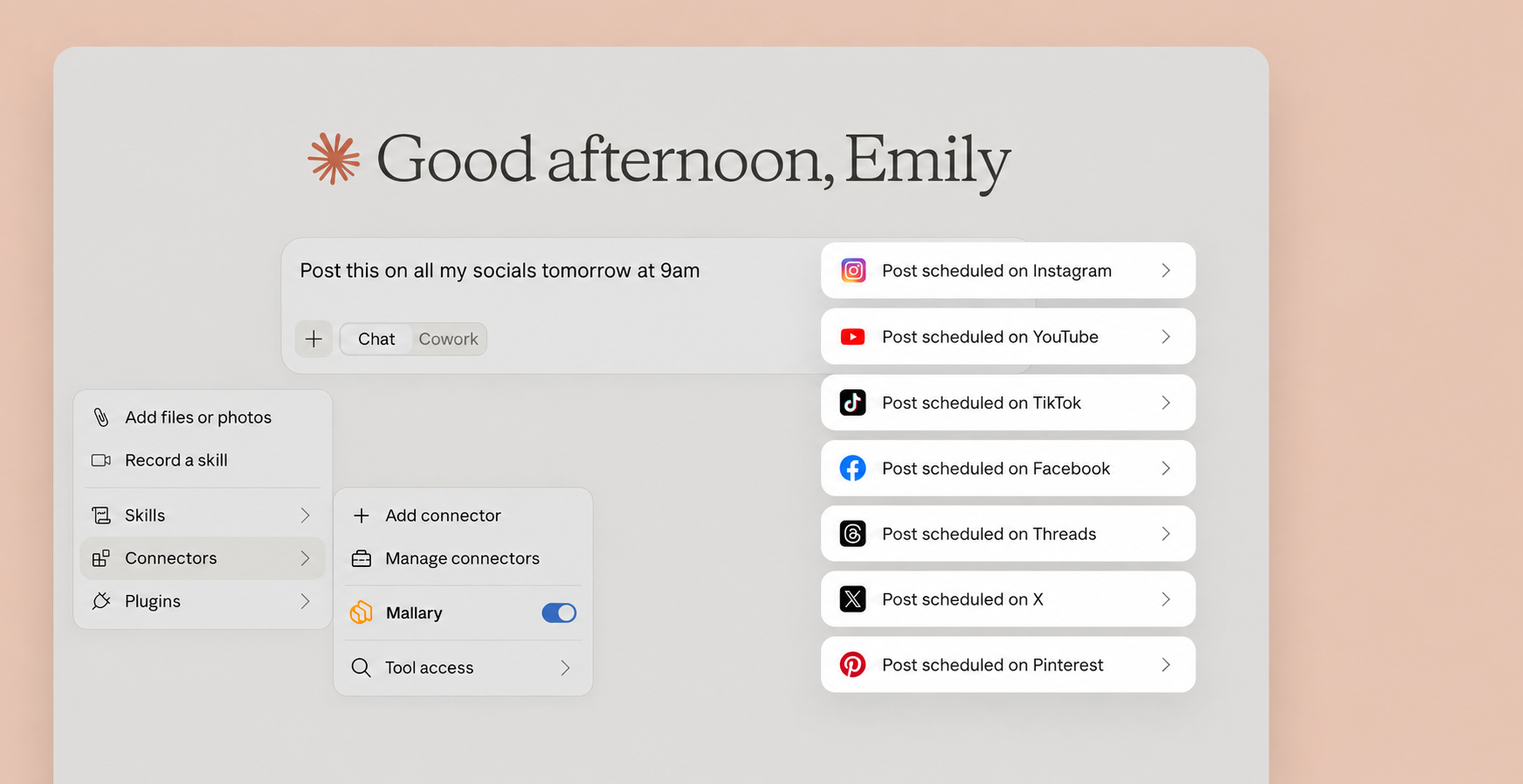
Let Claude handle your social media posts

with a little help from the official Mallary Claude connector.

Claude scheduling social media posts with Mallary
Brand-Aware Auto-Replies

Don't just post.
Engage on autopilot.

Mallary can detect new questions and comments on your published posts, and then use AI to post helpful replies and calls to action.

Simply add your business description, product features, pricing and FAQs in the Mallary dashboard, and let our AI handle the community engagement while you sleep.

  • Context-aware, brand-safe responses
  • Answers questions. Supports CTAs, links, and follow-ups
  • Works natively across all supported platforms
Learn more
Instagram
Acme Co
Example social post receiving an AI-powered comment reply

sarah_designs Does this integrate with Slack? Need to know for my team!

Acme Co is typing . . .

Acme Co Hey Sarah! 👋 Yes, we have a native Slack integration available on all Pro plans. Let us know if you need help setting it up!

Quick Setup Now

Pick the AI tool you use. Follow three quick steps to connect Mallary and try your first command.

Connect Mallary to Claude

1

Connect your socials

Create your Mallary account and connect the social accounts you want Claude to use.

Create Mallary account
2

Add Mallary to Claude

Open the Mallary connector page in Claude and follow Claude's steps to add it.

Add to Claude
3

Try it

Tell Claude "use Mallary to get a list of my latest social media posts"

Officially Verified & Approved

Mallary is fully audited and approved by Meta, Google, LinkedIn, TikTok and more. We use 100% official APIs, no browser bots or unofficial posting workarounds.

  • Meta Verified Tech Provider
  • X Enterprise Tier
  • Instagram Approved
  • LinkedIn Marketing Partner
  • TikTok Official API
  • Google Verified App
  • Pinterest Verified
Alex - Developer at Foundry Marketing
"I automated the posting on 5 different platforms in under 20 minutes. Highly recommend!"
Alex
Developer at Foundry Marketing
Sarah - Product at Crest Creative
"I was totally confused by the official TikTok API. Mallary made it simple. Using it every day."
Sarah
Product at Crest Creative
James - Founder at Ironline
"OAuth management is usually a nightmare. Mallary abstracted that away completely."
James
Founder at Ironline

Ready to automate your Instagram posts?

Use marketing automation to save hours every week with Mallary's social media scheduling API.

  • 14 day free trial
  • Cancel anytime
  • Money-back guarantee