Written by Outrank. Published by Mallary Labs LLC.
Published .
Post to Multiple Instagram Accounts: A Step-by-Step Guide
You have one campaign, eight regional accounts, and a launch time that cannot slip. You copy the caption into your notes, switch profiles in the app, upload the same video again, and start wondering which account still needs the Story. That manual loop is how teams post the wrong caption, miss a market, or publish twice. To post to multiple Instagram accounts reliably, you don't need faster tapping. You need a workflow where each account runs as its own job.
Table of Contents
- Choose a Workflow and Prepare Each Account
- How to Publish to Each Account as Its Own Job
- Batch Scheduling Without Hitting Publishing Limits
- Attaching First Comments and Keeping Replies Live
- Fixing Duplicates, Rejections and Expired Tokens
- Roll Out to Your Full Account List Safely
Choose a Workflow and Prepare Each Account
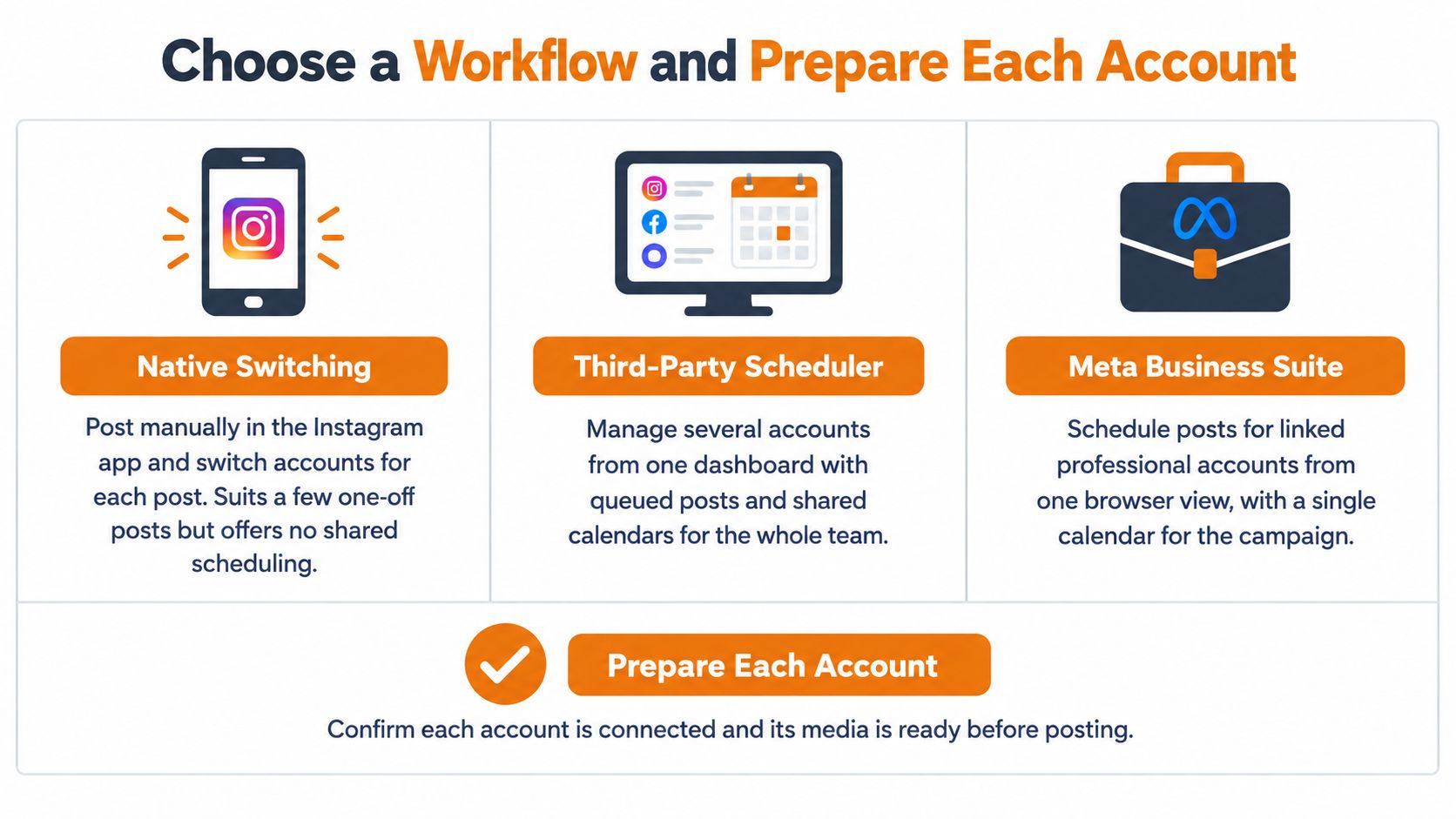
Three workflows get conflated constantly, and they produce very different results. Native account switching means you post manually in the Instagram app and switch accounts for each post. It's honest, simple work, and it's fine for a few one-offs. You get no shared schedule, no central status, and no protection against uploading the fashion caption to the pet shop account.
Instagram Collab is different. One account publishes, invited collaborators accept, and everyone shares one post, one permalink, one caption, and one pooled comment thread. That's useful for a joint launch with a partner brand. It isn't cross-posting.
Independent API publishing sends the same creative as separate jobs. Each account gets its own media container, caption, first comment, status, and analytics. You can localize the copy, change the call to action, and retry one failed account without touching the rest.
Why Collab Is Not a Substitute
Collab leaves operational questions most guides skip. Who can edit or delete the shared post? What happens if a collaborator declines the invitation, or accepts and later removes it? How do you attribute reach, comments, and conversions when engagement is pooled across brands?
Stories expose the gap further, because Stories aren't part of the same co-authored post model. A team that needs feed posts and Stories on every account still needs a second workflow. I would choose independent publishing unless the brands genuinely want one shared post with shared ownership.
| Workflow | Same Content Everywhere | Ownership | Stories | Analytics | Best Fit |
|---|---|---|---|---|---|
| Native account switching | Manual, one post at a time | Each account owns its own post | Manual, per account | Separate per account | A few one-off posts |
| Instagram Collab | One shared post | Shared with collaborators | Not included in the co-authored model | Pooled across collaborators | Joint launches with partner brands |
| Independent API publishing | Yes, as separate jobs | Each account owns its own post | Supported through the API | Separate per account | Agencies, SaaS teams and regular multi-account campaigns |
Prepare Each Account in API Order
Independent publishing only works if every destination is eligible and authorized before you queue anything. Meta's Content Publishing API announcement states Meta launched the feature on January 26, 2021, allowing Instagram Business accounts to schedule and publish feed posts from external platforms, and eligibility expanded on June 12, 2023, when Instagram Creator accounts gained access and Stories became an eligible media type. Access required developers to pass Meta's App Review process, which is why browser automation and scraping aren't a supported route.
Work through each account in this order:
- Convert to Professional: Move personal accounts to Business or Creator, since only professional accounts can publish through the API.
- Record the identity: Confirm the account type and note its Instagram user ID, because publishing is account-specific.
- Check the connection path: Older Facebook Login routes generally need a linked Facebook Page, while newer Instagram Login routes don't. Verify the route your tool uses against current Meta documentation.
- Confirm authority: The person authorizing needs admin or role access. For agency work, get written client approval before connecting, and review a secure setup for multiple Instagram profiles so credentials and verification steps don't become shared team knowledge.
- Store one token per account: Never share tokens across destinations. Separate storage is what lets you revoke or refresh one account without breaking the batch.
Many teams use a platform that already holds App Review approval rather than building their own integration. Mallary.ai handles OAuth, token refresh, and permission scopes so each account is authorized once. That account-level hygiene sits alongside the broader discipline of managing multiple social media accounts without mixing calendars, audiences, or approvals.
Choose Collab for shared ownership. Choose independent jobs when each account needs its own caption, analytics, and right to delete the post.
How to Publish to Each Account as Its Own Job
Each account is a separate job, even when one person prepares the whole campaign. That's not bureaucracy, it's how the API works. Meta's Instagram Platform overview states Meta's official API supports publishing images, videos, Reels, and carousels on behalf of professional accounts, and each publish runs through that account's own media container and media_publish call.
The sequence below shows the five operational stages for every destination.
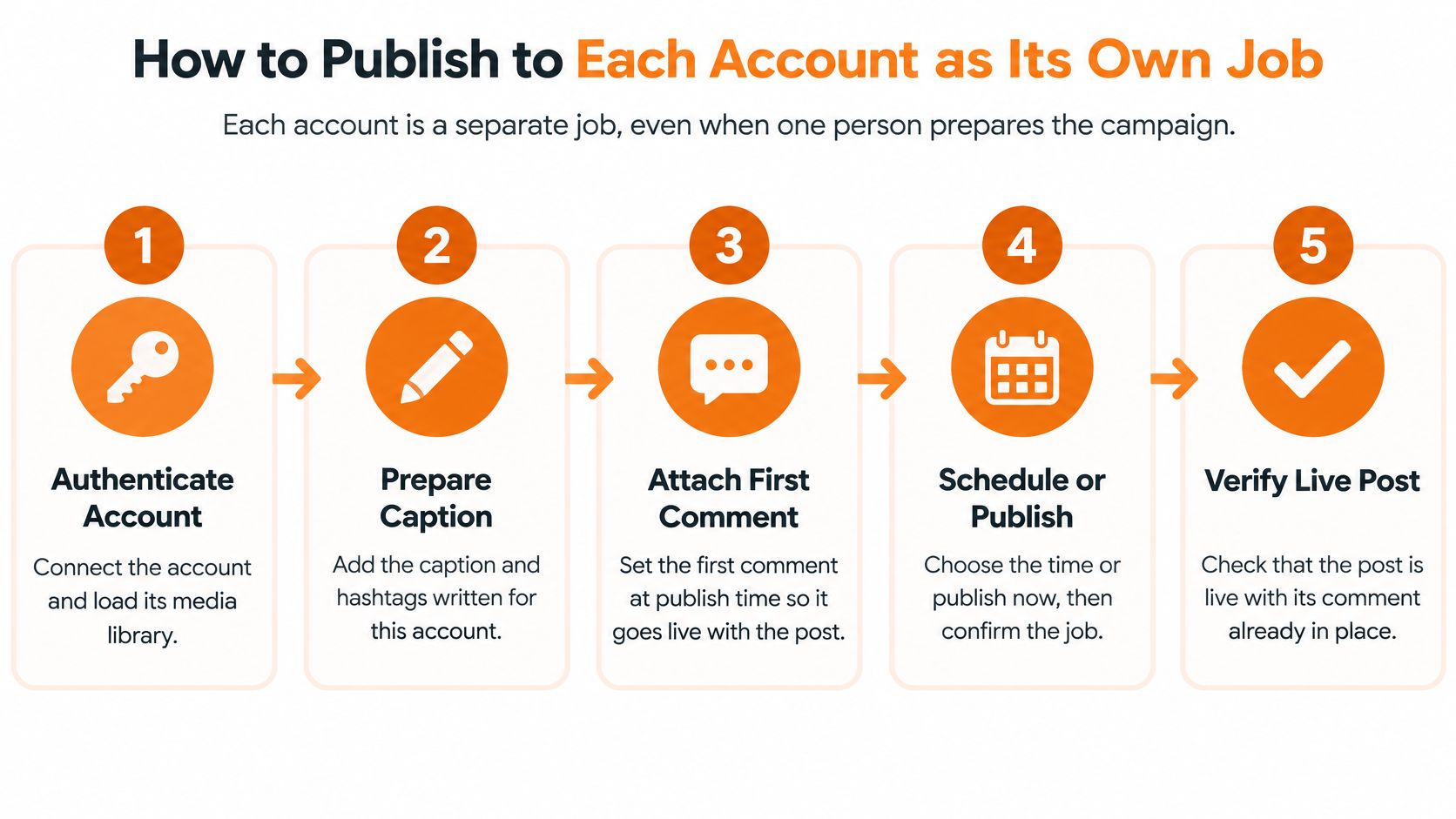
Run this sequence once per account:
- Authenticate the account: Load its Instagram user ID and access token. Don't borrow state from another destination.
- Validate caption and media: Check format, aspect ratio, and caption rules against that account's payload, not a generic template.
- Create the media container: Create it with that account's ID and persist the returned creation ID immediately.
- Poll processing status: Wait where required. Publishing an unprocessed container is a self-inflicted rejection.
- Publish and record: Call the account-specific
media_publishstep with the creation ID, then store the published media ID and status for that account alone.
The Idempotency Rule That Prevents Duplicates
Generate an idempotency key from the account ID plus a content version, for example acct_123_spring_sale_v2. Persist container IDs as they're created, and retry only transient failures. The dangerous case is a timeout. Your system sees no response, assumes failure, retries, and posts twice, when the first publish succeeded and only the response was lost.
Practical rule: If you don't know whether a publish succeeded, reconcile first. A blind retry is how one post becomes two.
Add one preflight check before container creation. Confirm the source media is still publicly reachable, because the container must be created and processed before publication. A signed URL that expires mid-processing will strand the job.
Say a spring sale goes to eight regional accounts, each with its own caption and local link. Seven publish cleanly. The eighth fails media validation because its crop breaks the format rules. With per-account jobs, you fix that one payload and retry that destination. The other seven don't republish, don't lose their media IDs, and don't get marked failed because a sibling job broke.
A single campaign request should therefore carry per-account payloads, run preflight checks per destination, adapt each payload to platform rules, and keep job state per account. Your result screen should answer one question per account: published, processing, or failed, and why.
Batch Scheduling Without Hitting Publishing Limits
Quota headroom matters more than raw throughput. A post to 20 accounts isn't 20 API requests. Meta's Graph API rate limiting documentation describes rolling-window Graph API rate limiting at the application level, where call counts are calculated over a one-hour window, and each destination post needs at least three core operations for container creation, status handling, and publication, so 20 accounts with one post each means roughly 60 core publishing requests before retries.
Authentication refresh and reconciliation calls sit on top of that math. Check content_publishing_limit for each account too, since it reports that account's publishing activity since a timestamp. Never assume one account's headroom applies to all, and confirm the current per-account publishing cap in Meta's documentation before you set batch sizes.
| Campaign | Accounts | Posts per Account | Core Requests | Notes |
|---|---|---|---|---|
| Single brand launch | 1 | 3 | 9 | Before retries and reconciliation |
| Regional rollout | 5 | 2 | 30 | Spread across the day |
| Agency monthly plan | 20 | 1 | 60 | Matches a one-post-per-account campaign |
| Agency weekly plan | 20 | 7 | 420 | Schedule over several days to stay under per-account limits |
| Large client network | 50 | 1 | 150 | Stagger sends with bounded concurrency |
Rules for a Queue That Survives a Launch
Use a durable queue, not a loop that fires every account at once. Synchronized fan-out creates a burst, throttling follows, and immediate retries make the burst worse.
- Stagger sends: Spread start times across the window instead of launching every job in the same minute.
- Cap concurrency: Run a bounded number of jobs at once, so one campaign can't consume the whole application budget.
- Back off with jitter: Retry with exponential backoff plus random jitter, so failed jobs don't return in lockstep.
- Add per-account circuit breakers: Pause the one account that's failing while the rest of the batch continues.
Track every job as submitted, processing, published, or failed, and reconcile ambiguous outcomes before retrying. Teams that bulk upload to Instagram through a scheduler get queueing and fan-out handled for them, so a 50-account launch spreads across the day instead of landing as one burst.
Attaching First Comments and Keeping Replies Live
A first comment should be set at publish time, not typed by hand afterwards. If someone has to open each live post and paste text, some accounts will get it late and some won't get it at all. Attach it to the job, and every post goes live with its supporting detail already in place.
The image below captures the team review moment where first comments and reply rules should be agreed, before anything is queued.

Say a launch goes to 12 accounts. Each first comment carries a region-specific link and one short question that prompts replies. Keep each comment to one purpose, keep it short, and vary the wording across accounts so the posts don't read like identical copies. Your publishing platform can attach multiple first comments in order at publish time, which works well when account one needs a link plus hashtags and account two needs a question plus a store detail.
Set Reply Rules Before You Automate
Near real-time AI auto-replies powered by OpenAI can answer common questions and guide people toward your call to action. They only stay safe if you define the boundaries first:
- Allowed topics: Opening hours, pricing basics, booking steps, delivery areas, and product availability.
- Human handoff: Complaints, refunds, legal questions, and medical questions always go to a person.
- Tone per brand: Write the voice down for each account. A clinic and a streetwear label shouldn't sound alike.
- Fallback message: When the reply engine is unsure, it acknowledges the question and says a team member will follow up.
The short video below is a useful prompt for checking how your team currently handles comments after a multi-account publish.
Agent builders can drive the same reply workflow through an MCP interface or CLI. Add webhooks that trigger an internal alert when a thread needs a person, so automation speeds up routine answers without hiding the conversations that matter.
Fixing Duplicates, Rejections and Expired Tokens
Partial success is normal. Six of eight accounts publishing isn't a failed campaign, it's six completed jobs and two specific problems. Report results per account, fix the broken destination, and leave the successful posts alone. Teams that label the whole batch failed end up republishing to accounts that were already live, which creates the duplicates they're trying to avoid.
Match the symptom to the cause before you touch anything:
| Symptom | Likely Cause | Fix |
|---|---|---|
| Same post appears twice | Timeout after a successful publish, retried without an idempotency key | Reconcile the media ID before retrying; use a key per account and content version |
| One account fails, the rest publish | Media rejected by that account's rules or permissions | Fix that account's payload and retry only that destination |
| One account stops publishing suddenly | Revoked token or expired permission | Re-authenticate that account; other accounts continue |
| Many accounts fail in the same minute | Synchronized fan-out triggers throttling | Stagger sends, cap concurrency and let backoff with jitter run |
| Container stuck in processing | Source media not publicly reachable or still processing | Check the media URL in preflight and poll status before publishing |
| Quota error on some accounts | Per-account publishing limit reached | Check content_publishing_limit and defer that account to the next window |
Read the Pattern, Not Just the Error
A single rejection usually points to an asset or permission condition on that account. Fix the payload and retry only that destination. A sudden stop on one account usually means a revoked token or expired permission, so re-authenticate it while the others keep publishing. Healthy systems make this routine with proper OAuth token refresh rather than emergency reconnects on launch day.
A cluster of failures in the same minute tells a different story. That's synchronized fan-out hitting throttling, and the fix is staggering and backoff, not faster retries. A container stuck in processing usually means the source media isn't publicly reachable, which your preflight check should have caught. For quota errors, check content_publishing_limit and defer that account to the next window.
Retry the destination that failed. Never rerun the campaign.
Roll Out to Your Full Account List Safely
Don't start with your full account list. Start with two accounts that have different audiences, publish one identical campaign to both, and compare the per-account results and engagement. If both jobs publish once, with the right captions and first comments, your workflow is sound.
Then add accounts in groups. Increase the batch size only after a full cycle runs without duplicates or rejections. I would rather add five accounts a week than debug fifty on launch day.
Checklist Before Each New Group
- Professional and authorized: Every account is Business or Creator, connected, and approved by its owner.
- Separate tokens: Each account has its own stored token, with refresh working.
- Preflight passes: Every media file is publicly reachable and validates for its destination.
- Queue is clean: No circuit breakers are open and no jobs are stuck in processing.
- Engagement is set: First comments and AI reply rules exist per account, not as one shared default.
Keep an account out of a batch when its content needs a unique legal disclaimer, its audience reads a different language, or its owner hasn't approved the campaign. Excluding one account deliberately beats explaining an unwanted post afterwards.
Test on a free plan or trial with two accounts first. Move to a business tier when the batch size, team seats, or approval needs outgrow the trial. Because the same workflow can run from a single API endpoint, an MCP agent interface, or a CLI, your team can publish from code, an agent, or a dashboard without rebuilding the process each time.
Connect your first two Instagram accounts and run one campaign as separate, trackable jobs, with first comments attached and per-account results you can read clearly. Visit Mallary.ai to start a trial, publish to both accounts today, and scale to your full account list once the first cycle runs clean.
Try it with Mallary
STOP!
Want ChatGPT or Claude to post on Instagram for you?
Connect your social accounts one time. Then tell your AI what to write. It can make your posts, share them, and reply on social sites that allow replies. You do not need to write code.
Pick your AI





Connect once. Ask in plain English. Mallary does the work.


