Mallary vs Blotato
Last Updated: October 28, 2026
Blotato helps make content as well as publish it. If you already create your own images and videos, compare publishing tools; if you need AI creation, include those costs too.
About 48% cheaper for 5 social media accounts
$15/month on Mallary Starter compared with Blotato $29/month on Starter.
Both prices are billed monthly. USD before tax and separate X usage. Features and bundle sizes differ. Blotato includes 20 accounts and AI media credits. This example is for managing 5 accounts, not matching its full bundle. Check Blotato pricing.
| Feature | Blotato | Mallary |
|---|---|---|
| Best for | Content creation and repurposing with AI | Publishing and comment tools for apps and AI agents |
| Starting price | $29/month, billed monthly | $15/month, billed monthly |
| Developer workflow | REST API, MCP, and official n8n and Make nodes are part of paid plans. | REST API, MCP, CLI, and webhooks on paid plans. |
| Team workflow | Higher plans focus on more AI credits, processing speed, and support. | Profiles group accounts. Team permissions and client approvals must be handled by your app. |
| What to check | AI media uses credits. The seven-day trial excludes API and MCP access. | No self-hosted edition, built-in client approvals, social listening, or full AI content studio. Check supported post types before moving. |
Blotato vs Mallary: The Verdict
Choose Mallary for publishing and comment tools through a dashboard, REST API, MCP, or CLI. Keep Blotato if making and repurposing content is the hardest part of your work. Mallary is for publishing and engagement, not a full AI media studio.
- Manage 5, 15, or 100 total social media accounts with unlimited posts.
- Use scheduling, analytics, AI comment replies, dashboard, API, MCP, and CLI.
- Start with a 14-day free trial. X publishing and comments use credits at cost.
Pricing Comparison
$29/month on Starter
$15/month on Mallary Starter
Mallary is about 48% cheaper for this 5-account example. Both prices are billed monthly. USD before tax and separate X usage. Features and bundle sizes differ.
Free Trial Comparison
Every Mallary paid plan includes a 14-day free trial
Every Mallary paid plan starts with a 14-day free trial. That gives developers two full weeks to test dashboard publishing, API workflows, scheduling, analytics, comments under posts, MCP, CLI, and AI auto-replies.
There is no commitment and you can cancel anytime. Every plan also comes with a 30-day money-back guarantee, giving you extra time to make sure Mallary fits your workflow. Some competitors offer shorter 7-day trials, while others use free tiers instead of timed paid-plan trials. Hootsuite currently offers a 14-day trial with posting limits and no bulk scheduling.
Mallary Developer focus
14-day free trial on all paid plans
No commitment, cancel anytime, and a 30-day money-back guarantee.
Hootsuite
Timed free trial
14-day trial with posting limits; bulk scheduling is excluded during trial.
Buffer
Timed free trial + free plan
14-day trial on paid plans.
PostPlanify
Timed free trial
7-day free trial.
Post Bridge
Timed free trial
7-day free trial.
Blotato Current comparison
Timed free trial
7-day free trial; API and MCP access are excluded during trial.
Postiz
Timed free trial
7-day hosted trial; self-hosting is also available.
Free tier instead of timed trial
Zernio
Free tier
First connected accounts are free; this is a free tier, not a standard timed paid-plan trial.
Upload-Post
Free tier
Free tier with limited monthly uploads; no clearly stated standard timed paid-plan trial.
Metricool
Forever free plan
Free plan does not expire; treat as a free plan, not a timed paid-plan trial.
Trial details can change. Always check each provider's pricing page for the latest terms.
Trusted by creators, founders and developers






Integrates with the tools you already use





It's this easy to post with Mallary
fetch('https://mallary.ai/api/v1/post', {
  method: 'POST',
  headers: {
    'Authorization': 'Bearer YOUR_API_KEY',
    'Content-Type': 'application/json'
  },
  body: JSON.stringify({
    platforms: ["youtube", "facebook", "instagram"],
    message: "Check out our new product!",
    media: [{ url: "https://files.mallary.ai/launch-video.mp4" }],
    comments_under_post: ["comment 1", "comment 2", "comment 3"],
    auto_reply_enabled: true,
  })
})
Blotato vs Mallary: What You Need to Know
Creation: list the writing, image, voice, and video tools you use. A publishing API will not replace all of them.
Testing: Blotato excludes API and MCP from its free trial. Check how you can test the integration before paying.
Limits: compare AI credits and account counts with the actual content you make each month.
More Blotato guides
Check the current price, public review themes, and other options before you choose.
Compare other platforms
Officially Verified & Approved
Mallary is fully audited and approved by Meta, Google, LinkedIn, TikTok and more. We use 100% official APIs, no browser bots or unofficial posting workarounds.
-
Meta Verified Tech Provider
-
X Enterprise Tier
-
Instagram Approved
-
LinkedIn Marketing Partner
-
TikTok Official API
-
Google Verified App
-
Pinterest Verified





Supported Platforms
Connect accounts, schedule posts, and publish across 9 ready platforms.


Built for AI Agents.
Give your agents social media super powers
Mallary isn't just for humans. We provide native tools, skills, and protocols for autonomous agents and workflow automation platforms to manage your social presence.

Agentic Social Media Scheduling
Our API is designed with LLMs in mind. Predictable schemas, clear error messages, and unified payloads make it incredibly easy for agents to reason about and execute actions.
MCP Support
Native Model Context Protocol (MCP) support. Expose Mallary's posting, scheduling, and analytics capabilities directly to your custom AI agents as callable tools and skills.
n8n & Make.com
Plug-and-play integrations for popular automation platforms. Build complex, multi-step social media workflows in n8n or Make.com without writing a single line of code.
Quick Setup Now
Pick the AI tool you use. Follow three quick steps to connect Mallary and try your first command.
Connect Mallary to Claude
 Mallary
Connect your socials
Create your Mallary account and connect the social accounts you want Claude to use.
Create Mallary accountAdd Mallary to Claude
Open the Mallary connector page in Claude and follow Claude's steps to add it.
Add to ClaudeTry it
Tell Claude "use Mallary to get a list of my latest social media posts"
Connect Mallary to Claude Code
Connect your socials
Create your Mallary account and connect the social accounts you want Claude Code to use. You do not need to copy an API key.
Create Mallary accountCopy the setup prompt
Paste it into Claude Code. It will guide you through OAuth.
Set up Mallary for me in Claude Code.

1. Install the official Mallary CLI with `npm install -g @mallary/cli`.
2. Install the official Mallary agent skill for Claude Code with `npx skills add mallarylabs/mallary-agent --global --agent claude-code --yes`.
3. Run `mallary auth login`.
4. Show me only the Mallary sign-in URL and one-time code. Do not ask me for my Mallary password, API key, access token, or refresh token. Wait while I approve access in my browser.
5. After approval, run `mallary auth status`, `mallary health`, `mallary profiles list`, and `mallary platforms list`.
6. Tell me what you installed and whether the safe checks passed. Do not upload files, create or delete posts, reply to comments, change webhooks or settings, or disconnect accounts during setup. Later, only post or change Mallary when I clearly ask. If a needed detail is missing or unclear, ask one short question. Do not ask me to approve the same post twice. If the Mallary skill does not appear yet, tell me to restart Claude Code once.Approve in your browser
Claude Code will show a Mallary link and one-time code. Sign in once and approve Mallary access. No API key needs to be shared with the agent.
Connect Mallary to Cursor
Connect your socials
Create your Mallary account and connect the social accounts you want Cursor to use. You do not need to copy an API key.
Create Mallary accountAdd Mallary to Cursor
Open the command palette and choose Cursor Settings > Tools & MCPs > Add Custom MCP.
{
  "mcpServers": {
    "mallary": {
      "url": "https://mallary.ai/mcp"
    }
  }
}Sign in and try it
Click Connect in Cursor, then sign in to Mallary in your browser.
Ask Mallary to show my connected social accounts. Do not post anything.
Connect Mallary to Codex
Connect your socials
Create your Mallary account and connect the social accounts you want Codex to use. You do not need to copy an API key.
Create Mallary accountCopy the setup prompt
Paste it into Codex. It will guide you through OAuth.
Set up Mallary for me in Codex.

1. Install the official Mallary CLI with `npm install -g @mallary/cli`.
2. Install the official Mallary agent skill for Codex with `npx skills add mallarylabs/mallary-agent --global --agent codex --yes`.
3. Run `mallary auth login`.
4. Show me only the Mallary sign-in URL and one-time code. Do not ask me for my Mallary password, API key, access token, or refresh token. Wait while I approve access in my browser.
5. After approval, run `mallary auth status`, `mallary health`, `mallary profiles list`, and `mallary platforms list`.
6. Tell me what you installed and whether the safe checks passed. Do not upload files, create or delete posts, reply to comments, change webhooks or settings, or disconnect accounts during setup. Later, only post or change Mallary when I clearly ask. If a needed detail is missing or unclear, ask one short question. Do not ask me to approve the same post twice. If the Mallary skill does not appear yet, tell me to restart Codex once.Approve in your browser
Codex will show a Mallary link and one-time code. Sign in once and approve Mallary access. No API key needs to be shared with the agent.
Connect Mallary to OpenClaw

Connect your socials
Create your Mallary account and connect the social accounts you want OpenClaw to use. You do not need to copy an API key.
Create Mallary accountCopy the setup prompt
Paste it into OpenClaw. It will guide you through OAuth.
Set up Mallary for me in OpenClaw.

1. Install the official Mallary CLI with `npm install -g @mallary/cli`.
2. Install the official Mallary agent skill with `npx skills add mallarylabs/mallary-agent`.
3. Run `mallary auth login`.
4. Show me only the Mallary sign-in URL and one-time code. Do not ask me for my Mallary password, API key, access token, or refresh token. Wait while I approve access in my browser.
5. After approval, run `mallary auth status`, `mallary health`, `mallary profiles list`, and `mallary platforms list`.
6. Tell me what you installed and whether the safe checks passed. Do not upload files, create or delete posts, reply to comments, change webhooks or settings, or disconnect accounts during setup. Later, only post or change Mallary when I clearly ask. If a needed detail is missing or unclear, ask one short question. Do not ask me to approve the same post twice.Approve in your browser
OpenClaw will show a Mallary link and one-time code. Sign in once and approve Mallary access. No API key needs to be shared with the agent.
Connect Mallary to Hermes

Connect your socials
Create your Mallary account and connect the social accounts you want Hermes to use. You do not need to copy an API key.
Create Mallary accountCopy the setup prompt
Paste it into Hermes. It will guide you through OAuth.
Set up Mallary for me in Hermes.

1. Install the official Mallary CLI with `npm install -g @mallary/cli`.
2. Install the official Mallary agent skill with `npx skills add mallarylabs/mallary-agent`.
3. Run `mallary auth login`. One login gives Hermes access to view, publish, reply, and manage Mallary.
4. Show me only the Mallary sign-in URL and one-time code. Do not ask me for my Mallary password, API key, access token, or refresh token. Wait while I approve access in my browser.
5. After approval, run `mallary auth status`, `mallary health`, `mallary profiles list`, and `mallary platforms list`.
6. Tell me what you installed and whether the safe checks passed. Do not upload files, create or delete posts, reply to comments, change webhooks or settings, or disconnect accounts during setup. Later, only post or change Mallary when I clearly ask. If a needed detail is missing or unclear, ask one short question. Do not ask me to approve the same post twice.Approve in your browser
Hermes will show a Mallary link and one-time code. Sign in once and approve Mallary access. No API key needs to be shared with the agent.
Connect Mallary to ChatGPT
Connect your socials
Create your Mallary account and connect the social accounts you want ChatGPT to use.
Create Mallary accountAdd Mallary to ChatGPT
Open the Mallary plugin page in ChatGPT. Click Install plugin, then sign in with OAuth.
Add to ChatGPTTry it
Use Mallary to show me which of my recent posts are getting the most likes, comments, and views.
Don't just post.
Engage on autopilot.
Mallary can detect new questions and comments on your published posts, and then use AI to post helpful replies and calls to action.
Simply add your business description, product features, pricing and FAQs in the Mallary dashboard, and let our AI handle the community engagement while you sleep.
-
Context-aware, brand-safe responses
-
Answers questions. Supports CTAs, links, and follow-ups
-
Works natively across all supported platforms


sarah_designs Does this integrate with Slack? Need to know for my team!
Acme Co Hey Sarah! 👋 Yes, we have a native Slack integration available on all Pro plans. Let us know if you need help setting it up!
Official platform partners


See Mallary before you switch
Use the dashboard for manual work or the API for your app. Use MCP, CLI, scheduling, analytics, comment replies, and AI auto-replies with your plan.
Starter is $15/month, billed monthly for 5 total social media accounts and unlimited posts. Need more accounts? Pro includes 15 for $29 a month, and Business includes 100 for $95 a month.
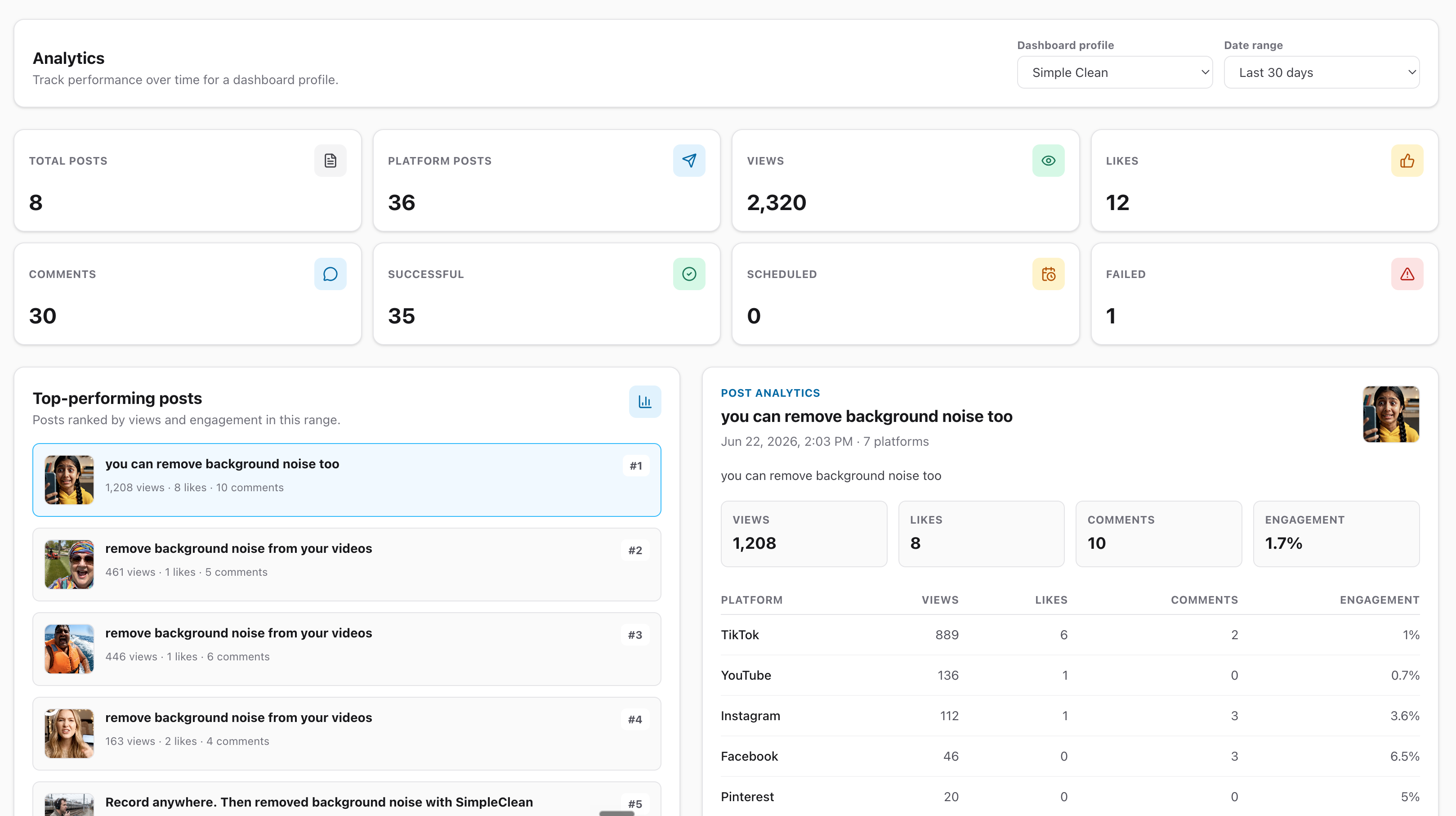
Test a complete workflow with our API scheduling walkthrough, ChatGPT setup guide, or Claude setup guide. Check current platform support for the post types you use.
How to move from Blotato to Mallary
Save finished media and captions before moving. Keep your content creation steps in Blotato or another tool and rebuild only the publishing steps you choose to move.
- List the accounts, media files, future posts, and reports you need. Mallary does not import another tool's queue or history.
- Start a trial and connect your social accounts to Mallary. Set up your brand profiles and use Mallary credentials in your app or agent.
- Test each needed post type, schedule, and comment workflow. Check the published result and delivery status for every destination.
- Recreate future posts and check the times. Remove the old scheduled copy before its publish time to avoid posting twice. Keep any history or reports you need before closing the old service.
Questions about Blotato alternatives
Which Blotato alternative should I choose?
Choose by the job you need: Mallary for publishing and comment tools for apps and AI agents; Postiz for open-source control with hosted and self-hosted choices; Upload-Post for media upload and video processing workflows; Buffer for simple calendars and queues; Post Bridge for simple cross-posting for one person. Keep Blotato if its strengths still fit.
How do the prices compare?
Blotato: $29/month on Starter. Blotato includes 20 accounts and AI media credits. This example is for managing 5 accounts, not matching its full bundle. Mallary: $15/month on Mallary Starter. Starter includes 5 total social media accounts and unlimited posts. Use any mix of our 10 supported social media platforms. Scheduling, analytics, AI comment replies, dashboard, API, MCP, and CLI are included. Mallary is about 48% cheaper for this 5-account example. Both prices are billed monthly. USD before tax and separate X usage. Features and bundle sizes differ.
Is there a free alternative to Blotato?
Some tools in this guide offer free plans or free self-hosted software. Free plans have limits, and self-hosting still needs a server and upkeep. Mallary offers a 14-day free trial on paid plans, not an ongoing free publishing plan.
Can I keep using ChatGPT, MCP, or an API?
Check the exact tools and plan for each service. Mallary paid plans include REST API, MCP, and CLI access. You can use the Mallary ChatGPT plugin or Claude connector after setup. Each service needs its own connection and credentials.
Will Mallary import my scheduled posts and history?
Mallary does not import another scheduler's queue or post history. Connect your social accounts, upload your media, and recreate future posts. Check each new post before removing its old scheduled copy so it does not publish twice. Posts already on your social accounts stay there.
Choose the tool that fits your work
Choose Mallary when your app or AI agent needs publishing, scheduling, analytics, and comment tools with a dashboard included.
Keep Blotato if making and repurposing content is the hardest part of your work. Mallary is for publishing and engagement, not a full AI media studio.
Need a different fit? Postiz for open-source control with hosted and self-hosted choices. Upload-Post for media upload and video processing workflows. Buffer for simple calendars and queues. Post Bridge for simple cross-posting for one person.