
Written by Outrank. Published by Mallary Labs LLC.
Published .
X API Rate Limits: The Developer's Reference
You've shipped the integration, the happy-path tests pass, and then a customer imports a large account set while several tenants publish at once. Requests that worked moments earlier start returning 429 Too Many Requests. Workers retry together, queues grow, and nobody can tell whether the exhausted quota belongs to the user token, the app, the endpoint, or the billing plan.
That's the operational reality behind X API rate limits. X doesn't expose one universal counter that you can solve with a single sleep statement. Limits are endpoint-specific, authentication-sensitive, windowed, and increasingly connected to monthly usage and billing. A reliable integration therefore needs a model of capacity, not just a handler for errors.
Table of Contents
- Why X API Rate Limits Are a System Design Problem
- Rate Limit Windows and How X Counts Requests
- Per-App vs Per-User Rate Buckets
- Endpoint Limits by Auth Type in Practice
- Reading 429 Responses and Rate Limit Headers
- Backoff and Retry Patterns That Survive Bursts
- Monthly Caps and the Move to Metered Billing
- Aggregator Mitigations and Multi-Account Pools
- Monitoring Limits Before Users Notice
- An Architecture for Rate-Limit Resilience
- Quick Reference for Common X API Endpoints
- FAQ on X API Rate Limits
Why X API Rate Limits Are a System Design Problem
Treat rate limits as an architectural constraint before the first HTTP request reaches production. A 429 is only the visible symptom. The underlying failure may be a bursty queue, a shared app bucket exhausted by another tenant, a user token with no remaining capacity, or a monthly allowance that has been consumed despite every short request window staying healthy.
X documents limits as per endpoint, with requests generally enforced in 15-minute windows and some endpoints using longer windows, including 24-hour windows. Exceeding an endpoint's allowance returns a 429 until the relevant window ends, as described in the X rate-limit documentation. That means your scheduler needs to know which resource it's calling and which authentication context issued the request.
A practical design separates three coupled constraints:
- Window capacity: How many requests can this endpoint accept before its reset?
- Identity capacity: Is the counter associated with the app, a specific X user, or both?
- Monthly consumption: Does the plan impose a usage ceiling that can stop otherwise well-paced traffic?
The simplest implementation sends calls directly from request handlers and retries after failure. It's also the design most likely to create synchronized retry storms. A queue, a shared rate-state store, and token-aware scheduling add moving parts, but they let you trade immediate throughput for predictable recovery.
Practical rule: Every request should carry enough context to answer, “Which endpoint bucket, authentication identity, tenant, and billing budget did this consume?”
Before building a custom governor, compare the design against Mallary's API rate-limit guidance. The important lesson isn't a particular library. It's that rate limiting belongs in a shared platform layer, where workers can coordinate rather than making isolated guesses.
Rate Limit Windows and How X Counts Requests
A worker can exhaust a GET /2/users/me allowance at second 14:59, then immediately receive 429 responses. The endpoint may recover at its reset point, but an arbitrary sleep() does not tell the worker when that will happen. Rate limits therefore belong in scheduler design, not only in error handling.
Most X endpoints use a 15-minute window. Some use 24-hour or other longer windows. X states that most limits reset every 15 minutes, but the window is defined per endpoint rather than across the application. The official rate-limit reference is a lookup for endpoint behavior, not a basis for one global timer.
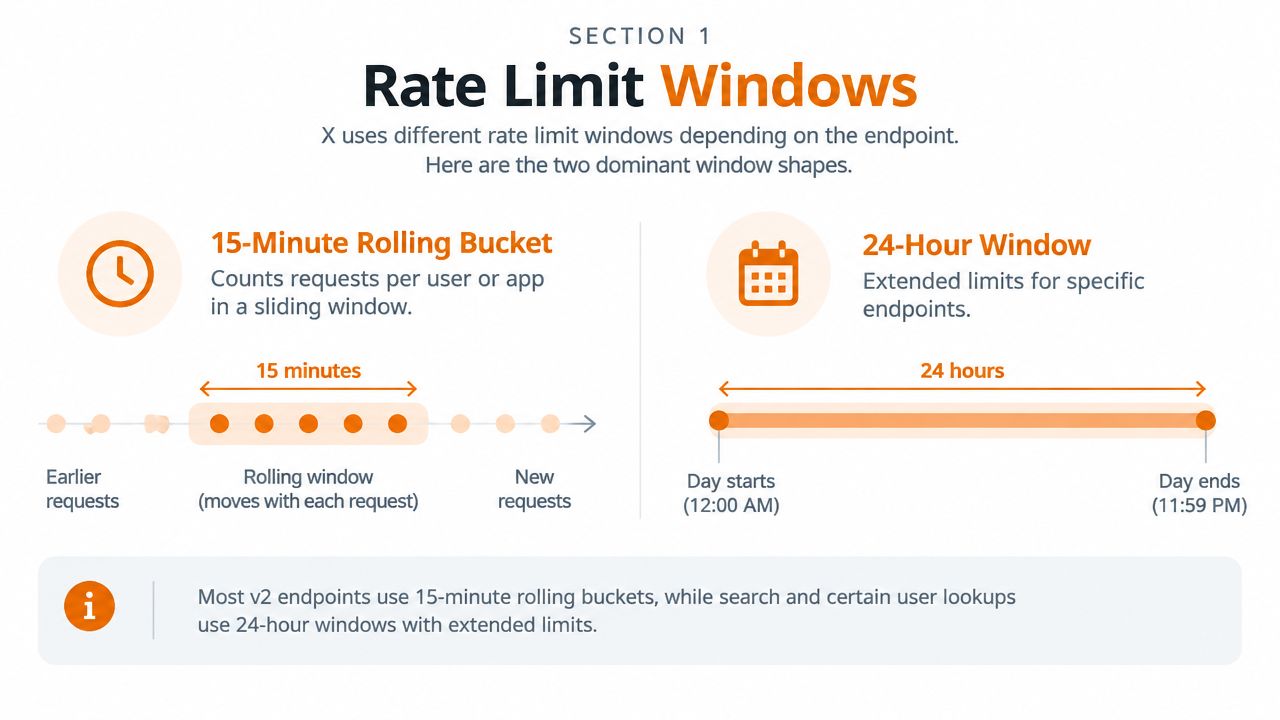
A window is a counter tied to a reset boundary. Requests are not necessarily averaged smoothly across that period. Two workers sending calls at the same wall-clock moment can consume the same remaining capacity, even after a quiet stretch.
Window length changes the recovery strategy:
- Short windows: A 15-minute bucket can recover at reset. Pause the queue, add jitter, and resume.
- Long windows: A 24-hour cap requires caching, deduplication, and lower request volume. Repeating a call cannot create capacity.
- Mixed endpoints: A search worker and a posting worker can remain healthy while another endpoint is exhausted.
The scheduler should read reset metadata from X and wait for that endpoint's reset point, with a safety margin for clock differences and scheduling delay. Treating every 429 as a fixed-delay retry turns synchronized workers into another burst.
Build window awareness into the scheduler
Store rate state by endpoint family and authentication identity. Persist the observed limit, remaining count, reset timestamp, and response-received time. A process-local counter can smooth bursts, but multiple workers need shared state to coordinate.
Window math creates production bugs when separate counters are collapsed into one. A global “requests remaining” value may look healthy while an endpoint-specific bucket is empty. Use a map keyed by resource and identity, and treat unknown values conservatively rather than as unlimited capacity.
Per-App vs Per-User Rate Buckets
X's rate-limit model distinguishes per-app and per-user capacity. A per-app bucket aggregates requests made through the developer application, while a per-user bucket tracks activity associated with a particular X account. The same endpoint can expose different ceilings depending on whether a bearer token, user token, or another authentication context issued the request.
| Dimension | Per-App Bucket | Per-User Bucket |
|---|---|---|
| What it represents | Shared application capacity | Capacity associated with one X account |
| Who competes for it | Tenants and workers using the app | Requests made for that user |
| Common operational risk | One noisy tenant starves other tenants | One account exhausts its own allowance |
| Scaling effect | More user tokens don't automatically remove the app ceiling | More users can add user-scoped capacity, subject to app limits |
| Scheduler key | App identity plus endpoint | User identity plus endpoint |
User-context timeline reads commonly draw from user-oriented buckets. App-only searches commonly draw from app-level capacity. OAuth 1.0a user-context calls can involve both dimensions, so the application needs to observe the response headers rather than infer the result from the token type alone.
This creates a counterintuitive failure mode. Multiplexing requests across many user tokens may distribute per-user consumption, but all those calls can still accumulate against the same per-app ceiling. Token rotation is not the same thing as capacity multiplication.
Decision rule: Choose the authentication context based on the counter you intend to consume, then size scheduling and isolation around that counter.
In a multi-tenant service, record both identities on every request. Route user-specific work through the relevant user bucket, and protect shared app capacity with tenant quotas, fair queues, and admission control. If you only track the token string, you'll miss the fact that several tokens may share an application-level ceiling.
Endpoint Limits by Auth Type in Practice
The supplied X documentation confirms the important operational rule, endpoint limits are not global, and X can apply different counters according to authentication context. It doesn't provide a stable universal table for every endpoint and auth combination that a production client can safely hard-code forever. That distinction matters because undocumented assumptions age badly when platform policies change.
Avoid embedding unverified endpoint numbers in application logic. Instead, treat the first live responses as capability discovery and record the headers returned for each endpoint and identity. The following table is intentionally a design reference rather than a fabricated quota card.
| Endpoint family | Auth context | Limit | Window |
|---|---|---|---|
| User lookup | User context | Read from live response headers | Endpoint-specific |
| Posting | User context or app context | Read from live response headers | Endpoint-specific |
| Search | App-only or user context | Read from live response headers | Endpoint-specific |
| Timeline reads | User context | Read from live response headers | Endpoint-specific |
| Follow graph | User context | Read from live response headers | Endpoint-specific |
| Media upload | User context | Read from live response headers | May use a longer window |
The implementation pattern is straightforward:
- Send a controlled request for each endpoint and authentication mode.
- Capture the limit, remaining count, reset timestamp, resource, and cost fields when present.
- Store the observation with the credential and endpoint family.
- Let the scheduler use the most recent valid state, with conservative fallback behavior when headers are absent.
- Revalidate after an X API change, plan change, or authentication migration.
OAuth 2.0 user tokens should be treated as user-context credentials for scheduling purposes. Bearer tokens are app-oriented, so your pool manager must not assume that adding bearer tokens creates independent user capacity.
The right source of truth for an active request is the response itself. Documentation establishes the model, while headers reveal the bucket X applied to that particular call.
Reading 429 Responses and Rate Limit Headers
A 429 means the server rejected the request because the applicable request allowance was exceeded. X's documentation identifies the common reset pattern, but your client still needs to inspect the response rather than infer timing from the status code alone.
On successful responses, capture the rate-limit headers that X returns, including:
x-rate-limit-limit, the observed allowancex-rate-limit-remaining, the capacity leftx-rate-limit-reset, the reset time as Unix epoch secondsx-rate-limit-resource, when suppliedx-rate-limit-resource-cost, when suppliedrate-limit-policy, when supplied
On a 429, prefer Retry-After when X provides it. Treat x-rate-limit-reset as useful scheduling evidence, not an unquestionable promise, because clocks, concurrent workers, and bucket transitions can make the exact moment difficult to predict.
A 503 is different. It indicates temporary service unavailability rather than proving that your endpoint counter is empty. The retry layer should classify 429, 503, and network failures separately, even though all three can require delayed work.
For every rejection, log the method, URL, status, complete rate-limit headers, request ID, tenant, credential identifier, and any resource-cost field. Legacy endpoints may omit useful headers, and missing telemetry should make the worker more cautious, not more aggressive.
For a user-facing explanation of rejected requests and account-level attempt limits, SupaBird's article on Twitter limits provides helpful context. Use it as troubleshooting background, while relying on the live X response for retry decisions.
Backoff and Retry Patterns That Survive Bursts
A retry layer fails when every worker treats a 429 as an invitation to try again immediately. During a burst, that creates a synchronized wave: workers receive the same signal, wait the same duration, and collide again when they wake.

Use a layered policy instead:
- Retry only safe work by default: GET requests are usually easier to replay. Treat writes as non-idempotent unless your application has a durable idempotency strategy.
- Honor
Retry-After: When present, it outranks a locally calculated delay. - Use reset metadata as fallback: Compute the time until reset, subtract a small safety margin, and combine it with jitter.
- Cap attempts: A bounded retry budget prevents one job from occupying a worker indefinitely.
- Coordinate workers: A shared scheduler must reserve capacity before dispatching another request.
For a 429, the retry delay should be based on the server's instruction. For a 503 or a network timeout, use exponential backoff with full or decorrelated jitter. A simple local formula can start with a one-second base and increase per attempt, but the exact delay must remain bounded by the job's deadline and the endpoint's recovery behavior.
Do not retry POST /2/tweets blindly. If the response is ambiguous, the request may have reached X even if your client didn't receive a response. Persist the publish job, use an idempotency mechanism where supported by your workflow, and reconcile state before creating another post.
A token-aware helper can follow this shape:
send(job):
  state = rate_state.for(job.endpoint, job.user, job.app)

  if state.remaining == 0:
      wait_until(state.reset)

  for attempt in bounded_attempts:
      response = request(job)

      record_headers(response, state)

      if response.success:
          return response

      if response.status == 429:
          delay = retry_after(response) or time_to_reset(response)
          sleep(jitter(delay))
          continue

      if response.status == 503 or network_failure(response):
          sleep(decorrelated_backoff(attempt))
          continue

      send_to_dead_letter(job)
      return failure
The queue should also limit concurrency before the API rejects calls. A shared process budget prevents ten workers from independently believing they can spend the same remaining capacity.
A visual explanation of retry coordination can be useful when reviewing worker behavior with a team, but the implementation must still be driven by headers, endpoint identity, and durable job state.
Monthly Caps and the Move to Metered Billing
A worker can stay below every short-window threshold and still exhaust its monthly allowance. Window limits decide when requests may run; monthly caps decide how much the application can consume during the billing cycle. X's developer documentation lists pay-per-usage access with a cap of 3 million Post reads per monthly billing cycle, as described in the X developer rate-limit documentation.
X has also moved toward metered access. The changelog lists write pricing of $0.015 per post, $0.20 per post containing a URL, and $0.01 for summarized replies. Those charges affect engineering decisions, not only finance. Retries after uncertain failures, repeated backfills, and missing deduplication can all create billable work.
| Access tier or model | Monthly post cap | Monthly read cap | Typical use case |
|---|---|---|---|
| Write-only access | 500 posts at user and app level | Not specified in the verified data | Limited publishing workflows |
| Higher write tier | 3,000 user posts and 50,000 app posts | Not specified in the verified data | Larger publishing integrations |
| Top listed write tier | 288,000 user posts and 300,000 app posts | Not specified in the verified data | High-volume publishing |
| Pay-per-usage access | Not specified in the verified data | Up to 3 million Post reads per monthly cycle | Metered read workloads |
The pricing direction has changed over time. In October 2024, X raised Basic API pricing from $100 to $200 per month, while reporting Basic reads increasing from 10,000 to 15,000 and limiting Basic and Pro customers to two top-ups per month, according to TechCrunch's report on the API pricing change. By 2026, usage-based access had become more prominent.
Track two budgets in one dashboard: short-window endpoint capacity and monthly consumption. Engineering needs queue depth, reset timing, and projected depletion. Finance needs the expected bill and remaining allowance. A service that monitors only 429 responses can still fail later when its monthly budget runs out.
Aggregator Mitigations and Multi-Account Pools
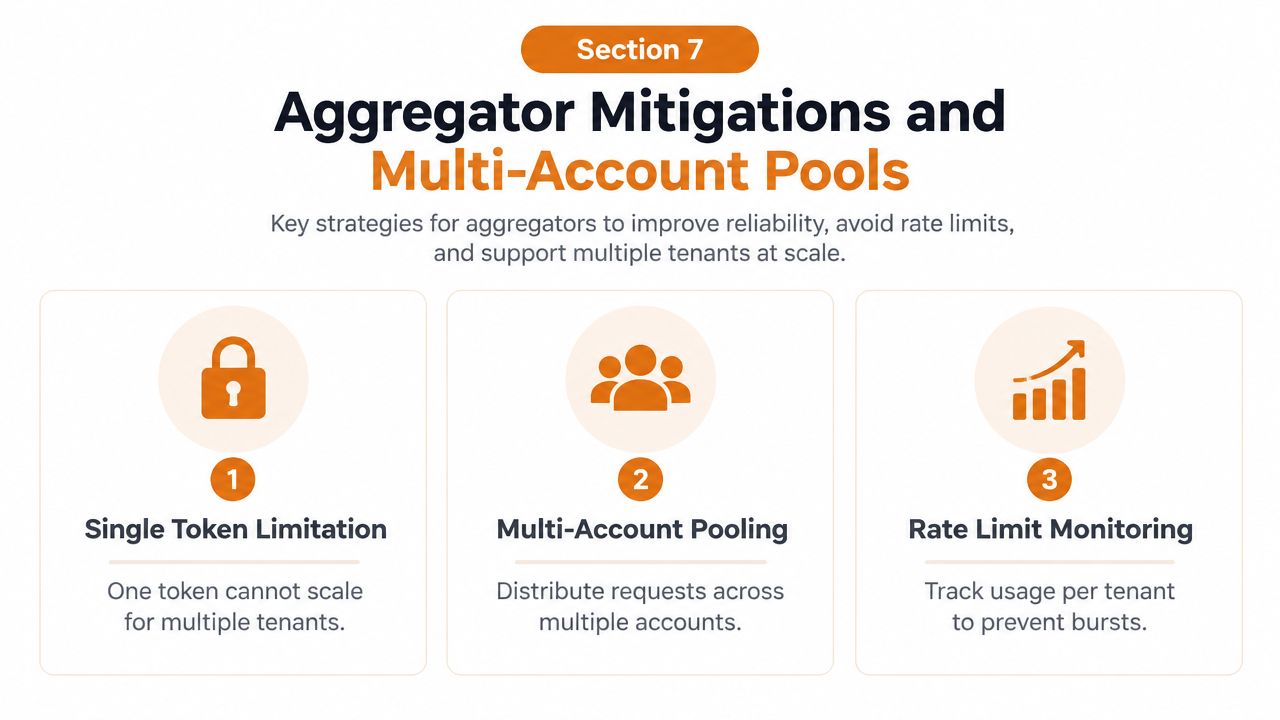
One developer app rarely provides a safe foundation for an aggregator. A dashboard that reads for many customers, a listening product that fans out across accounts, or a scheduler that publishes for multiple brands can exhaust shared app capacity even when each tenant behaves reasonably in isolation.
The pool isn't just a collection of credentials. It's a routing and fairness system:
- Credential separation: Associate each app and token with explicit tenants and endpoint families.
- Pool-aware dispatch: Choose a credential whose app and user buckets both have headroom.
- Tenant isolation: Route a bursty customer to a bounded partition instead of allowing it to consume the whole shared pool.
- Utilization tracking: Record remaining capacity per credential, not only aggregate volume.
- Graceful degradation: Pause background analytics before blocking time-sensitive publishing.
Credential rotation introduces real costs. You need secure storage, refresh handling, revocation workflows, audit logs, and a clear interpretation of X's developer terms. Sharing tokens across unrelated products or using accounts solely to evade enforcement can create policy risk, so scaling should come from legitimate account and application ownership, not concealment.
A practical guardrail is to reserve headroom for every tenant and quarantine a tenant that produces repeated failures or unusually bursty work. Don't allow one customer to monopolize a pool while other customers wait behind it.
For architecture patterns beyond a single integration, see Mallary's guide to social media API aggregation. The useful design question is whether your service should own credential orchestration or delegate it to a platform that already handles OAuth, queues, and platform-specific limits.
Monitoring Limits Before Users Notice
Rate-limit monitoring should expose pressure before customers see failed actions. A dashboard that only counts 429 responses is a post-incident report, not an early-warning system.
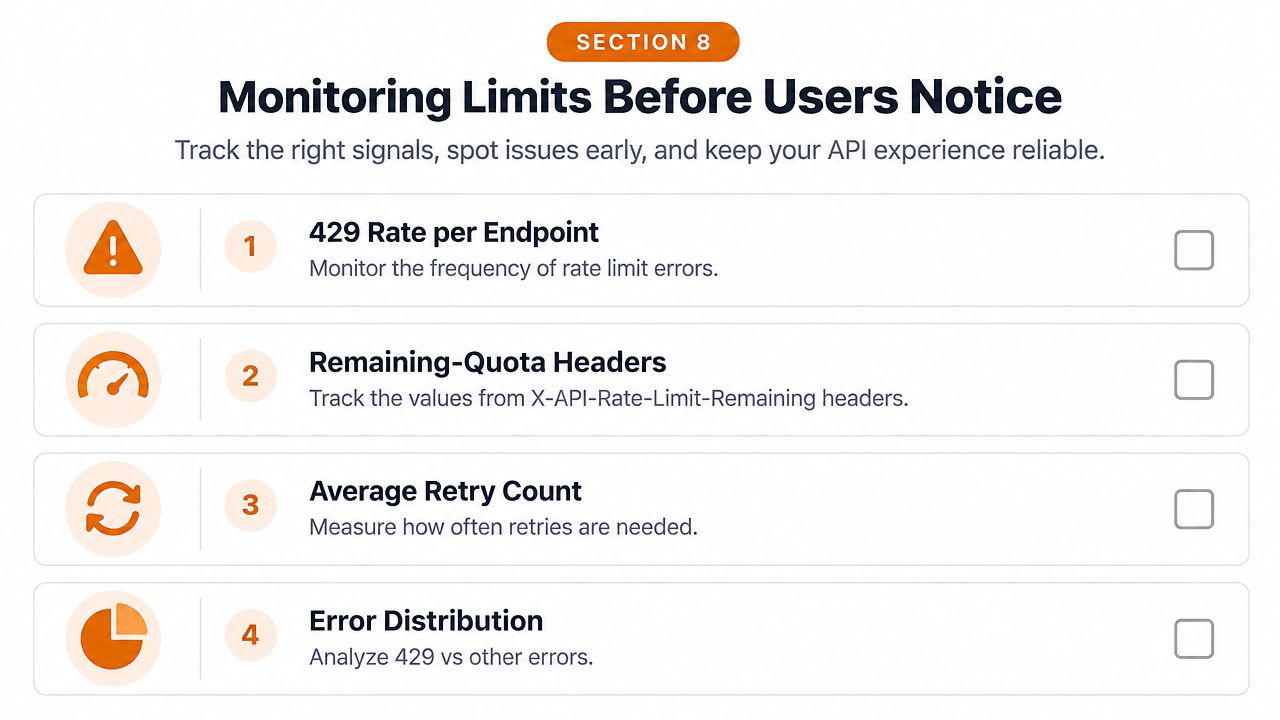
Track these signals per endpoint, credential pool, and tenant:
- 429 rate: Separate rejected calls by endpoint and authentication context.
- Remaining quota: Record the latest
x-rate-limit-remainingvalue and its reset timestamp. - Retry behavior: Measure average retries and the share of jobs entering delayed execution.
- Throttled latency: Watch p95 latency for requests that wait or retry.
- Reset proximity: Show time until the next known reset for each active bucket.
- Queue pressure: Alert on pending depth and oldest job age.
Use operational thresholds that fit your traffic rather than copying a generic number. A sustained increase in 429s, a rapid fall in remaining capacity, or a queue that stops draining should trigger investigation before the customer-facing error rate rises.
Log every rejection with the request ID, endpoint, token or account identifier, reset timestamp, and tenant. Group dashboards by endpoint, pool, and tenant so an app-wide problem doesn't look like a single-account problem.
Rehearse the incident path. The runbook should say which jobs pause first, how workers drain synchronized retries, how credentials are quarantined, and how support communicates delayed publishing. Detection without an action plan only produces better graphs of the outage.
An Architecture for Rate-Limit Resilience
A resilient X integration can remain relatively small if the boundaries are explicit. Producers create durable jobs, a queue holds work during a reset, and a scheduler decides when a specific user and app combination has permission to run.
The scheduler maintains rate state keyed by endpoint, user, and app. Before dispatch, it checks the observed remaining count and reset time, then reserves local capacity so concurrent workers don't overspend the same bucket. A multi-account pool plugs into this layer, allowing eligible credentials to receive work without hiding a shared app-level bottleneck.
The retry layer classifies outcomes:
- 429: Honor
Retry-After, or wait for the endpoint reset with jitter. - 503: Apply bounded exponential backoff and keep the job durable.
- Network ambiguity: Reconcile writes before replaying them.
- Permanent client errors: Move the job to a dead-letter store with actionable metadata.
Expose pending depth, oldest job age, per-token utilization, and reset proximity as first-class metrics. Those values tell operators whether the service is merely delayed or structurally unable to drain work.
If your broader integration also involves protected web properties, keep scraping concerns separate from official API publishing and queue design. Scrapeway's Cloudflare protection resource is relevant to that adjacent problem, but it shouldn't be used as a substitute for respecting X's official API controls.
Quick Reference for Common X API Endpoints
Keep this reference beside the operational dashboard, especially during a traffic spike. It is a planning aid, not a fixed contract. X applies limits by endpoint and authentication context, with short windows commonly resetting every 15 minutes and some limits using longer windows. The X rate-limit documentation does not establish one universal numeric cap for every endpoint and credential combination.
| Endpoint family | Auth type | Window | Typical limit |
|---|---|---|---|
| User lookup | User context | Endpoint-specific | Read live headers |
| Follow graph | User context | Endpoint-specific | Read live headers |
| Timelines | User context | Commonly short-window | Read live headers |
| Search | App-only or user context | Short or endpoint-specific | Read live headers |
| Posting | User context or app context | Commonly short-window | Read live headers |
| Media upload | User context | May be longer | Read live headers |
| Post reads | App or user context | Endpoint-specific | Plan-dependent |
Build the internal card from live observations and the current X API reference. Record each value with its timestamp, endpoint, credential, user or app scope, and observed reset. That context matters when an aggregator fans one request into many endpoint calls or when several users share an app bucket. Recheck the card after a plan change, endpoint migration, or authentication change.
Billing adds a separate ceiling. X lists materially different monthly write quotas by access tier. A write-only tier advertises 500 posts per month at both user and app level, higher tiers advertise 3,000 user posts and 50,000 app posts, and the top listed tier advertises 288,000 user posts and 300,000 app posts, according to the linked documentation. Use these figures for capacity planning. Keep them separate from retry logic, which should respond to the active window and live headers.
FAQ on X API Rate Limits
Do pagination cursors create a separate limit?
No assumption is safe. A paginated request still consumes the endpoint's applicable bucket, so cache cursors and avoid refetching pages that your system already has. Treat each page as work against the same endpoint and authentication state unless live headers demonstrate otherwise.
Do streaming endpoints share REST capacity?
Don't infer shared capacity from similar data. Verify the stream endpoint's documented policy and observe its responses separately. Keep streaming connection health and REST request budgets in different scheduler records so a REST burst doesn't accidentally pause stream recovery.
What happens if a bearer token is rotated mid-window?
Rotation may change the credential identity, but it doesn't prove that the application-level budget has changed. Reinitialize state for the new token while retaining app-level protection, then use the first responses to learn the active bucket.
How can I tell whether a 429 came from X or a proxy?
Inspect response headers, request IDs, body format, and the network path. A response that lacks X-specific metadata or uses a proxy's own error shape should be classified separately, because waiting for an X reset won't repair an upstream gateway limit.
Should webhooks replace polling?
Use webhooks where the product flow supports them, because event delivery can reduce unnecessary reads. Keep a reconciliation poller for missed events, but schedule it as lower-priority work with deduplication and a bounded backfill budget.
What if X throttles below the published limit?
Trust repeated live observations over a stale configuration. Capture headers and request IDs, compare behavior by endpoint and auth context, reduce concurrency, and escalate with evidence if the lower ceiling persists.
Mallary.ai provides a unified social media API and dashboard for publishing, engagement, and analytics across platforms, while handling OAuth, token refresh, idempotency, retries, and durable job queues. If you'd rather delegate this rate-limit plumbing than maintain it across every tenant and network, visit Mallary.ai to evaluate the integration.
Try it with Mallary
STOP!
Want ChatGPT or Claude to post on X for you?
Connect your social accounts one time. Then tell your AI what to write. It can make your posts, share them, and reply on social sites that allow replies. You do not need to write code.
Pick your AI





Connect once. Ask in plain English. Mallary does the work.


