Written by Outrank. Published by Mallary Labs LLC.
Published .
What Is an MCP Server and How AI Tools Use It
What happens when an AI assistant stops just answering questions and starts touching your real accounts? Somewhere between the prompt and the action sits a piece of software most developers have never looked at closely: the MCP server.
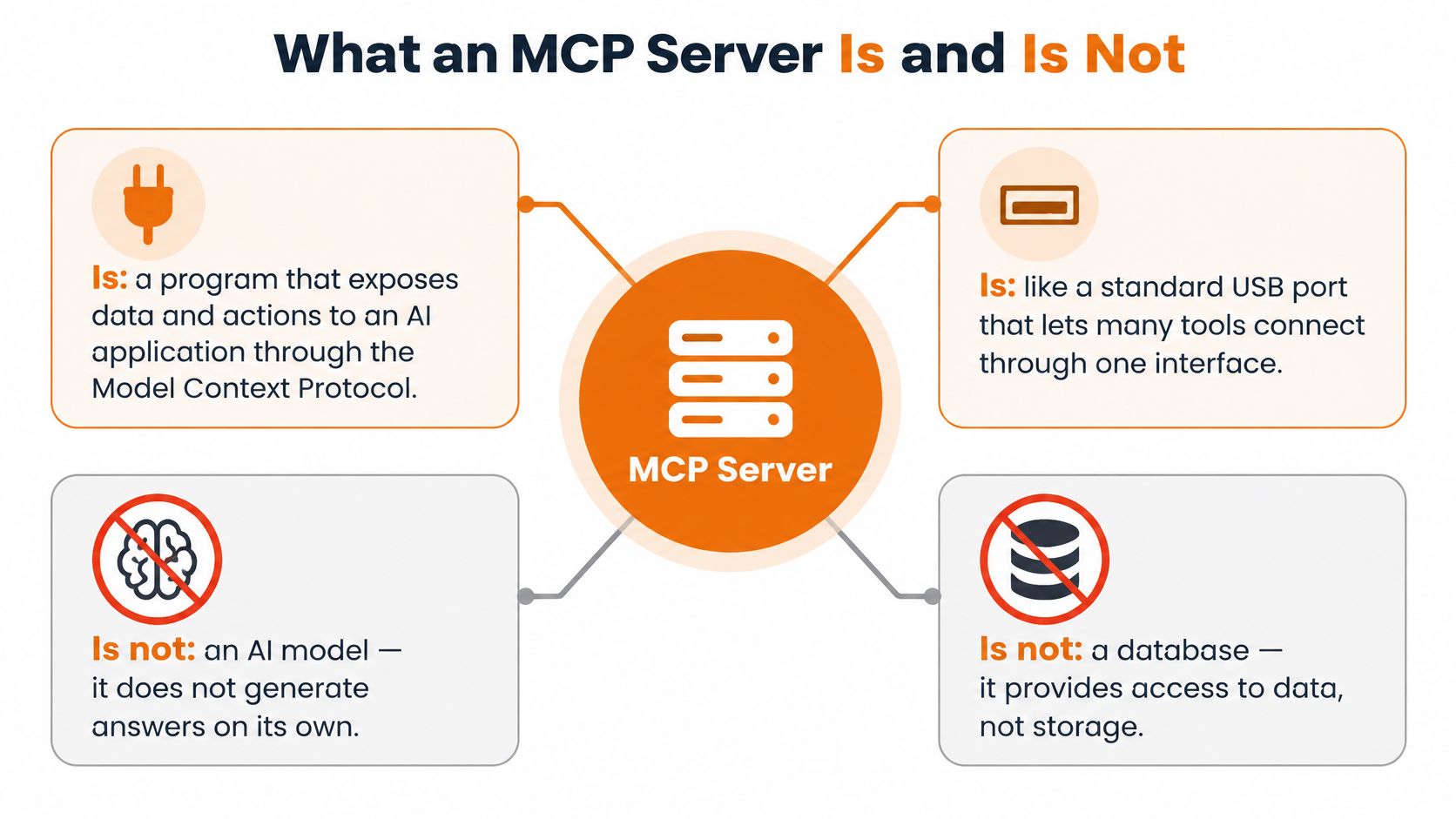
An MCP server is a program that exposes data and actions to an AI application through the Model Context Protocol. It works like a standard USB port, one connector shape that lets many devices attach, so nobody has to build a custom cable for every peripheral. MCP servers are now widespread enough that an assistant you already use has likely been talking to one without telling you.
So why do almost all explanations stop at the wiring? They tell you what an MCP server is, walk you through an install, then go quiet on the two questions that decide whether you sleep at night. What can an agent change through this server? And who answers when it changes the wrong thing? Those two questions matter more than the protocol itself, because a connector that can publish, delete or spend money is only as safe as the controls wrapped around it. Everything below builds toward answering them, starting with a precise definition, then following a single request from prompt to post, and ending with the ownership and security controls worth demanding before you connect anything to an agent.
Table of Contents
- What an MCP Server Is and Is Not
- The Three Things an MCP Server Offers
- Following One Request from Prompt to Post
- How Developers Use MCP for Social Media Automation
- Security and Ownership Controls to Require
- Connect Your First MCP Server
What an MCP Server Is and Is Not
Strip away the acronym and an MCP server has one job: it is an integration layer. It speaks the protocol so an AI application can read from a system and act on it through a single predictable contract, instead of a custom connector per tool. The USB comparison holds because both replace a pile of bespoke cables with one shape everyone agrees to support.
Anthropic published the protocol as an open standard on November 25, 2024, describing it as a way to create "secure, two-way connections" between AI assistants and systems such as content repositories, business tools, and development environments, per the original Model Context Protocol announcement. Adoption moved quickly. Anthropic reported more than 10,000 active public MCP servers in December 2025, as recorded in its announcement transferring the protocol to the Agentic AI Foundation.
Keep it concrete. A social publishing platform could expose creating a post, scheduling content, pulling analytics or answering comments, while the assistant handles the conversation. The server never writes the caption. It offers the operation and enforces the platform's rules when the model asks for it. That division of labor is the whole point: the model decides what to ask for, and the server decides what is allowed to happen.
The three roles, named precisely
Three roles appear in every MCP setup, and beginners blur them constantly. The host is the AI application the user talks to. The client is the connector living inside that host, and each client keeps a dedicated one-to-one connection with one server. The server is the integration layer that publishes context and capabilities. A single host can run several clients at once, which is how one assistant reaches a documentation server, a customer-record server and a publishing server without three separate integrations.
| Role | What it is | Example in social publishing |
|---|---|---|
| Host | The AI application the user talks to | A chat assistant or code editor |
| Client | Connector inside the host, one per server | Links the assistant to one publishing server |
| Server | Integration layer exposing capabilities | Exposes create-post and read-comments operations |
Notice what the table rules out. The server is not the assistant, and the host is not the integration. The model can run in the host and never appear in the server at all. The MCP architecture specification states this plainly: the server does not need to contain the language model, because it publishes discoverable primitives that the host then makes available to whatever model the host runs. In other words, the server describes what it can do, the client carries that description across the connection, and the host decides which of those capabilities its model may see and call.
Accountability enters the picture here, and it surprises people. When a post goes out at the wrong time or a reply lands on the wrong thread, the model made the choice, the client carried the request, and the server executed it against the connected account. Three parties touched that action, so "the AI did it" is never a complete answer. Knowing which role did what is how you trace the failure back to its source.
Five beliefs to correct before you connect anything
"An MCP server is an AI model." It is not. It supplies tools and context to a model running elsewhere, and it produces no answers of its own.
"MCP makes integrations safe." The protocol standardizes how an agent discovers and calls tools. It adds no authorization, no approval gate and no audit trail, so safety remains your build.
"One server behaves the same in every app." Hosts differ in which primitives they support. Check what your client implements before you assume a feature works.
"MCP replaces APIs." It sits on top of an API. That API still does the work and still enforces its own rules.
"Local and remote servers are interchangeable." They use different transports, so authentication and latency planning differ.
The test that matters: open a server's tool list before you connect it. If you can't say what each tool changes in the outside world, you don't yet know what you're granting.
If you want the anatomy labelled side by side, MCP server key parts explained maps the same pieces with a diagram. The short version is that an MCP server turns a service into something an agent can read from and act on through one standard interface, and it does nothing beyond that. Everything it exposes, though, it exposes to a model that will make its own decisions, which is why the definition matters less than the tool list.
The Three Things an MCP Server Offers
Every server offers some mix of three primitives, and the mix tells you what the agent can do.
| Primitive | Who controls it | What it does | Social media example |
|---|---|---|---|
| Tools | The model decides when to call | Executable functions that read or act | create_post, get_analytics |
| Resources | The application decides what to load | Structured context supplied to the model | Connected account list, recent post history |
| Prompts | The user picks the template | Reusable instructions for a task | Weekly recap draft, reply tone guide |
The control column is the reason this table matters. The MCP server specification describes resources as structured data or content supplied for the user or model, prompts as predefined templates or instructions, and tools as executable functions that let a model retrieve information or perform actions. It then fixes the ownership: prompts are user-controlled, resources are application-controlled, and tools are model-controlled.
That split carries real weight. A tool can publish, delete, refund or reply, all of which change something outside the conversation. A resource normally just supplies information, and a prompt only structures the interaction. When someone asks me why an agent "suddenly did something", nine times out of ten the answer starts with a tool the model chose on its own.

What a client learns before it calls anything
At startup the client and server exchange protocol versions and capabilities, so the client discovers which features the server implements rather than assuming. Messages then travel as JSON-RPC 2.0 over that session. The server wraps an existing API, database or SaaS platform and keeps that service's own authorization and operational rules intact, which is why a publishing server can refuse a request its API would refuse.
Three things are worth checking on every tool:
- The name.
create_postshould mean one thing.run_anythingtells you nothing about blast radius. - The input schema. Typed fields with required values stop a model from inventing a time zone or a platform name.
- The result shape. A job ID and a status field let the agent confirm what happened later, while a bare "OK" leaves everyone guessing.
Practical habit: before you connect, read the tool list out loud. Anything you can't explain to a colleague in one sentence is a tool you shouldn't hand to an agent yet.
Following One Request from Prompt to Post
Say a user types: "Schedule tomorrow's launch post to LinkedIn and X at 9am." That single sentence crosses the whole stack, and each step can fail in its own specific way.
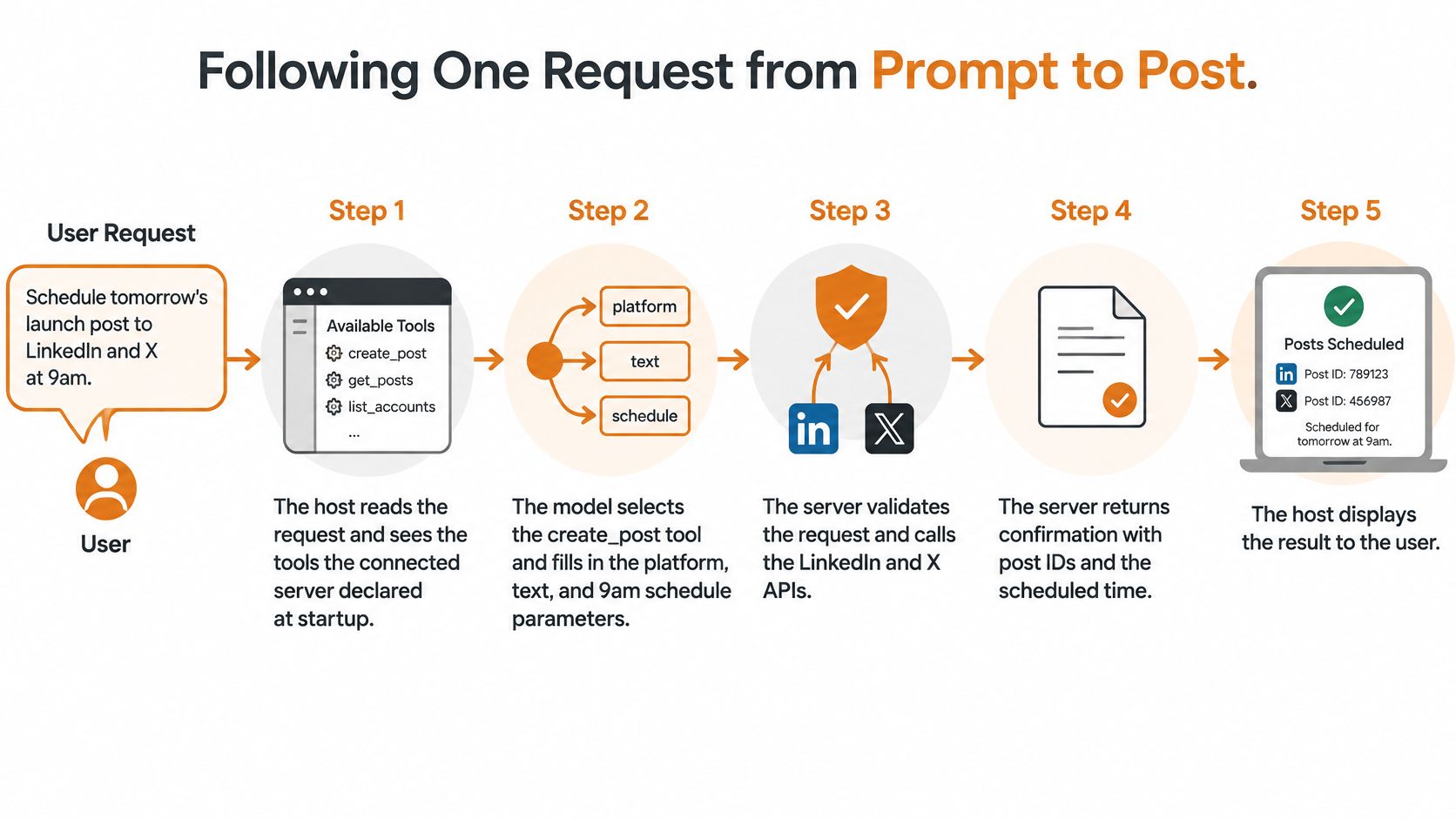
- The host reads the request and checks the tool list. It already knows which tools the connected server declared at startup, so it filters out anything irrelevant. Skip that check and the model may reach for a tool that doesn't exist, then apologize for a failure that never happened.
- The model picks
create_postand fills the arguments. Platforms, post text, time zone and scheduled time all become structured fields. The common slip is the time zone, since a model that assumes UTC will schedule a 9am post hours off for a team in another region. - The client sends a JSON-RPC request over its session. One session per server keeps the exchange predictable. The slip here is a client that retries too eagerly and fires the same call twice.
- The server validates before any external call. It checks the payload against its schema, confirms the user's permissions on both accounts and applies each platform's media rules. A missing permission should return a structured error the model can explain clearly, not a vague failure the assistant papers over.
- The server calls the publishing API and returns a result. A job ID or a structured error comes back, and idempotency earns its keep: without an idempotency key, a retried request can create a duplicate post on a live account.
- The model reports and follows up. It tells the user the post is queued, then calls a status tool later to confirm it went live. A model that declares success without checking has told the user something it can't verify.
A good response looks boring on purpose. You should see a job ID, a per-platform post ID for each network, the scheduled timestamp with its time zone, and a status of pending or scheduled. Anything less and you should ask the agent what it confirmed.
If you'd rather watch the flow than read it, this walkthrough covers the same path from prompt to published post.
How Developers Use MCP for Social Media Automation
The reason developers reach for a server instead of twelve scripts comes down to one interface covering publishing, replies and reporting across many networks.
| Task | Tools the server exposes | Where it helps | Risk to design for |
|---|---|---|---|
| Schedule a week of posts | create_post, list_accounts | Teams batch content from a chat or agent | Duplicate publishes without idempotency keys |
| Reply to comments | list_comments, reply_to_comment | Community managers answer questions faster | Auto-replies that promise things the business cannot deliver |
| Pull engagement analytics | get_post_metrics | Weekly reports pulled into a notes tool | Stale data if the agent caches results |
| Cross-post a video | upload_media, create_post | One source file goes to many platforms | Platform media rules rejecting the file |
Each row hides an engineering decision. Scheduling a batch leans on create_post plus list_accounts so the agent knows which destinations exist, and the duplicate risk disappears only when every publish carries an idempotency key tied to the job. Replying is the highest-stakes row, because a comment tool writes in public. Gate it behind an approval step, or scope it to questions the business can answer.
Analytics look harmless until you notice the cache. An agent that holds a metrics response in its context will confidently report last week's numbers as this week's, so stamp every result with a fetch time and let a fresh call overwrite it. Video is where platform rules bite, since aspect ratios, duration caps and file sizes differ by network and a rejected upload surfaces as an error the model must relay clearly.
Why one connection beats thirteen
A developer-first platform collapses the connector sprawl. Mallary provides managed social publishing and engagement through a dashboard, REST API, MCP and CLI, and the same Mallary profiles and connected accounts serve all of them along with ChatGPT, Claude, n8n and Make. You connect a social account once rather than once per tool, so an agent and a human team look at identical accounts with identical permissions. Mallary also lists n8n, Make and the MCP Server among its integrations, alongside AI agent integrations such as ChatGPT, Claude and Cursor.
That shared-account model is the part worth copying even if you build your own server. When the social media posting API and the MCP tools resolve to one record of connected accounts, you stop debugging a mismatch between what the dashboard shows and what the agent can reach.
Security and Ownership Controls to Require
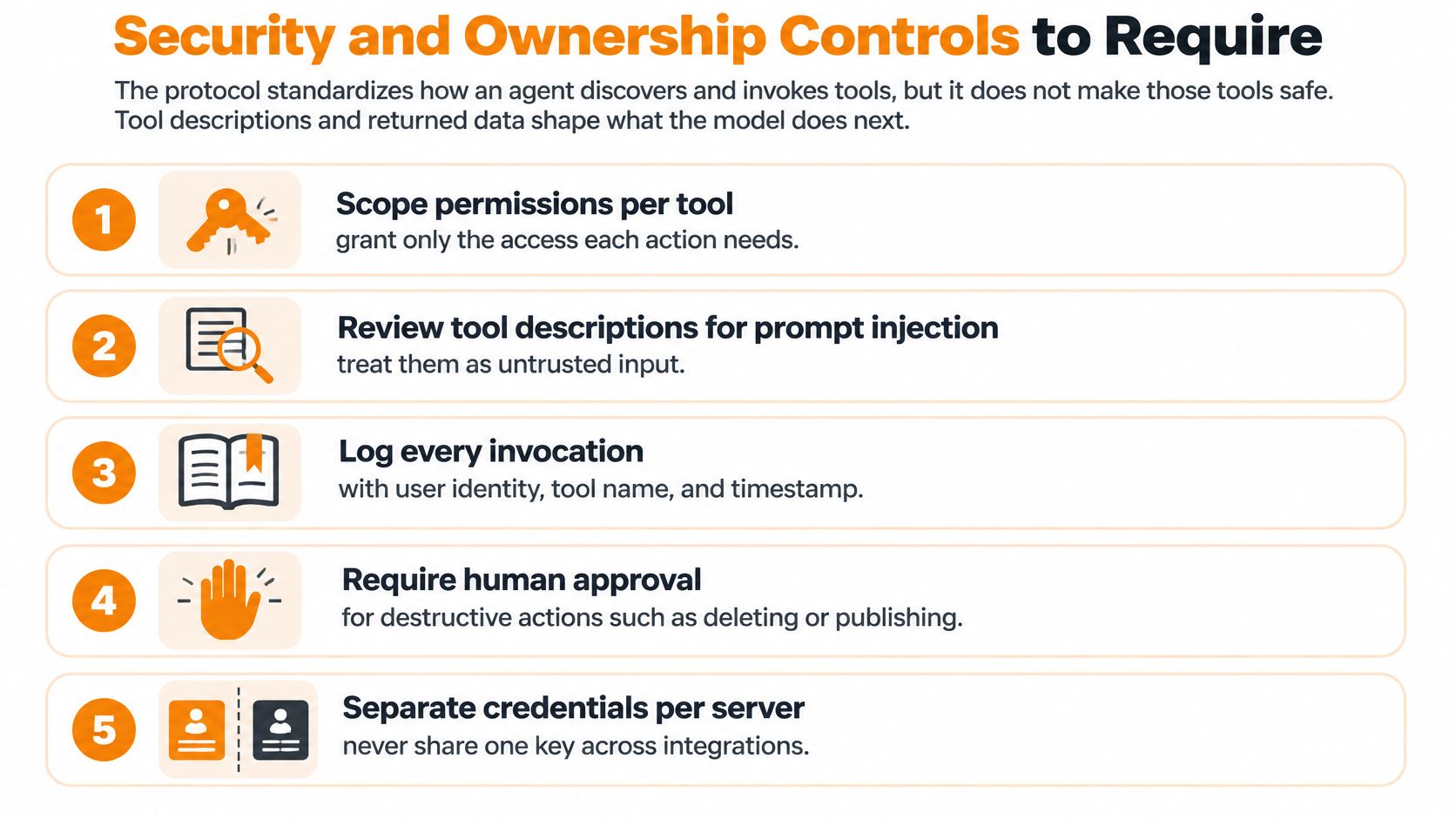
Protocol capability and security capability are different things, and that gap is where most introductions to MCP stop too early. The protocol standardizes how an agent discovers and invokes tools. It does not make those tools trustworthy, least-privileged or safe.
The MCP authorization security considerations tell implementers to handle token audience validation, OAuth resource parameters and PKCE, and the guidance treats security as largely implementation-dependent. It also flags the issue beginners miss: tool descriptions and returned data influence what the model does next, so a compromised description can carry instructions that trigger unintended actions or disclosure. Tool poisoning is not a theoretical edge case. Any text the model reads can steer what it does.
Treat a server that can publish, reply or change account settings like an internet-facing API, because that is exactly what it is. Run this checklist before you connect:
- OAuth sign-in, not a pasted key. A browser consent screen keeps a long-lived credential out of the chat transcript. Mallary's ChatGPT plugin and Claude Connector both use OAuth this way, so you sign in without copying an API key into the chat.
- Authorization scoped per account and per tenant. One client's LinkedIn page must never be reachable from another client's session.
- Approval gates on destructive actions. Deletes, bulk publishes and mass replies deserve a human yes.
- Rate limits and bounded retries. Unbounded retries turn a flaky API into a duplicate-post incident.
- Idempotency keys on every write. A retried publish should return the original job, not a second post.
- Audit logs of model-generated arguments. Record the user, the tool, the arguments and the timestamp.
- A named owner. Someone has to answer when the agent posts the wrong text to the wrong account.
Who answers for the action
Ownership is the angle most explanations never reach. When an agent duplicates a post or replies to a customer with a promise the business can't keep, someone must be able to trace the call, reverse it or compensate for it. Without durable job state, a structured error contract and an observability trail, nobody can even reconstruct what happened. The audit log in the checklist above is what turns "the agent did something" into a specific answer: this user, this tool, these arguments, this timestamp.
Exposure research backs the concern. One large-scale assessment identified 21,000-plus publicly detectable MCP server instances and found 91.8% of dynamically audited servers without OAuth authentication, as reported in that assessment of MCP exposure. Those figures describe internet-facing servers rather than every deployment, and they're still a fair warning about wrapping an API and calling it production-ready.
MCP doesn't replace conventional API engineering. It raises the bar for it, because a probabilistic client now chooses which tool to call and with what arguments.
The safest pattern is an agent-facing interface backed by the same validated API, queue, OAuth layer and audit trail your non-agent clients already use. Mallary works on this model: the dashboard, API, MCP, CLI, ChatGPT, Claude, n8n and Make all use the same Mallary profiles and connected accounts, so one permission decision applies everywhere instead of being re-made per tool. Teams that plan for that from the start avoid the retrofits, and the social media security best practices cover the account-side controls that pair with them.
Connect Your First MCP Server
A first MCP connection should answer three small questions: can the client reach the server, can it see the right accounts, and can it make one controlled change? Cursor makes a good place to start because the setup is short and the feedback is immediate. Treat it like checking a new power outlet before plugging in a machine. The connection either works cleanly or it gives you an error you can fix.
- Open Cursor settings and add a custom MCP server. You're creating one client entry, not a whole integration project.
- Enter the complete MCP server URL,
https://mallary.ai/mcp. Use the full address exactly, because a typo returns a connection error rather than a partial handshake. - Click Connect, then sign in through the browser. In Cursor you add the custom server, click Connect and sign in to Mallary in the browser, so no API key gets pasted into the chat.
- Ask the assistant to list your connected accounts. This is the read test. Skip it and you won't know which accounts the agent can reach until it tries to post.
- Make one write, on one account. Draft or schedule a single post rather than a multi-platform blast, then open the dashboard to confirm the result matches what the assistant claimed.
That single-post check tells you more than a dozen tool descriptions. You see the arguments the model chose, the response shape, and whether the platform accepted the media. Beginners often confuse the client, the server and the social account. Cursor is the client, the MCP server is the tool interface, and your connected Mallary accounts are what that interface can act on.
The paid-plan detail matters too. REST API, MCP, CLI, webhooks, uploads, analytics, comments and replies are available on Mallary's paid plans, so confirm your plan before you build a workflow around them. Comments can be read and replied to through the API, MCP or CLI. If you want the wider picture of what agents do with these tools, MCP for AI agents is a useful next read.
Adopt an MCP server when an AI agent must act on a service under clear rules, with permissions, approvals and logs around it. If one repeatable task is all you need, a fixed script is cheaper to run and easier to reason about.
Mallary.ai gives your agent a social media surface it can act on under rules you set. Connect your accounts once and the same profiles work through the dashboard, REST API, MCP, CLI, ChatGPT, Claude, n8n and Make, so an agent can draft, schedule, reply and pull analytics without a fresh login for every tool. When you're ready to point your first server at real accounts, start at Mallary.ai.
Try it with Mallary
STOP!
Want ChatGPT or Claude to post on social media for you?
Connect your social accounts one time. Then tell your AI what to write. It can make your posts, share them, and reply on social sites that allow replies. You do not need to write code.
Pick your AI





Connect once. Ask in plain English. Mallary does the work.


