September 21, 2026
Twitter Trending API Guide to Fetch Trends Fast
STOP!
Want ChatGPT or Claude to post on X for you?
Connect your social accounts one time. Then tell your AI what to write. It can make your posts, share them, and reply on social sites that allow replies. You do not need to write code.
Pick your AI





Connect once. Ask in plain English. Mallary does the work.
You need trend data for a dashboard, a scheduler, or a social listening workflow. The first prototype usually looks easy. Hit an endpoint, grab a list, show “trending now,” done.
Production is where work starts.
The Twitter Trending API has never been just a generic feed of popular topics. It's a location-scoped system with legacy identifiers, tier-dependent access, schema quirks, and monitoring costs that change fast once you stop polling one place and start polling dozens. That's why teams that only think about the first API call usually rebuild the whole thing a few weeks later.
Table of Contents
- Introduction to Twitter Trend Data and Why It Matters
- How the Twitter Trending API Works Today
- Authenticating and Fetching Trends With Code Examples
- Handling Rate Limits Caching and Reliable Integrations
- Costs Alternatives and Migration Strategies That Scale
- Putting It All Together and Next Steps for Production
Introduction to Twitter Trend Data and Why It Matters
A product team building a content calendar usually asks for one simple feature: “show what's trending so we can post at the right time.” A marketing agency asks for something similar: “watch trends in a few client markets and alert us when something relevant spikes.” A newsroom wants a faster signal than waiting for search traffic. Different teams, same underlying need.
What they need isn't a list. They need a repeatable signal.
What trend data is useful for
Trend data becomes valuable when a team uses it in a workflow, not when they look at it once in a dashboard.
- Editorial timing: A content team can line up posts with active conversations instead of publishing on a fixed schedule.
- Brand monitoring: Agencies can catch unexpected mentions or adjacent topics before a client asks what happened.
- Geo-specific analysis: SaaS teams serving multiple markets can compare what matters in one region versus another.
- Seed discovery: A trend often becomes the starting point for search, engagement, and paid media decisions.
That's why trend feeds show up next to tools for scheduling, analytics, and workflow automation. If you're already stitching together social signals across channels, this broader social media analytics API guide is the kind of context that helps avoid building your trend collector in isolation.
Why newcomers get tripped up
Most developers expect a “top trends” endpoint. What they find instead is a system shaped by geography, access level, and vendor differences. That matters because a trend isn't just “popular on X.” It's popular for a supported location, under a specific ranking system, at a specific moment.
Trends are more useful as snapshots than as truths. They tell you what the platform is surfacing now, not what the whole world cares about equally.
That distinction affects product decisions immediately. If your UI says “global trends” but your backend polls one country, your output is misleading. If your alerting system compares raw lists from different providers without normalization, your analysts will chase noise.
The practical scope
The hard part of a Twitter Trending API integration isn't making one successful request. It's deciding:
- which locations to monitor
- how often to poll
- what to store
- how to normalize different response shapes
- when official access is worth the cost
- when a wrapper API is the smarter engineering choice
Teams that get this right treat trend collection like an operational system. Teams that don't end up with brittle cron jobs, unexplained gaps, and invoices nobody expected.
How the Twitter Trending API Works Today
A trend collector usually breaks after the first success. One request for one city looks fine in Postman. The trouble starts when product asks for 40 locations, finance asks why the bill jumped, and your analysts ask why two providers return different fields for what looks like the same topic.
X trend data is still organized around WOEID, short for Where On Earth ID. You do not query a universal trends feed. You query a supported location, then get a ranked snapshot for that location. The legacy v1.1 docs for available trend locations still show that model clearly in the official reference for supported places (X developer documentation for trends locations).
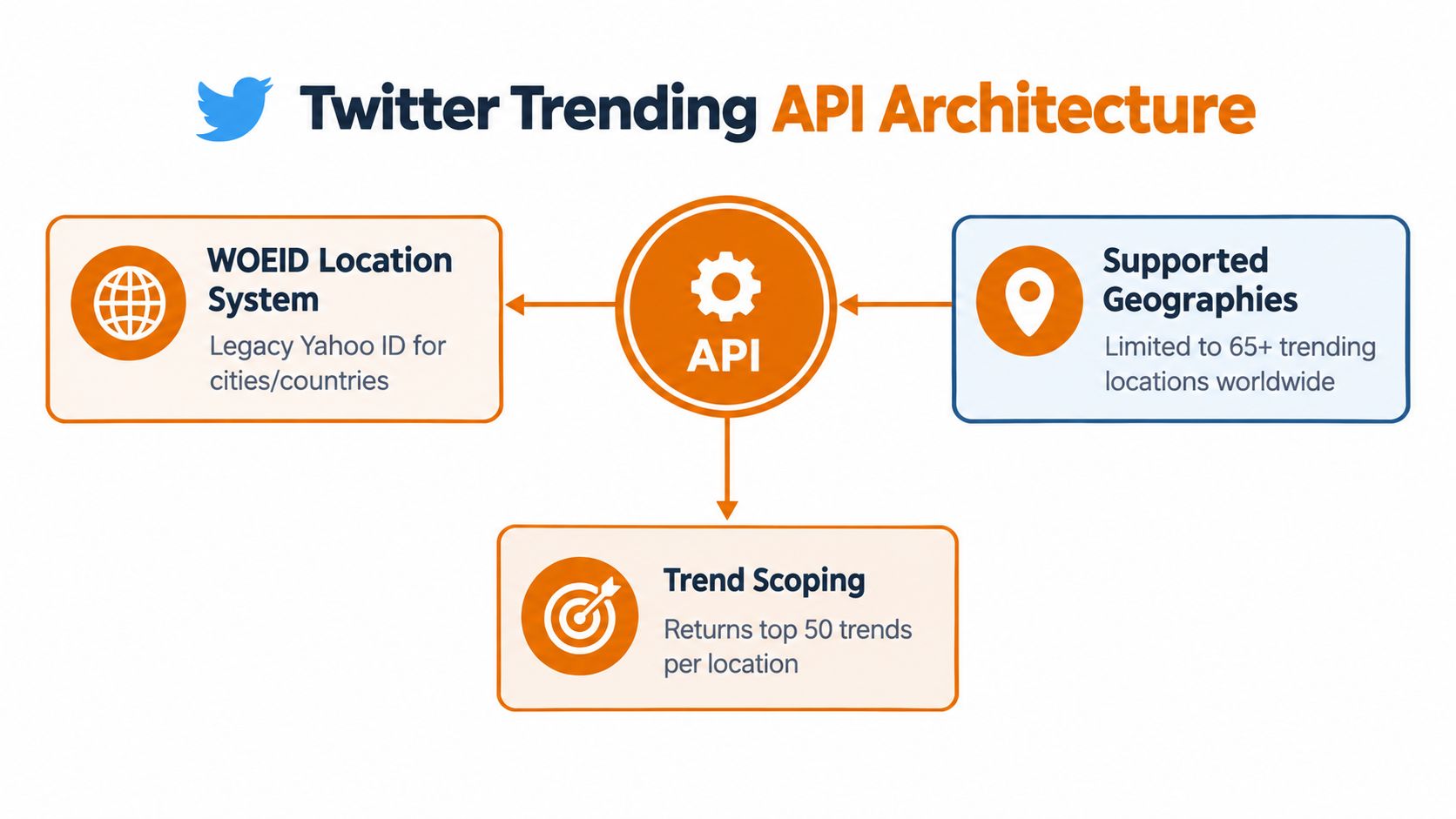
WOEID is still your primary key
For implementation, that means your real unit of work is not “fetch trends.” It is “fetch trends for WOEID X at time Y from provider Z.”
That sounds small, but it drives the whole design:
- Location selection is upstream work. Someone on the product side has to decide which countries, metros, or cities matter.
- Coverage is finite. If a place is not supported, there is nothing to poll.
- Cross-region comparisons need normalization. Topic names, tweet volume fields, and ranking depth can vary by source.
- History is something you build. The API gives a current snapshot. Longitudinal analysis comes from your own storage.
The old Yahoo naming is a clue here. WOEID survived because too many integrations, dashboards, and ETL jobs already depend on it. That is common in production APIs. Identifier schemes outlive the systems that named them.
The API surface changed, and access got tighter
A lot of older examples still reference trends/place and trends/available from v1.1. That history matters because many wrappers and blog posts were built around those endpoints. Then access policy changed, tiers changed, and teams that had working collectors found themselves maintaining code against a moving target. TechCrunch covered part of that shift when X retired legacy API tiers and deprecated some older access paths in 2023 (TechCrunch coverage of the 2023 API changes).
The practical takeaway is simple. Before you design polling frequency or storage, confirm what your account can call. I have seen teams spend more time debugging 403s and mismatched docs than writing the parser.
What the newer model means in practice
On the newer surface, the pattern to watch is Trends by WOEID, exposed as GET /2/trends/by/woeid/:id in current X documentation and examples. There is also a personalized trends concept tied to the authenticated user context. For backend systems, personalized trends are usually the wrong abstraction. They are harder to test, less stable across accounts, and awkward for reproducible monitoring.
For broader platform context, this guide to the X API and its current access model helps if trend collection is only one part of your integration.
If you are building a collector that has to survive provider changes, keep your internal contract narrow:
| Input | Why it matters |
|---|---|
| WOEID | Defines the geographic scope |
| Timestamp | Turns a transient response into a usable historical record |
| Provider | Determines field names, limits, and failure modes |
| Auth context | Decides whether the request works at all, and whether results are generic or personalized |
That schema choice matters more than the first API call. Store trends as location + fetched_at + provider + normalized_topics + raw_payload. The normalized layer lets analysts compare outputs across official and wrapper sources. The raw payload lets you recover when a field changes or a vendor adds metadata you did not model yet.
This is the difference between a demo and a system. One request proves the endpoint works. A durable trend monitor starts by assuming the endpoint, the schema, and the access rules will all change.
Authenticating and Fetching Trends With Code Examples
Once the mental model is clear, implementation gets much cleaner. Start with one WOEID, one endpoint, one parser. Don't begin by building a “global trend monitor” across many regions. That's how teams hide basic auth and payload mistakes behind concurrency.

Keep auth boring
For official API access, use bearer-token handling that matches the endpoint requirements for your tier and app setup. Store tokens in your secret manager, not in source, not in local config checked into Git, and not in CI variables with broad visibility.
If your team doesn't already have a safe internal flow for credential issuance and rotation, it helps to document who can generate API keys and where those keys are stored before you write the collector itself. Trend jobs are usually background jobs, which means leaked keys can sit unnoticed for a while.
A minimal Python client for a WOEID-based trends call looks like this:
import os
import requests

BEARER_TOKEN = os.environ["X_BEARER_TOKEN"]

def get_trends_by_woeid(woeid: int) -> dict:
    url = f"https://api.x.com/2/trends/by/woeid/{woeid}"
    headers = {
        "Authorization": f"Bearer {BEARER_TOKEN}",
        "Accept": "application/json",
    }

    response = requests.get(url, headers=headers, timeout=30)
    response.raise_for_status()
    return response.json()
That's enough for a smoke test. It's not enough for production.
Validate the response shape early
Trend payloads aren't uniform across providers, and even official-style responses can contain optional fields. Write a parser that tolerates missing values.
from dataclasses import dataclass
from typing import Optional, Any

@dataclass
class TrendItem:
    name: str
    query: Optional[str]
    tweet_volume: Optional[Any]
    promoted_content: Optional[Any]

def parse_trends(payload: dict) -> list[TrendItem]:
    items = []

    for raw in payload.get("data", []):
        items.append(
            TrendItem(
                name=raw.get("trend_name") or raw.get("name") or "",
                query=raw.get("query"),
                tweet_volume=raw.get("tweet_volume"),
                promoted_content=raw.get("promoted_content"),
            )
        )

    return [item for item in items if item.name]
Three defensive choices matter here:
- Multiple field fallbacks: Different providers may use
trend_nameorname. - Nullable handling:
tweet_volumeand promoted markers may be absent. - Filtering invalid items: Empty names should never reach downstream systems.
Support both old and new paths if you have legacy code
Some teams still maintain older integrations built around v1.1-era trend resources. If you're migrating, create an adapter instead of rewriting your whole ingestion pipeline at once.
def normalize_trend_record(raw: dict, provider: str, location_key: str) -> dict:
    return {
        "provider": provider,
        "location_key": location_key,
        "name": raw.get("trend_name") or raw.get("name"),
        "query": raw.get("query"),
        "tweet_volume": raw.get("tweet_volume"),
        "promoted": raw.get("promoted_content") or raw.get("promoted"),
        "raw": raw,
    }
That lets your storage layer stay stable while you switch inputs.
Don't optimize for the prettiest request example. Optimize for the parser you won't have to revisit every week.
Test with one supported location
Before adding queues, retries, or dashboards, verify these basics with a single known-good WOEID:
- Authentication works: The token has the required access.
- The location is supported: Unsupported locations should fail predictably in your code path.
- The parser survives nulls: Don't assume every field is present.
- You can persist snapshots: Store raw payloads alongside normalized records during early development.
A simple test harness helps:
def main():
    woeid = 1  # replace with the location you want to test
    payload = get_trends_by_woeid(woeid)
    trends = parse_trends(payload)

    for trend in trends[:10]:
        print({
            "name": trend.name,
            "query": trend.query,
            "tweet_volume": trend.tweet_volume,
            "promoted_content": trend.promoted_content,
        })

if __name__ == "__main__":
    main()
If this output isn't stable enough for you to read and trust, it isn't stable enough to feed into a client feature.
Handling Rate Limits Caching and Reliable Integrations
A trend monitor usually fails in a boring way. One worker starts returning 429, the retry logic is too aggressive, the cache expires, and a client dashboard keeps serving old rankings with fresh timestamps. That is the failure mode to design around.
The practical unit of work is not one API call. It is a polling system across many WOEIDs, each with different business priority, freshness requirements, and failure tolerance. Official endpoints and wrapper APIs also behave differently under load. Some expose clearer rate-limit headers. Some return cleaner schemas but add their own quotas or queueing. Build the integration so you can swap providers without rewriting scheduling, caching, or storage.
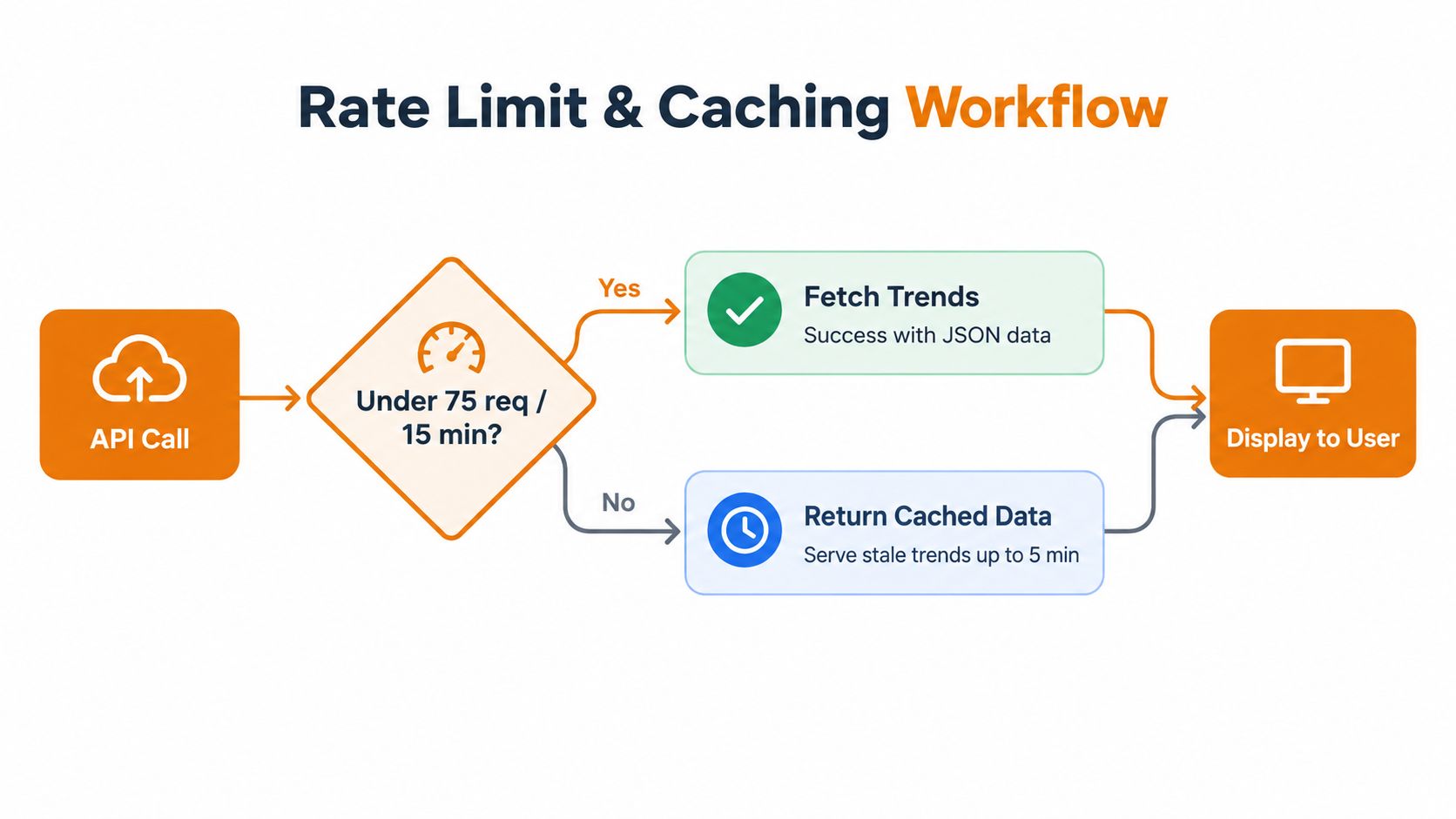
Cache by WOEID and provider
Trend data is location-scoped, and provider differences matter too. If you cache one global latest_trends object, you will eventually serve the wrong city or mix records from two upstreams with different fields.
Use cache keys like these:
trends:{provider}:{woeid}trends_meta:{provider}:{woeid}trends_lock:{provider}:{woeid}
The cached value should include normalized items, fetch time, source metadata, and a hash of the raw payload if you want cheap change detection. TTL should reflect product needs, not guesswork. If a client feature can tolerate slightly older data, give yourself enough buffer to survive a short burst of upstream failures.
For a useful primer on sizing workers around upstream quotas, keep this guide to API rate limit strategies for production systems nearby.
Poll by priority, not by loop order
A flat cron job works for one location. It gets expensive and unreliable once you monitor dozens or hundreds.
Schedule high-value WOEIDs more often. Push low-traffic markets to a slower cadence. For dormant locations, refresh on demand when a user opens the page or when another signal says activity changed. This is the first place where cost control and reliability meet. If quota is tight, cut geographic coverage before you let your primary markets go stale.
A queue with per-location priority is usually enough:
- Tier 1: revenue-driving or client-visible markets
- Tier 2: standard markets with regular refresh
- Tier 3: on-demand or low-frequency markets
- Fallback: serve cached data and mark freshness explicitly
Treat rate limiting as a scheduler problem
Retries alone do not solve rate limits. Bad retry logic can burn the rest of your quota window and make every location late.
Use jittered backoff for the single request that failed. Use a token bucket or leaky bucket at the worker level so your whole fleet respects the upstream ceiling. If your provider returns reset headers, feed them into the scheduler. If it does not, track recent request volume yourself and stay conservative.
Here's a basic async pattern in Python:
import asyncio
import random

async def poll_location(client, woeid: int):
    try:
        payload = await client.fetch_trends(woeid)
        await client.store_snapshot(woeid, payload)
        await client.update_cache(woeid, payload)
    except client.RateLimitError:
        await asyncio.sleep(random.uniform(1, 3))
    except Exception as exc:
        await client.record_error(woeid, str(exc))

async def scheduler(client, woeids: list[int]):
    tasks = [poll_location(client, woeid) for woeid in woeids]
    await asyncio.gather(*tasks)
In production, I would not fan out every WOEID at once like this. I would cap concurrency per provider, separate polling from persistence with a queue, and add idempotency keys so a replayed job does not create duplicate snapshots.
Store snapshots and normalized rows
Trend endpoints give you current state. Historical analysis is your job.
Persist the raw response for every successful poll, then write normalized rows for querying. That split pays off when schemas drift. Official and wrapper APIs rarely line up perfectly on fields like promoted flags, tweet volume, or nested metadata. Raw payloads let you reparse old data after a mapper change without asking the upstream for anything again.
A simple storage layout works well:
| Table | Purpose |
|---|---|
| trend_snapshots | Stores raw payload per provider and WOEID |
| trend_items | Stores normalized trend entries for querying |
| poll_runs | Tracks success, failure, latency, and retry outcomes |
Track freshness separately from success. A poll can succeed technically and still return data that is too old for your product promise. Expose fetched_at, cache_expires_at, and source_provider in your internal model so downstream services can make sane decisions.
A short operational demo helps visualize the control flow before you build it into workers and cron:
Costs Alternatives and Migration Strategies That Scale
The Twitter Trending API conversation gets real. Fetching one location is a coding problem. Monitoring many locations is an economics problem.
Recent coverage describes official trend access as tied to paid tiers, with one source describing Pro at $5,000/month minimum and another estimating the official endpoint at about $0.01 per call, which makes broad polling expensive for startups and agencies (twitterapi.io's trends pricing discussion). Even if your team can pay that, you should still ask whether the data path matches your workload.
Official versus wrapper APIs
Third-party providers increasingly package trend access behind simpler APIs because developers want stable schemas and easier automation. That demand isn't just about convenience. It reflects a real data-shape problem.
Another recent writeup points out that different providers expose different versions of the same concept, including ranked topics, search queries, promoted flags, tweet volumes when available, and normalized JSON, which makes “trend” less canonical than many teams assume (Sorsa's analysis of Twitter trends API variability).
Here's the decision frame I use.
Choosing Your Trend Data Source
| Criteria | Official X Trends API | Third-Party Wrapper APIs |
|---|---|---|
| Access model | Controlled by X tier and endpoint availability | Usually simpler signup and token model |
| Location model | WOEID-based and tied to supported geographies | Often still WOEID-based, sometimes abstracted |
| Schema stability | Official surface, but version transitions can affect implementation | Often more normalized for dashboards and automation |
| Cost at scale | Can become expensive when polling many locations frequently | Often easier to budget for repeated polling workloads |
| Compliance posture | Best fit when policy requires official platform sourcing | Better fit when engineering simplicity and cost control matter more |
| Migration effort | Lower if you already depend on official X infrastructure | Lower if you want one simplified endpoint for many use cases |
What works in practice
If you already run on official X access for other reasons, staying official may be the simplest move. Your auth, governance, and legal review are already aligned.
If you're building a trend monitor primarily for dashboards, alerts, or content workflows, wrapper APIs often win because they reduce three kinds of engineering overhead:
- Auth friction
- Schema cleanup
- Unit-cost stress when polling many locations
A safe migration pattern
Don't hardwire your app directly to one provider's payload. Put a tiny abstraction layer in front of it.
A minimal interface is enough:
class TrendProvider:
    async def fetch(self, location_id: str) -> dict:
        raise NotImplementedError
Then implement one adapter for official X and one for your wrapper provider. Your app should consume a normalized model, not provider-native JSON.
This migration pattern works well:
- Wrap your current provider behind an interface.
- Normalize outputs into one internal schema.
- Dual-run a subset of locations to compare behavior.
- Switch read paths only after storage and cache layers handle both cleanly.
The teams that regret trend integrations usually skipped this step. They optimized for getting data in quickly, then discovered later that provider changes touched every part of the stack.
Putting It All Together and Next Steps for Production
A production-grade Twitter Trending API integration is really four systems working together: credential management, location-aware polling, storage for historical snapshots, and normalized delivery to the product layer. If one of those is weak, the whole feature feels unreliable.
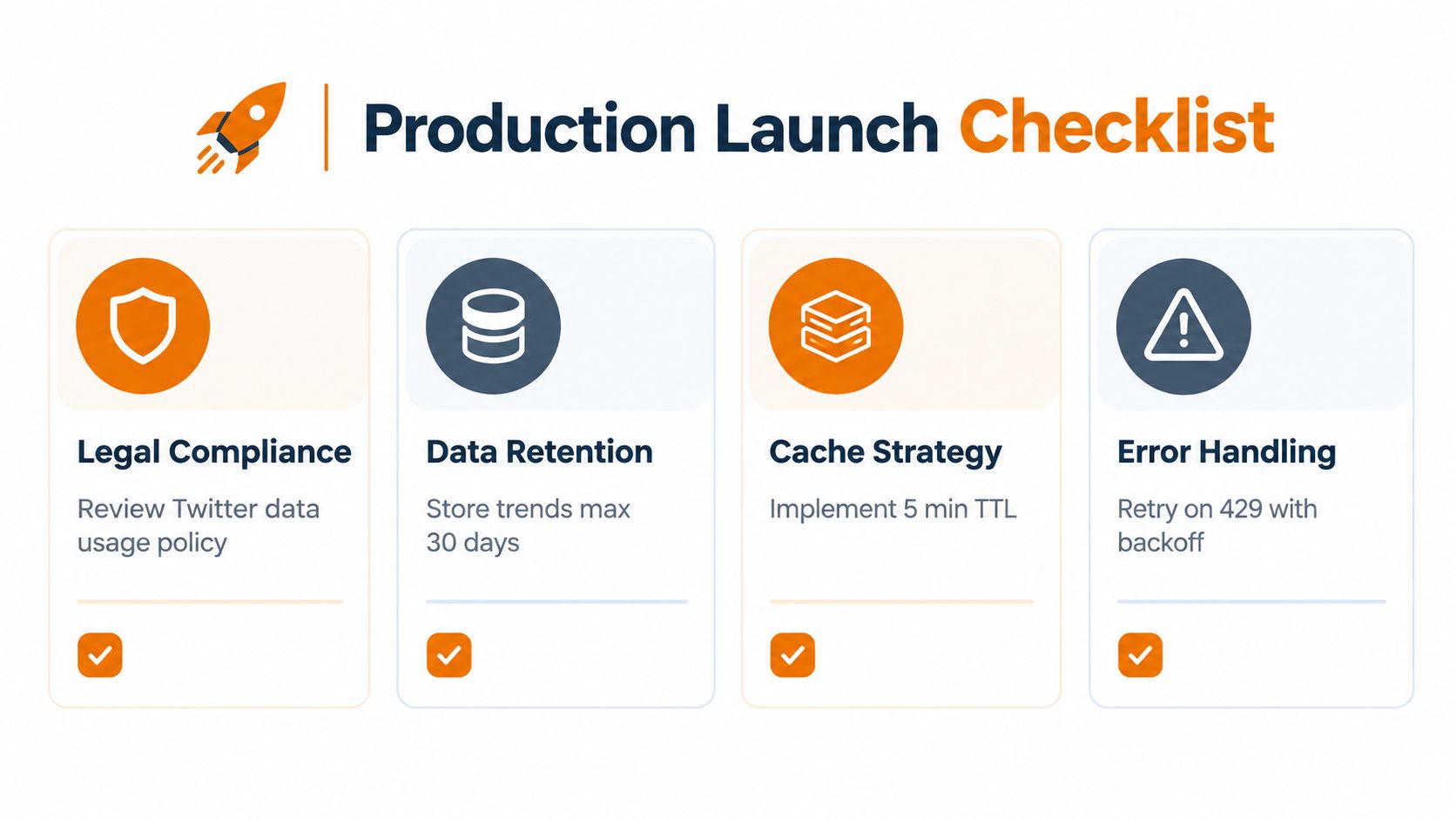
Production checklist that actually matters
Before launch, verify the parts teams often postpone:
- Policy review: Confirm your use of trend data matches the platform terms attached to your access path.
- Retention rules: Decide how long to keep raw snapshots and normalized records.
- Observability: Track failed polls, stale cache reads, and parser drift.
- Automation boundaries: Don't let a trend list directly trigger posting without human review or strong guardrails.
What to do first
If you're still at prototype stage, don't overbuild. Start with:
- one provider
- one supported WOEID
- one normalized schema
- one snapshot table
- one cache layer
- one alert when polling fails repeatedly
That's enough to prove whether the signal is valuable.
What to revisit as you grow
As usage expands, the architecture questions shift:
- Are your most important markets getting fresher data than low-priority ones?
- Are provider schema differences leaking into product code?
- Are historical snapshots queryable without parsing raw JSON every time?
- Can automation tools like n8n, Zapier, or internal workers consume the same normalized output?
A good trend system stays boring under load. It keeps collecting when one region fails, serves cached data when upstream gets noisy, and gives product teams a consistent shape no matter which provider sits behind it.
Build the collector like infrastructure, not like a widget. That's the difference between a demo and a dependable signal.
If your roadmap includes automated scheduling, cross-platform analytics, or workflow tooling, trend monitoring shouldn't live as a one-off script on the side. It should be treated as another durable data input in your social stack.
Mallary.ai gives teams a practical way to build that broader stack without juggling separate platform integrations by hand. If you're turning trend signals into scheduling, publishing, engagement, or analytics workflows, Mallary.ai is worth a look for the API infrastructure, automation hooks, and payload handling that usually consume the most backend time.


