Written by Outrank. Published by Mallary Labs LLC.
Published .
Scheduling Posts on Instagram: The Complete 2026 Guide
In 2026, Instagram scheduling is built natively into the app for all public accounts, with standard scheduling reaching up to 30 days ahead and a limit of 25 posts per day. For multi-account governance, approvals, and automation, tools like Mallary.ai are the necessary upgrade.
You've probably been there: the content is ready, the caption has been approved, and someone still has to remember to publish it at the right time. One missed post becomes a rushed upload, a typo survives because nobody had time to review it, and the team spends more energy coordinating Instagram than creating content.
Scheduling posts on Instagram solves the daily scramble, but the scheduler itself isn't the strategy. The core decision is whether Instagram's native workflow can support the way you work. A solo creator with one public account has very different needs from an agency managing client approvals, recurring campaigns, and several social networks.
The practical rule is simple. Use native scheduling when the work is straightforward and account volume is low. Move to a dedicated platform when publishing becomes a team process, a multi-account operation, or a product feature your customers depend on.
Table of Contents
- Native vs Third-Party Scheduling Tools
- How to Use Native Instagram Scheduling
- When Native Scheduling Hits a Wall
- Perfecting Captions and Media Rules
- The Science of Optimal Posting Times
- Building Your Final Scheduling Strategy
- Frequently Asked Questions
Native vs Third-Party Scheduling Tools
A creator preparing one post for one public account should start with Instagram's native scheduler. A team handling approvals, several accounts, or publishing across networks should use a dedicated platform before coordination turns into missed posts and preventable errors.
Instagram's native scheduler now handles more than basic queuing. Meta says eligible public accounts can schedule posts and Reels up to 30 days ahead without a subscription, while a Meta One subscription extends that window to 365 days. Instagram also shows follower-active-time suggestions during scheduling, although the feature is unavailable to teens. Meta's scheduling guidance explains the workflow and account conditions.
Third-party tools address the operational work around publishing. They combine calendars, approvals, account management, batch planning, and cross-network publishing in one workspace. API access, webhooks, retries, and integrations also make them a better fit when scheduling becomes part of a product or repeatable marketing system.
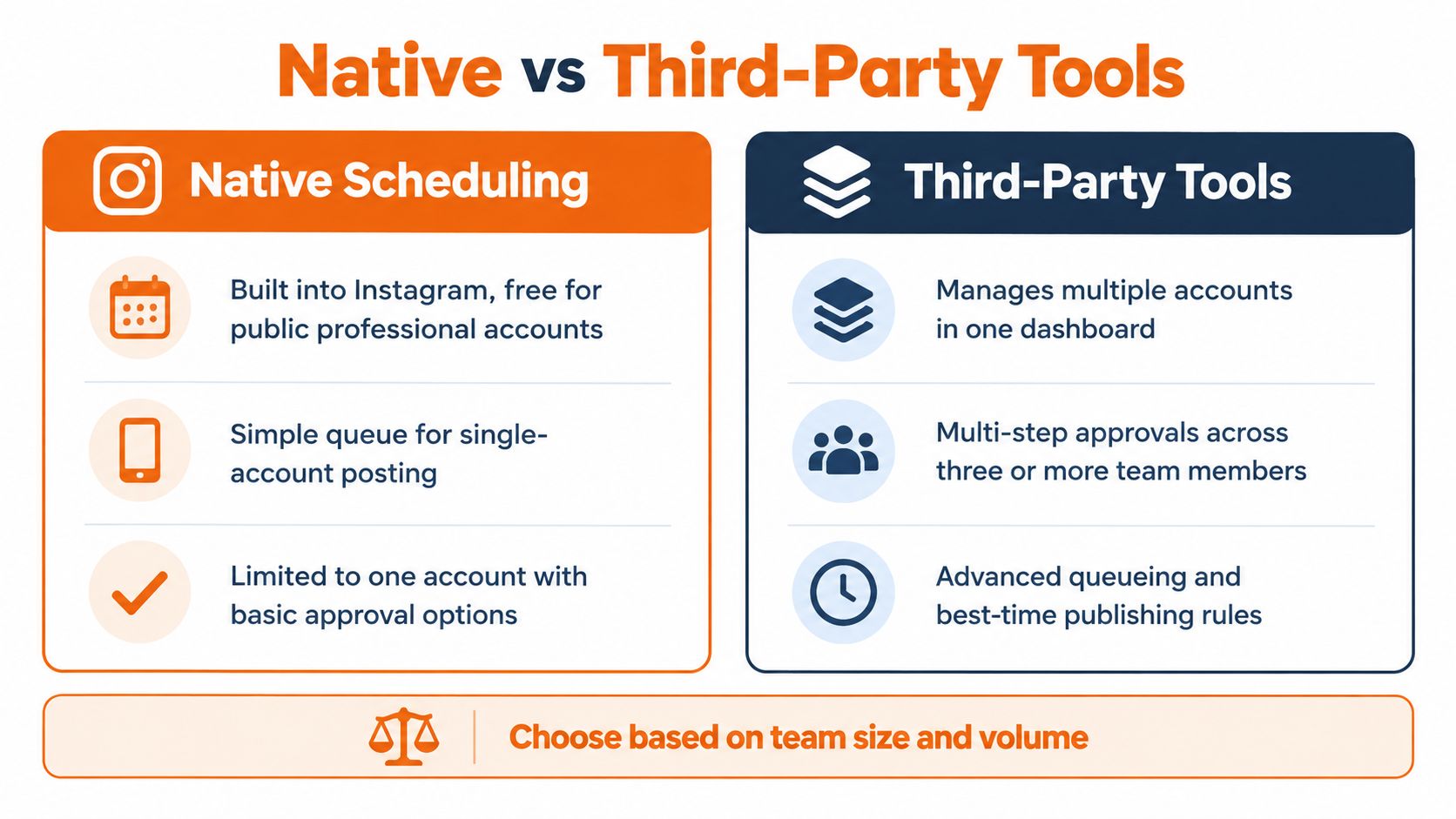
| Need | Native Instagram scheduling | Third-party scheduling |
|---|---|---|
| One public account | Strong fit | Often unnecessary |
| Multiple accounts | Awkward account switching | Centralized workspace |
| Client or team approvals | Basic or unavailable | Structured review workflows |
| Cross-network publishing | Limited | Designed for it |
| Bulk planning | Manual | Calendar, queues, and batch workflows |
| Technical automation | Not the primary use case | API, webhooks, retries, and integrations |
The rollout changed the buying decision. Industry coverage identifies March 1, 2026 as the point when public personal accounts gained native scheduling, while reporting a standard ceiling of 25 scheduled posts per day and roughly 30 days ahead. Creatorflow's account of the rollout and limits records that shift from professional-only access to a mainstream publishing feature.
Practical rule: Use native scheduling when one person manages one account. Switch when another person must approve, edit, monitor, or coordinate publishing.
For platform features, calendar design, approval layers, and publishing workflows, use this guide to compare social media scheduler tools. Choose the smallest system that removes your current bottleneck, then move to an API-first platform when manual work starts creating risk.
How to Use Native Instagram Scheduling
You manage one public account, have the content ready, and need it published while you are away from your phone. Instagram's native scheduler handles that job well, provided you review the post before placing it in the queue. The process sits inside Instagram's regular creation flow, so you do not need a separate dashboard or subscription for ordinary posts and Reels.
The native workflow
Start the content. Open Instagram, tap create, and choose a photo, carousel, or Reel. Add the media, caption, mentions, location, and any other available details.
Open the advanced controls. Tap More options, then turn on the scheduling control. The wording may vary slightly by app version, but the setting appears within the publishing controls.
Choose the date and time. Set when the content should go live. Treat Instagram's follower-active-time suggestion as a starting point, not a command. If your audience spans regions, confirm which local time the recommendation represents before scheduling.
Confirm the schedule. Return to the main creation screen and review the scheduled post. Check the account, media, caption, tags, and selected time before leaving the screen.
Review the queue. Open your profile menu and locate scheduled content. Edit or reschedule any post that changed during review.
Current guides commonly report a limit of 25 scheduled posts per day and a native planning horizon of 30 days, while some native workflows or account contexts may offer a 75-day window. Planable's scheduling guide explains the longer horizon and the risks of placing content too far ahead. Follow the limit Instagram displays for your account when it differs from these general descriptions.
The native scheduler supports posts, carousels, and Reels, but it does not cover every Instagram format. Stories remain outside this in-app scheduling flow, and native scheduling handles one account at a time. That suits an owner-managed profile. It becomes slow once you switch between brands, collect approvals, or coordinate the same campaign across channels.
Keep your queue shorter than the maximum. A calendar packed with unreviewed posts creates false confidence and leaves less room for timely announcements. Batch the content, review each item before scheduling, and keep open slots for changes that require a fast response. If account volume, approvals, or technical publishing checks become part of the job, move to an API-first platform instead of forcing Instagram's app to serve as a team workflow.
When Native Scheduling Hits a Wall
Native scheduling breaks down when the account is no longer the unit of work. Your real unit becomes the campaign, client, product launch, or content system. That system may include several Instagram profiles, multiple reviewers, different time zones, and publishing requirements that Instagram's app wasn't designed to coordinate.
Four warning signs
Account switching consumes the day. Native Instagram scheduling is built around one account at a time. Teams managing several clients or locations lose time logging in, checking queues, and confirming the correct profile.
Approvals happen in the wrong place. A screenshot in a chat is not an approval workflow. It creates version confusion, leaves no clean audit trail, and makes it easy for an old caption or asset to reach the queue.
The same campaign needs several networks. Instagram content often has to appear alongside TikTok, LinkedIn, Facebook, or other channels. Rebuilding the campaign manually in each native app multiplies the chance of inconsistent timing and copy.
Failures need technical handling. Publishing can fail because an account token expires, a request hits a rate limit, media rules reject an asset, or a temporary platform issue interrupts delivery. A person checking several dashboards manually is a poor retry system.
That's where an API-first platform earns its place. The platform should handle authentication, token refresh, rate limits, retries, durable queues, and platform-specific validation while your team works from a single campaign workflow. You're no longer asking, “Did someone remember to post?” You're asking whether the job was accepted, queued, published, and reported correctly.
For teams that regularly prepare large batches, a workflow built around bulk Instagram uploads is more practical than creating every post separately. Bulk operations matter because they reduce repetitive entry, but they only help when the system preserves account targeting, timing, captions, media validation, and review status.
A reliable API-first workflow should also expose webhooks or status events, so your application can react when a post succeeds or fails. That distinction matters for SaaS teams embedding social publishing, agencies managing client operations, and automation builders who can't depend on a person watching a queue all day.
Native tools are excellent at removing manual publishing from a simple account. They aren't designed to become the control plane for a social product or a multi-client agency.
Perfecting Captions and Media Rules
A scheduled post can fail before it reaches the audience, or publish successfully while still looking careless. The most common operational mistake isn't choosing the wrong time. It's approving a caption, link, tag, or asset that nobody checks again before publication.
Start with a preflight review. Open the media on the device and account context where it will publish, read the caption from the first character to the last, and inspect every mention, hashtag, location, and call to action. Don't assume a post that looks correct in a planning document will behave identically inside Instagram.
Caption hygiene
Use a repeatable checklist rather than relying on memory:
- Lead with the promise. The first lines should tell the reader why the post matters before the caption asks for an action.
- Check brand language. Look for outdated product names, old offers, accidental claims, and inconsistent capitalization.
- Test every destination. If the caption references a profile, landing page, product page, or resource, verify that the destination still works.
- Separate the CTA from the explanation. A clear action is easier to follow than several competing requests.
- Read it aloud. Awkward phrasing, missing words, and overly formal copy become obvious when spoken.
If you're producing many variations, use a human review step after generation. Tools that create captions can speed up ideation, but they can also introduce generic phrasing or claims that don't fit the brand. A side-by-side resource to compare AI caption generators can help you evaluate output before it enters an approval queue.
Media and first comments
Instagram applies platform-specific rules to media, captions, tags, and publishing features. Validate the asset before scheduling, especially when the same campaign contains photos, carousels, and Reels. Keep source files organized, use clear campaign names, and avoid replacing an approved asset without sending it through review again.
The first comment is useful when the caption needs to stay focused. You can place supplementary context, a discussion prompt, or a set of relevant terms there, provided the comment adds value instead of looking like keyword stuffing. Treat it as part of the post, not as an afterthought.
Leave a QA buffer between approval and publish time. That buffer gives the team room to catch a broken destination, a changed offer, a mismatched visual, or a sudden event that makes the post inappropriate. Scheduling far ahead without review slack creates a queue that looks productive but increases correction work.
AI auto-replies can help with repetitive questions after publication, but they need boundaries. Give the system approved answers, escalation rules, and a clear handoff for complaints, sensitive requests, and questions it can't answer confidently. Automation should keep conversations moving, not hide uncertainty behind a confident response.
The Science of Optimal Posting Times
Scheduling does not damage reach. An independent 2026 analysis reported 8.19% engagement for scheduled posts versus 6.44% for native manual publishing. The analysis of scheduled versus manual publishing challenges the assumption that Instagram automatically penalizes scheduled content.
The more useful conclusion is narrower. Scheduling can support stronger outcomes when it helps a team publish consistently, reach people during relevant time windows, and stay available for early engagement. It doesn't rescue weak creative, an irrelevant offer, or a caption that asks the audience to do too much.
Run a timing experiment
Don't copy a generic chart and call the strategy finished. Test several windows across a 2-week period, then compare engagement rates using Instagram Insights or your analytics system. SocialBee's timing guidance identifies 9 AM to 12 PM on weekdays as a widely cited benchmark, with Friday often performing strongly, while early mornings before 8 AM and late nights after 10 PM tend to underperform.
Treat those windows as test conditions, not universal laws. Your audience may work in another time zone, consume Reels at different hours, or respond to educational content when they're less distracted.
Schedule near the top of your audience's peak window, because the first 30 to 60 minutes after publication are especially important for early engagement signals. Stay available after the post goes live. Reply to useful comments, correct errors quickly, and review the results weekly so the calendar reflects actual behavior rather than old assumptions.
Testing principle: Change the publishing window before changing several other variables. If the creative, format, and audience shift at the same time, you won't know what caused the result.
Use separate timing rules for different formats when the data supports it. Reels may need a different test from carousels, and a product announcement may behave differently from a community question. Teams focused on paid outcomes can also review guidance on how to optimize CPA with Reels timing, then validate those ideas against their own account data.
Frequency still matters, but there's no universal posting schedule that fits every account. Build a sustainable cadence, protect time for replies, and use this guide to how often to post on Instagram as a planning reference rather than a fixed rule.
Building Your Final Scheduling Strategy
Choose the tool based on operational complexity, not ambition. Native scheduling is enough when one person manages one public account, reviews each post, and can handle account-specific publishing without creating delays.
Use this decision matrix:
| Your situation | Recommended path |
|---|---|
| One account, simple posts, individual owner | Instagram native scheduling |
| One account plus Stories or desktop planning | Meta Business Suite |
| Several accounts or client sign-off | Dedicated social platform |
| Cross-network campaigns and automated workflows | API-first platform |
| Social publishing inside your own product | Official API integration |
Keep a portion of the calendar open for real-time content. A fully packed queue leaves no room for a product update, relevant news, or a necessary correction. The best calendar gives the team consistency without making the brand sound disconnected from what's happening now.
For visual accounts, review the upcoming grid instead of judging each post in isolation. For growth fundamentals beyond scheduling, RevelRaw's Instagram growth advice for photographers is a useful complement to the operational plan.
Your immediate action is straightforward. Audit the next batch of content, identify who must approve it, count how many accounts and networks are involved, and record every manual handoff. If those handoffs already create delays, native scheduling isn't saving time. It's moving the work into less visible places.
Frequently Asked Questions
Can every public account schedule posts?
Meta says eligible public accounts can schedule posts and Reels natively, with account and plan limits affecting the available horizon. The feature isn't available to teens, and private-account conditions may differ.
Can Instagram schedule recurring content?
Native scheduling queues individual posts rather than replacing a full recurring-content system. For recurring campaigns, create a reviewable batch and confirm each date, asset, and caption before publication.
Does scheduling work for Stories?
The native in-app workflow focuses on posts and Reels. If Stories are central to your plan, use a compatible Meta workflow or a third-party platform that supports the required Story publishing path.
What should you do when a post doesn't publish?
Check the account connection, media compliance, selected time, and current scheduling limit. If the issue persists, inspect the platform status and publishing logs instead of repeatedly recreating the post.
The strongest workflow combines native simplicity with disciplined review. Keep Instagram's own scheduler for manageable single-account work, and move to a governed automation system when approvals, accounts, retries, or cross-network publishing become part of the job.
Mallary.ai gives teams one API and dashboard for scheduling Instagram content, managing queued posts, validating platform-specific media, and connecting publishing with broader automation workflows. Visit Mallary.ai to evaluate whether its official API-based approach fits your multi-account or embedded social publishing needs.
Try it with Mallary
STOP!
Want ChatGPT or Claude to post on Instagram for you?
Connect your social accounts one time. Then tell your AI what to write. It can make your posts, share them, and reply on social sites that allow replies. You do not need to write code.
Pick your AI





Connect once. Ask in plain English. Mallary does the work.


