
Written by Outrank. Published by Mallary Labs LLC.
Published .
Bulk Upload Instagram: The Complete 2026 Guide
Your content calendar is full, the creative team has exported a week of product posts, and someone has put every caption into a spreadsheet. Then the manual work begins: open Instagram, upload an asset, wait for processing, add the caption, repeat. By the time the launch is ready, the team is spending more time operating the publisher than reviewing the content.
A reliable bulk upload Instagram workflow solves that bottleneck, but it isn't one large file transfer. It's a controlled publishing system built around public media, asynchronous containers, rolling quotas, retries, and account-specific rules. The teams that ship these systems successfully validate assets before queueing them and read Instagram's live publishing capacity instead of trusting a stale number copied into configuration.
Table of Contents
- Why Bulk Uploading Instagram Requires the Official API
- Preparing Your Batch Files and Validating Media
- The Container-Based Publish Flow Explained
- Rate Limits and the 24-Hour Publishing Window
- Retries, Idempotency, and Webhook Integration
- Troubleshooting Failed Bulk Uploads
- Preflight Checklist and Build vs Buy Decision
Why Bulk Uploading Instagram Requires the Official API
Suppose a direct-to-consumer brand has dozens of product posts planned across a launch week. A social manager can upload them manually, but that process creates inconsistent timing, weak auditability, and a long list of opportunities for human error. Browser automation appears to offer a shortcut, yet it depends on fragile screen flows, stored sessions, and page elements that Instagram can change without notice.
Unofficial scrapers and browser bots also put the account at operational risk. They can violate Instagram's platform rules, fail at two-factor authentication or checkpoint screens, and leave your team without a dependable record of which post was created, processed, or published. A pipeline that works only while a browser session remains open isn't a production integration.
The supported publishing routes
There are three legitimate patterns:
- Instagram Graph API: Use it for eligible Business and Creator accounts connected to Meta's account structure.
- Instagram Content Publishing API: Use the publishing endpoints to create media containers and publish approved content programmatically.
- Enterprise partners: Choose a platform that maintains the official integrations when your team doesn't want to own authentication, platform changes, and operational monitoring.
The official route provides the primitives a dependable pipeline needs, including container identifiers, documented publishing behavior, and supported status handling. The Instagram API implementation overview is useful background if you're mapping those pieces before writing your own service.
Before building, confirm the account and app prerequisites. You'll generally need a Meta Business portfolio, a connected Facebook Page where required by the account setup, a long-lived access token strategy, and approval for the permissions your publishing use case needs, including content_publish where applicable. Treat token storage, renewal, and revocation as part of the product, not as setup work you'll finish once.
Practical rule: If your workflow can't identify the account, media container, publish result, and failure reason for every row, it isn't ready for bulk production.
Preparing Your Batch Files and Validating Media
The spreadsheet is only the control plane. Your publishing service still has to retrieve every asset, pass Instagram's media checks, create containers, and handle asynchronous processing. Validate the files before making API calls, because a clean CSV can still contain an inaccessible URL, an unsupported image type, or a video that the destination rejects.
A useful staging schema looks like this:
| Column | Purpose |
|---|---|
caption |
The post text, including hashtags where needed |
media_url |
A public URL that the API can fetch directly |
media_type |
The intended type, such as image, carousel, or reel |
scheduled_time |
The time your worker should attempt publishing |
tags |
Internal labels or campaign metadata |
Keep the original files in an offline bundle if you need reproducibility, but don't assume a ZIP file can be sent directly to Instagram. The API workflow expects individually addressable media, and the URL must remain reachable while Instagram processes the container.
Validate the asset, not just the row
The current operational guidance is stricter than many spreadsheet templates suggest. Independent API coverage notes that publishing uses publicly accessible media URLs, supports specific media types, and may require JPEG for image publishing. That's why a PNG or HEIC asset can pass a local file check while failing during container creation. See Instagram API media requirements and agent-tool considerations before implementing your validator.
| Asset Type | Format | Max Size | Aspect Ratio | Duration |
|---|---|---|---|---|
| Image post | JPEG | Validate against your current account and endpoint rules | Validate against Instagram's current image rules | Not applicable |
| Carousel item | JPEG or supported carousel media | Validate each child independently | Validate each child independently | Not applicable |
| Reel | Supported video format and codec | Validate against current API rules | Validate against current reel rules | Validate against current API rules |
| Story | Supported story media | Validate against current API rules | Validate against current story rules | Validate against current API rules |
Don't hardcode values from an old template without checking the current documentation and endpoint response. Format rules can differ by media type, and a carousel introduces child containers that each need their own validation.
Check accessibility fields before the batch enters the queue. Store alt text, location data, and the final caption as separate fields so a reviewer can inspect them without parsing application payloads. Enforce the documented caption limit locally, then flag captions whose opening lines bury the useful hook.
Teams that sell through product content should also review tips for selling on Instagram while designing their metadata and review process. For video-heavy calendars, keep a separate media specification reference, such as this guide to social media video specs, beside the validator.
The Container-Based Publish Flow Explained
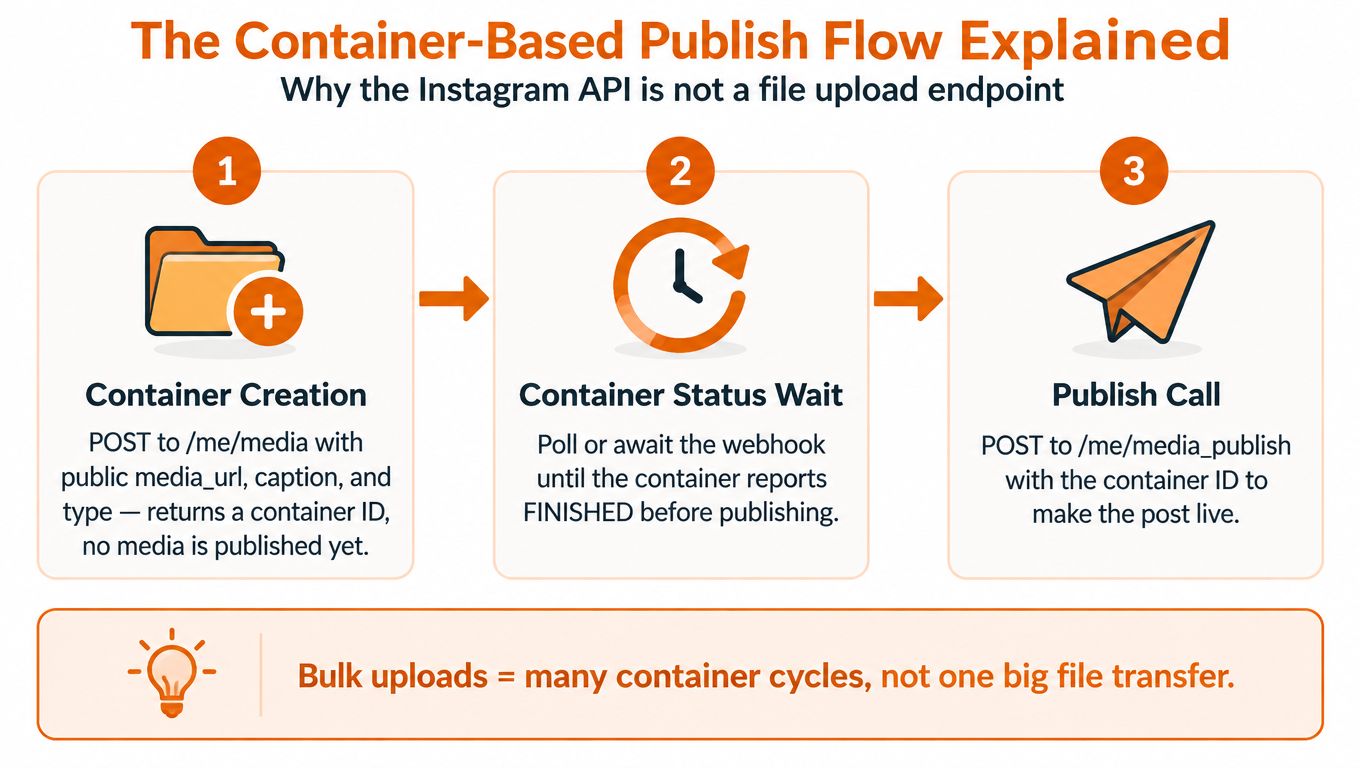
Instagram publishing isn't a conventional upload endpoint where your service sends a file and receives a live post in one response. Your application stages media in a container, waits for Instagram to process it, and then makes a separate publish call.
Three requests, different responsibilities
Container creation starts the cycle. Your service sends the public media_url, caption, media type, and any relevant flags to /me/media. Instagram returns a creation_id. Nothing is live yet, so your database should record the batch row, the returned identifier, and the payload version used.
For a carousel, stage the child media first. The parent container then references those child identifiers through carousel_children. A missing child, an expired child, or a child in the wrong processing state can invalidate the parent even when the individual files look correct.
Publishing is the commit step. Once the container reports FINISHED, call /me/media_publish with the container ID. Containers can also report IN_PROGRESS, ERROR, or EXPIRED, so a worker must poll status or consume the supported event mechanism rather than publishing immediately after creation. The social media posting API provides useful context for teams comparing direct platform integration with a unified publishing layer.
Reels add another layer because video transfer and processing aren't equivalent to image staging. A production worker may need the resumable upload protocol and chunked transfer for larger files before it can wait for the container to finish. Keep video jobs isolated from image jobs so a slow or failed video doesn't block a whole calendar.
A container that remains unpublished can expire, which creates a timing problem for large batches. Queue creation too early and the worker may have valid content but an unusable container by publish time. Queue too aggressively and the account may reach its rolling publishing quota before the remaining jobs are ready.
The safest architecture treats every post as a state machine:
READY, the row passed local validation.CREATED, Instagram returned a container ID.PROCESSING, the container is not yet publishable.PUBLISHABLE, status isFINISHED.PUBLISHEDorFAILED, with the response and diagnostic data stored.
This model is slower than pretending bulk publishing is a single request, but it gives you a recoverable system.
Rate Limits and the 24-Hour Publishing Window
The quota that matters for bulk publishing is a moving 24-hour window per professional account, not the number of HTTP requests your worker can send per minute. A scheduler can accept a large queue and still fail later at media_publish because earlier posts continue to occupy the rolling window.
The current official documentation states that professional accounts are limited to 50 API-published posts within a moving 24-hour window, and it says carousels count as one published post. It also exposes the content_publishing_limit endpoint, allowing developers to read live capacity instead of embedding an assumption in code. See Meta's Instagram content publishing documentation for the current endpoint behavior.
There's an important complication. Independent coverage reports that Meta's documentation has shown conflicting publishing figures, with some pages displaying 100 and others 50 API-published posts in the same type of 24-hour window. That contradiction changes queue sizing, retry planning, and launch-day expectations, so a copied number isn't a safe source of truth. The account-specific endpoint is more useful than a blog post, cached documentation page, or environment variable last updated months ago.
Read capacity before creating work
A worker should query the live endpoint before it creates or releases a batch. Store the returned usage data with the scheduling decision, reserve capacity for legitimate retries, and stop releasing new jobs when the response indicates that the account is near its current limit.
The response shape and field names can change, so parse the documented response rather than assuming a permanent schema. Conceptually, the scheduler should do this:
limit = GET /{ig-user-id}/content_publishing_limit
available = parse_current_capacity(limit)

if available <= reserved_retry_capacity:
    hold_new_publish_jobs()
else:
    release_jobs(min(batch_size, available - reserved_retry_capacity))
Don't treat container creation as proof that publishing capacity exists. The quota is enforced when the system reaches the publish operation, which means a queue can look healthy until the final call fails.
| Account Tier | Documented Quota | Live Endpoint Behavior | Recommended Buffer |
|---|---|---|---|
| Professional account | Current official documentation states 50 API-published posts in the moving window | Read the account's current usage and capacity through content_publishing_limit |
Reserve capacity for retries and avoid filling the entire reported allowance |
| Documentation conflict | Independent coverage reports pages showing 100 and 50 | Treat published figures as potentially inconsistent across Meta pages | Never size production queues from a hardcoded figure |
| Carousel publication | Counts as a single post in the official documentation | Confirm how the account response represents current usage | Track parent publication separately from child container creation |
App review status and production behavior aren't interchangeable. Approval to use a permission doesn't guarantee unlimited publishing capacity, and an account's live response should govern scheduling decisions. Also separate API request throttling from content publishing quota in your metrics. They're different failure classes and need different remediation.
Retries, Idempotency, and Webhook Integration
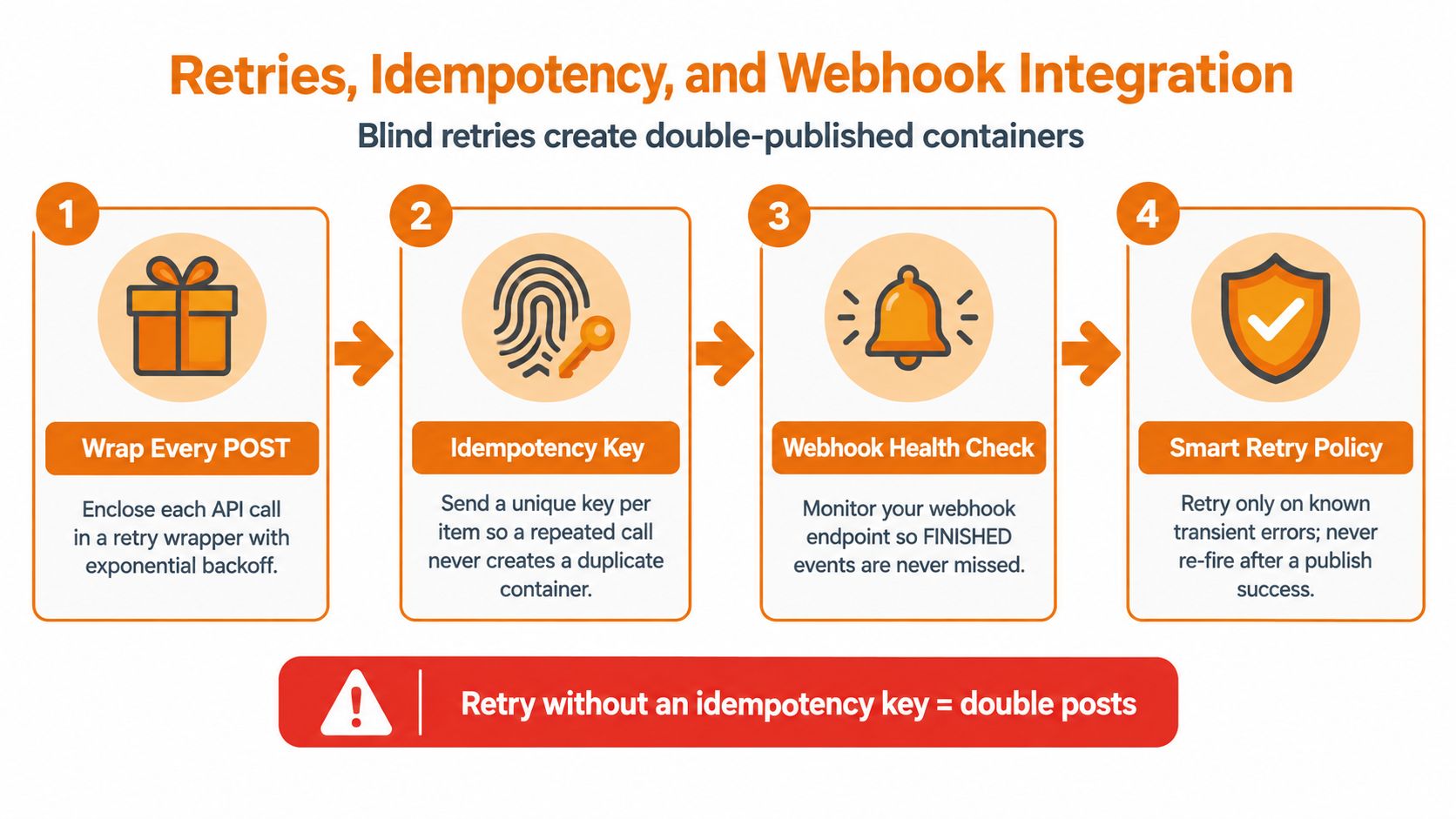
A network timeout doesn't tell you whether Instagram ignored a request or completed it before the response disappeared. If your worker blindly sends the POST again, it can create duplicate containers or duplicate publishing attempts. The fix is an application-level record that connects each calendar row to a stable client key, every returned creation_id, and the final publish result.
Make retries deliberate
Wrap each API call in a retry policy, but don't retry every error. A transient transport failure or temporary service response can merit another attempt. Invalid media, expired containers, missing permissions, and rejected captions need a data fix or a new container, not repeated requests.
Use exponential backoff with jitter so many workers don't retry simultaneously. Honor Instagram's Retry-After response when it's provided, then apply a maximum attempt ceiling and move the row to a visible failure state when the ceiling is reached.
Your idempotency record should contain:
- Client key: A stable value derived from the batch and calendar row.
- Request fingerprint: The media URL, caption, type, and relevant options.
- Container ID: The
creation_idreturned by Instagram. - Publish status: Pending, successful, or failed, with the raw response retained.
- Attempt history: Timestamp, HTTP result, error detail, and retry decision.
Retry only when you can explain why the previous attempt may not have completed. Unknown outcome means reconcile first, not duplicate first.
Webhooks can reduce polling and give your database a timely status signal, but they don't remove the need for reconciliation. Subscribe through the app dashboard, validate X-Hub-Signature-256, and make the handler idempotent because event delivery may be repeated or delayed. Process relevant field_changes events for media and engagement updates, then periodically reconcile records against the API so a missed event doesn't leave a post permanently marked as processing.
The source of truth should be your database. The dashboard, worker logs, webhook stream, and API responses should all update the same state record rather than maintaining separate interpretations of what happened.
Troubleshooting Failed Bulk Uploads
Most production failures aren't caused by sending too many rows. They happen because one layer assumes a file, URL, or container behaves differently from the next layer. Start with the API response, inspect the container status, and only then investigate the delivery path for the media.
Common failure patterns
| Symptom | Diagnostic step | Fix |
|---|---|---|
Generic 400 response |
Capture the full error body and inspect nested validation details, including OEmbedMediaValidationFailed when present |
Correct the asset or payload, then create a new container instead of retrying the invalid one |
| Media fetch fails | Request the media_url without an authenticated browser session and inspect the returned status and headers |
Remove login walls, expiring links, redirects, or access controls that prevent Instagram from fetching the file |
| Image asset rejected | Check the actual MIME type and file signature, not only the filename | Convert unsupported images to JPEG before container creation |
| Carousel fails after child creation | Inspect every child container and compare its status and expiry time with the parent workflow | Recreate expired or invalid children, then rebuild the parent container |
| Caption validation fails | Log the final UTF-8 caption after template expansion and count it before the API call | Shorten the caption and preserve the intended opening text |
A 403 from your CDN usually means the URL works for your team but not for Instagram's fetcher. Check whether the response requires cookies, signed access, or a referrer, and verify that the content type matches the file you intended to publish. A successful browser preview doesn't prove that an unauthenticated server-to-server request will succeed.
The JPEG restriction deserves a dedicated test because teams often validate extensions only. A filename ending in .jpg can still contain another format, while a valid PNG can be rejected by the publishing endpoint. Test both the MIME response and the decoded media format.
A practical triage order
- Read the API error: Preserve the complete JSON response, not only the HTTP status.
- Inspect container status: Determine whether the media is
ERROR, still processing, or expired. - Check the source URL: Fetch it without session credentials and inspect redirects, headers, and body content.
- Recreate only after correction: A failed or expired container shouldn't be treated as reusable.
- Isolate the row: Keep valid jobs moving while the bad asset is returned to the content queue.
Two pre-production checks catch a large share of these incidents: fetch every media URL from a clean server context, and run the exact container-creation payload against a validation environment or controlled test account. They test the path Instagram uses, rather than the path a content manager sees in a browser.
Preflight Checklist and Build vs Buy Decision
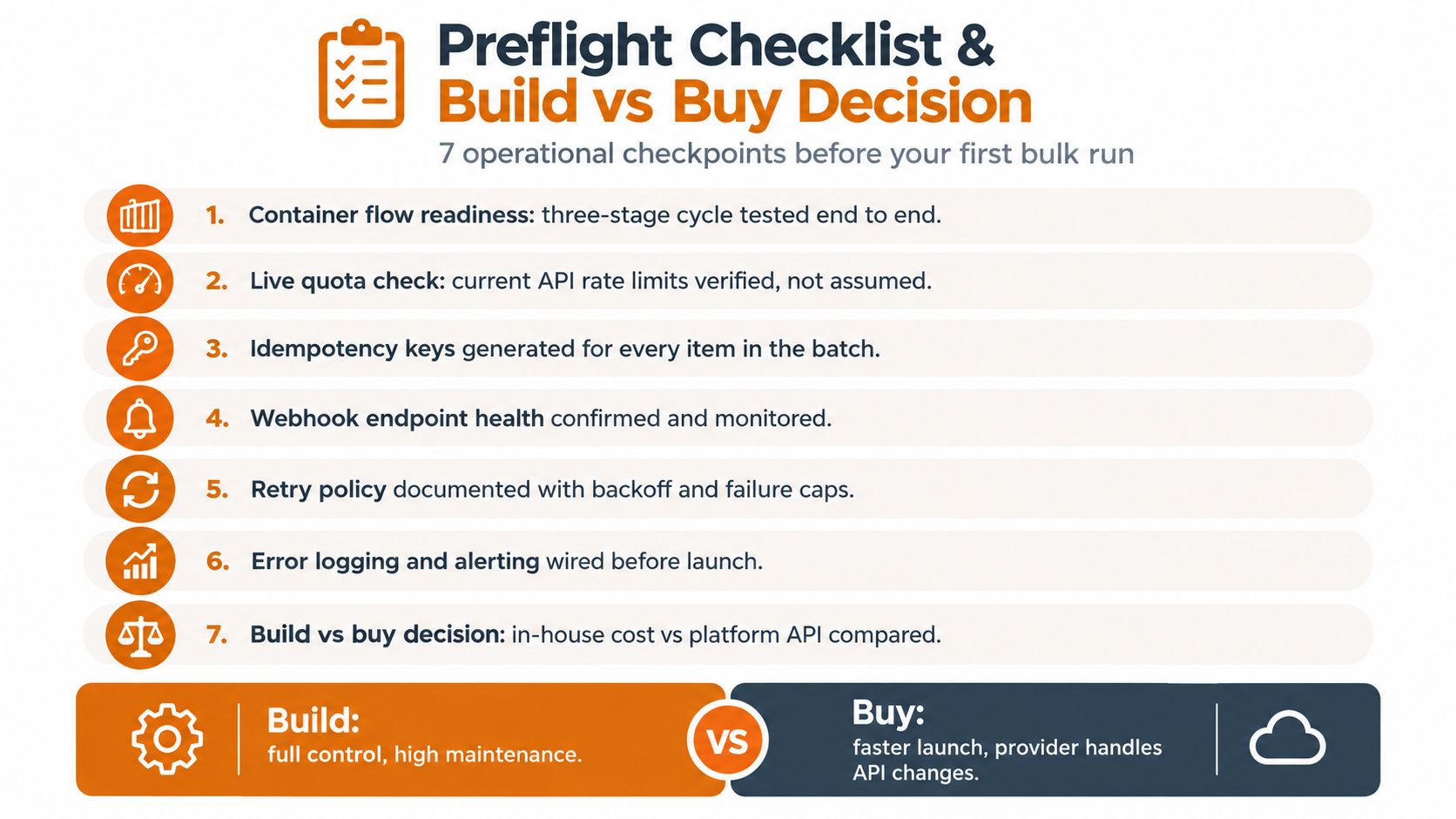
A bulk publisher is ready when it can fail locally, visibly, and without contaminating unrelated jobs. Before the first serious run, verify these seven checkpoints.
- Container flow readiness: Test creation, status handling, carousel assembly, and publication from end to end.
- Live quota check: Read
content_publishing_limitbefore releasing work, rather than relying on a stored cap. - Idempotency keys: Generate a stable key for every calendar item and persist every returned container ID.
- Webhook health: Verify signatures, monitor delivery, and reconcile missed events.
- Retry policy: Apply backoff and jitter only to known transient failures, with an attempt ceiling.
- Error observability: Store raw responses, nested validation messages, media status, and CDN diagnostics.
- Build versus buy review: Compare integration ownership with the time your team can dedicate to authentication, platform changes, and support.
Choose the operating model
| Decision factor | Build in-house | Use a unified API |
|---|---|---|
| Publishing scope | Maximum control over Instagram-specific behavior | A consistent interface across supported platforms |
| Media handling | Your team owns validation and transformations | The provider can normalize platform-specific payloads |
| Reliability work | You maintain queues, retries, webhooks, and token flows | The provider absorbs much of that operational layer |
| Compliance ownership | Your team tracks permissions and API changes | You still own your use case, while the provider maintains its integration |
| Team capacity | Suitable when integration work is a core product capability | Suitable when shipping campaigns matters more than owning plumbing |
Mallary.ai is one option for teams that want bulk uploads, Instagram publishing, media-rule validation, durable jobs, OAuth handling, retries, and webhook support behind a unified API and dashboard. Building directly remains sensible when Instagram-specific control is central to your product; using a unified layer is practical when a small engineering team needs to support several social destinations without recreating each platform's container and quota behavior.
If your team is still maintaining spreadsheets, ad hoc retries, and separate platform integrations, visit Mallary.ai to evaluate its unified API and dashboard for Instagram bulk publishing, media validation, queues, and webhooks. Start by mapping one real batch through preflight, quota checking, container creation, and publication before expanding the workflow to every channel.
Try it with Mallary
STOP!
Want ChatGPT or Claude to post on Instagram for you?
Connect your social accounts one time. Then tell your AI what to write. It can make your posts, share them, and reply on social sites that allow replies. You do not need to write code.
Pick your AI





Connect once. Ask in plain English. Mallary does the work.


