5 Buffer Alternatives Compared (2026)
Buffer is built around a calendar and a price for each channel. If you need a different account model, deeper reports, or publishing inside your app, compare the full workflow and cost.
By Mallary Labs LLC. Updated October 21, 2026.
Need posts and comments through an API or AI agent? Start with Mallary. Compare the other options for calendars, reports, content creation, or self-hosting.
Start 14-day free trial Compare the shortlistAbout 50% cheaper for 5 social media accounts
$15/month on Mallary Starter compared with Buffer $30/month on Essentials.
Both prices are billed monthly. USD before tax and separate X usage. Features and bundle sizes differ. Buffer charges $6 for each of these 5 channels. Check Buffer pricing.
Quick comparison: Buffer alternatives
We make Mallary and list it first for publishing and comment workflows. This is a guide by use case, not a test score. Vendor prices were checked October 28, 2026. Each source is linked below.
| Product | Best for | Starting price | Key tradeoff | Details |
|---|---|---|---|---|
| Mallary | Publishing and comment tools for apps and AI agents | $15/month, billed monthly | No self-hosted edition, built-in client approvals, social listening, or full AI content studio. Check supported post types before moving. | Read comparison: Mallary |
| Post Bridge | Simple cross-posting for one person | $39/month for 15 accounts, billed monthly | Account limits cover the total across platforms. Analytics are still labeled beta. | Read comparison: Post Bridge |
| Metricool | Analytics, competitor tracking, and client reports | Free; Starter from $25/month with monthly USD billing | API access starts above Starter. MCP limits and X add-ons need a separate check. | Read comparison: Metricool |
| PostPlanify | Client workspaces, approvals, and agency reports | Growth $99/month with monthly billing | More workspaces and higher plans change the total. A workspace bundle is different from a total social account allowance. | Read comparison: PostPlanify |
| Postiz | Open-source control with hosted and self-hosted choices | $29/month, billed monthly; self-hosted code is free | Running your own copy adds hosting and provider-app work. Check the hosted plan for your channel and AI media needs. | Read comparison: Postiz |
Prices use the billing period shown. Taxes, usage charges, extra seats, and account counts can change the total. The plans do not include the same things.
What to check before replacing Buffer
- Count channels: compare the total for all your social accounts, not just the entry price.
- Check approvals: Buffer Team includes team members and approvals. Mallary profiles group accounts; they do not replace an approval flow.
- Test automation: Buffer has an API too. Compare its request allowance and endpoints with the jobs your app needs.
1. Mallary
Publishing and comment tools for apps and AI agents
$15/month, billed monthly
Manage 5 social media accounts with unlimited posts from $15 a month. Publish, schedule, read analytics, and use AI comment replies from the dashboard, API, MCP, or CLI.
What to check: No self-hosted edition, built-in client approvals, social listening, or full AI content studio. Check supported post types before moving.
Compared with Buffer, shortlist Mallary when your main need is publishing and comment tools for apps and AI agents.
See Mallary before you switch
Use the dashboard for manual work or the API for your app. Use MCP, CLI, scheduling, analytics, comment replies, and AI auto-replies with your plan.
Starter is $15/month, billed monthly for 5 total social media accounts and unlimited posts. Need more accounts? Pro includes 15 for $29 a month, and Business includes 100 for $95 a month.
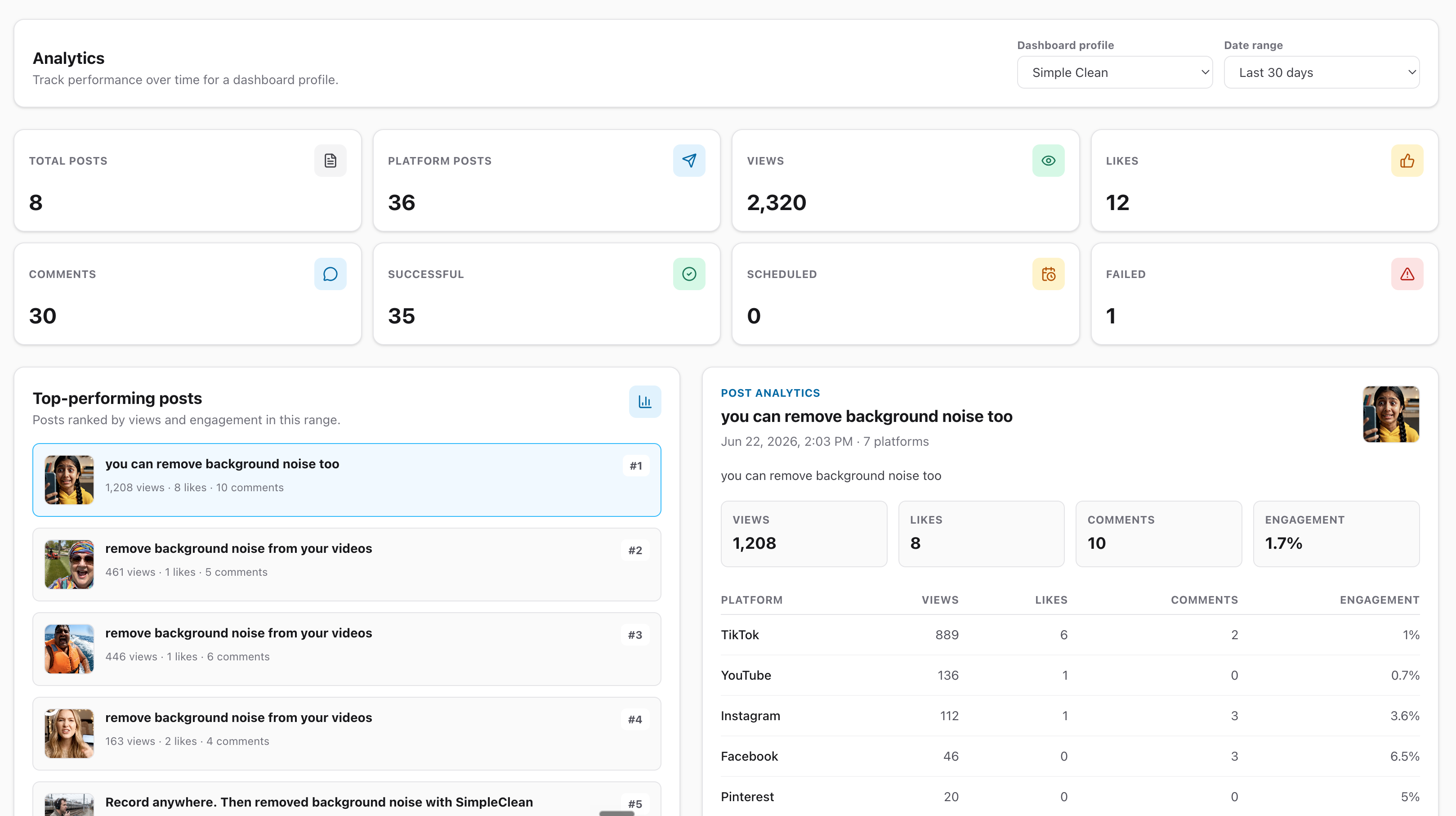
Test a complete workflow with our API scheduling walkthrough, ChatGPT setup guide, or Claude setup guide. Check current platform support for the post types you use.
2. Post Bridge
Simple cross-posting for one person
$39/month for 15 accounts, billed monthly
The Marketer plan combines a scheduler with API, MCP, unlimited posts, and beta analytics. Operator adds more accounts and team access.
What to check: Account limits cover the total across platforms. Analytics are still labeled beta.
Compared with Buffer, shortlist Post Bridge when your main need is simple cross-posting for one person.
3. Metricool
Analytics, competitor tracking, and client reports
Free; Starter from $25/month with monthly USD billing
Metricool combines planning with reports and competitor analysis. Advanced adds API access, team controls, and approvals.
What to check: API access starts above Starter. MCP limits and X add-ons need a separate check.
Compared with Buffer, shortlist Metricool when your main need is analytics, competitor tracking, and client reports.
4. PostPlanify
Client workspaces, approvals, and agency reports
Growth $99/month with monthly billing
Growth includes three workspaces, five social accounts per workspace, unlimited users, API, and MCP. Premium adds approvals and client reports.
What to check: More workspaces and higher plans change the total. A workspace bundle is different from a total social account allowance.
Compared with Buffer, shortlist PostPlanify when your main need is client workspaces, approvals, and agency reports.
5. Postiz
Open-source control with hosted and self-hosted choices
$29/month, billed monthly; self-hosted code is free
Postiz combines a scheduler with content tools, API, MCP, CLI, and webhooks. Its hosted Standard plan includes five channels.
What to check: Running your own copy adds hosting and provider-app work. Check the hosted plan for your channel and AI media needs.
Compared with Buffer, shortlist Postiz when your main need is open-source control with hosted and self-hosted choices.
When Buffer is still the right fit
Keep Buffer if its simple queue, ideas area, and team approval tools already fit your work. A new API is not needed for every publishing job.
Check Buffer pricing and features · Compare Buffer with Mallary
Mallary vs Buffer: the main tradeoffs
| Compare | Mallary | Buffer |
|---|---|---|
| Best for | Publishing and comment tools for apps and AI agents | Simple calendars and queues |
| Starting price | $15/month, billed monthly | Free for 3 channels; Essentials $5/channel/month, billed yearly |
| What you give up or need to check | No self-hosted edition, built-in client approvals, social listening, or full AI content studio. Check supported post types before moving. | Paid pricing grows with channel count. API request allowances vary by plan. |
How to move from Buffer to Mallary
Review posts still in the Buffer queue, including posts waiting for approval. Move the future items you need and agree on a cutover date with your team.
- List the accounts, media files, future posts, and reports you need. Mallary does not import another tool's queue or history.
- Start a trial and connect your social accounts to Mallary. Set up your brand profiles and use Mallary credentials in your app or agent.
- Test each needed post type, schedule, and comment workflow. Check the published result and delivery status for every destination.
- Recreate future posts and check the times. Remove the old scheduled copy before its publish time to avoid posting twice. Keep any history or reports you need before closing the old service.
Questions about Buffer alternatives
Which Buffer alternative should I choose?
Choose by the job you need: Mallary for publishing and comment tools for apps and AI agents; Post Bridge for simple cross-posting for one person; Metricool for analytics, competitor tracking, and client reports; PostPlanify for client workspaces, approvals, and agency reports; Postiz for open-source control with hosted and self-hosted choices. Keep Buffer if its strengths still fit.
How do the prices compare?
Buffer: $30/month on Essentials. Buffer charges $6 for each of these 5 channels. Mallary: $15/month on Mallary Starter. Starter includes 5 total social media accounts and unlimited posts. Use any mix of our supported social media platforms. Scheduling, analytics, AI comment replies, dashboard, API, MCP, and CLI are included. Mallary is about 50% cheaper for this 5-account example. Both prices are billed monthly. USD before tax and separate X usage. Features and bundle sizes differ.
Is there a free alternative to Buffer?
Some tools in this guide offer free plans or free self-hosted software. Free plans have limits, and self-hosting still needs a server and upkeep. Mallary offers a 14-day free trial on paid plans, not an ongoing free publishing plan.
Can I keep using ChatGPT, MCP, or an API?
Check the exact tools and plan for each service. Mallary paid plans include REST API, MCP, and CLI access. You can use the Mallary ChatGPT plugin or Claude connector after setup. Each service needs its own connection and credentials.
Will Mallary import my scheduled posts and history?
Mallary does not import another scheduler's queue or post history. Connect your social accounts, upload your media, and recreate future posts. Check each new post before removing its old scheduled copy so it does not publish twice. Posts already on your social accounts stay there.
Choose the tool that fits your work
Choose Mallary when your app or AI agent needs publishing, scheduling, analytics, and comment tools with a dashboard included.
Keep Buffer if its simple queue, ideas area, and team approval tools already fit your work. A new API is not needed for every publishing job.
Need a different fit? Post Bridge for simple cross-posting for one person. Metricool for analytics, competitor tracking, and client reports. PostPlanify for client workspaces, approvals, and agency reports. Postiz for open-source control with hosted and self-hosted choices.