Written by Outrank. Published by Mallary Labs LLC.
Published .
What Is Facebook Automation? a Practical Guide for 2026
Monday, 9:12 a.m. The marketing lead for a two-location bakery has eleven browser tabs open, a content calendar due at noon, and a phone buzzing with the same three questions under last week's post: do you deliver, are you open Sunday, how much is a custom cake.
By 9:40 she has queued three posts for the week and written a rule that answers the delivery question on its own. Nobody will open the Page again until Thursday. Everything that happens in that gap, on her behalf and without her hands on a keyboard, is Facebook automation.
Most explanations of what is Facebook automation stop at "it schedules your posts." That's like describing a car as a thing with a cupholder. Automation is a software layer that talks to Facebook's own servers under permissions you grant, and those permissions, quotas and error paths decide whether it works or fails at 2 a.m. on a Saturday.
Table of Contents
- What Facebook Automation Means in Practice
- The Four Jobs Automation Handles
- Official APIs Versus Scraping and Bots
- How an Automated Post Reaches Facebook
- Rate Limits and Permissions to Plan Around
- Benefits, Risks and AI Reply Guardrails
- Tools and How Developer Platforms Implement Safe Automation
- Choose a Safe Setup Before You Automate
What Facebook Automation Means in Practice
A Page manager can prepare a post in advance, then let software publish it at the chosen time. Facebook automation uses authorized APIs to run repeatable Page tasks, such as publishing posts or handling comments, without requiring a person to perform each step.

The first boundary is the account type. Facebook publishing through tools such as Mallary goes to Pages, not personal profiles. The Page owner connects the account and grants the permissions needed for the tool's tasks.
The next boundary is how the software acts. An authorized tool uses Facebook's APIs, while a browser bot may try to imitate a person clicking through the site. Review the permissions each tool requests before granting access, and make sure they match the work you want it to do.
Choosing a tool is separate from deciding what to automate. For hospitality businesses, compare AI automation options for hosts as one way to consider which tasks software might handle.
The Four Jobs Automation Handles
Four jobs cover nearly everything a marketer asks for, and they differ in the Facebook object they touch, the permission the app needs and the decision that has to stay with a person.
| Job | What Runs Automatically | Typical Example | Facebook Object and Human Decision |
|---|---|---|---|
| Scheduled publishing | Feed posts, multi-photo posts, video and Stories go out at set times | Three posts a week to a bakery Page | Page; a person approves the calendar |
| Comment and reply automation | Rule-based replies to comments on posts | Shipping and pricing answers under a product post | Comment thread; a person handles complaints and unusual questions |
| Moderation | Comments are hidden, flagged or routed by keyword | Spam links hidden automatically | Page comments; a person reviews borderline cases |
| Ad automation | Campaigns, ad sets and ads are created or edited | Rotating creatives in an ad set, pausing weak ads | Ad account; a person sets budgets and approves changes |
Scheduled publishing is the job everyone recognizes. A feed post, a multi-photo post, a video or a Story is composed once and sent to the Page at a set time, usually through a scope like pages_manage_posts. The bakery queues three posts every Monday. What stays human is the calendar itself, because no scheduler knows that the landlord's renovation starts on the 14th and the shopfront photos will be out of date.
Comment automation answers what you've already answered a hundred times. A rule watches for "delivery", "opening hours" or "price" and replies from an approved set of responses through pages_manage_engagement. The moment a comment mentions an allergy, a refund or a complaint, the rule should route it to a person rather than guess. One wrong allergy answer costs more than a year of saved typing.
Moderation is the least glamorous job and the most valuable at scale. Keyword rules hide link spam, flag abusive terms and leave borderline cases in a queue for review. A person still decides where the line sits, because keyword filters can't read sarcasm and regularly flag regulars who joke.
Ad automation is where the stakes change, since it moves money. The ads API can create campaigns, rotate creatives and pause underperforming ads inside an ad set. A gym might let software swap three creatives weekly, but the budget ceiling and any change above a set spend should still need a human approval.
Before you buy anything: list which of these four jobs you actually need this quarter. Each one adds a permission request, a review requirement and a failure mode, and a tool that does all four badly is worse than one that does publish and reply properly.
Official APIs Versus Scraping and Bots
A Page owner grants an app specific permissions through an official API. A browser bot may instead store a login or simulate clicks. Both can appear to publish a post, but they differ in how access is granted, how failures are handled, and how clearly actions can be audited.
| Criteria | Official API Automation | Scraping or Browser Bots |
|---|---|---|
| Access basis | Permissions granted by the Page owner through OAuth | Saved login or simulated user clicks |
| Policy status | Uses approved endpoints and granted permissions | Can violate platform rules when it collects data or acts without authorization |
| Failure behaviour | Returns errors that can identify issues such as expired access, missing permission or rate limits | Can break when the interface changes, with errors that are harder to interpret |
| Auditability | Requests, job state and post IDs can be logged | It can be difficult to trace which action ran and when |
| Account risk | Lower when permissions and limits are respected | Higher when automation acts outside approved methods |
Meta's Automated Data Collection Terms address automated collection of data from Meta products. Using official APIs with the permissions they grant gives an automation tool a defined way to access and act on a Page. That boundary matters: permission to publish does not automatically authorize every kind of data collection or action.
The operational difference shows up when something fails. A bot may encounter a changed button or return a page of HTML that does not explain the problem. An API can return an error that helps the system decide whether to request access, retry later or stop. Neither approach removes the need for oversight, but clear errors make it easier to diagnose a failed job.
Before comparing features, ask a vendor three questions:
- Does it request Page access through a login and permission flow, or ask for your password?
- Does it identify the official API it uses for publishing, comments or ads?
- Does it explain how it handles errors and rate limits, beyond saying it retries automatically?
Those answers show whether the tool's access and failure handling are understandable before you rely on it.
How an Automated Post Reaches Facebook
A scheduled post looks like one click. Underneath, it's a chain of authenticated steps, and each link has a way to break. Here's the whole path in four steps, then the seven-step version a developer builds.
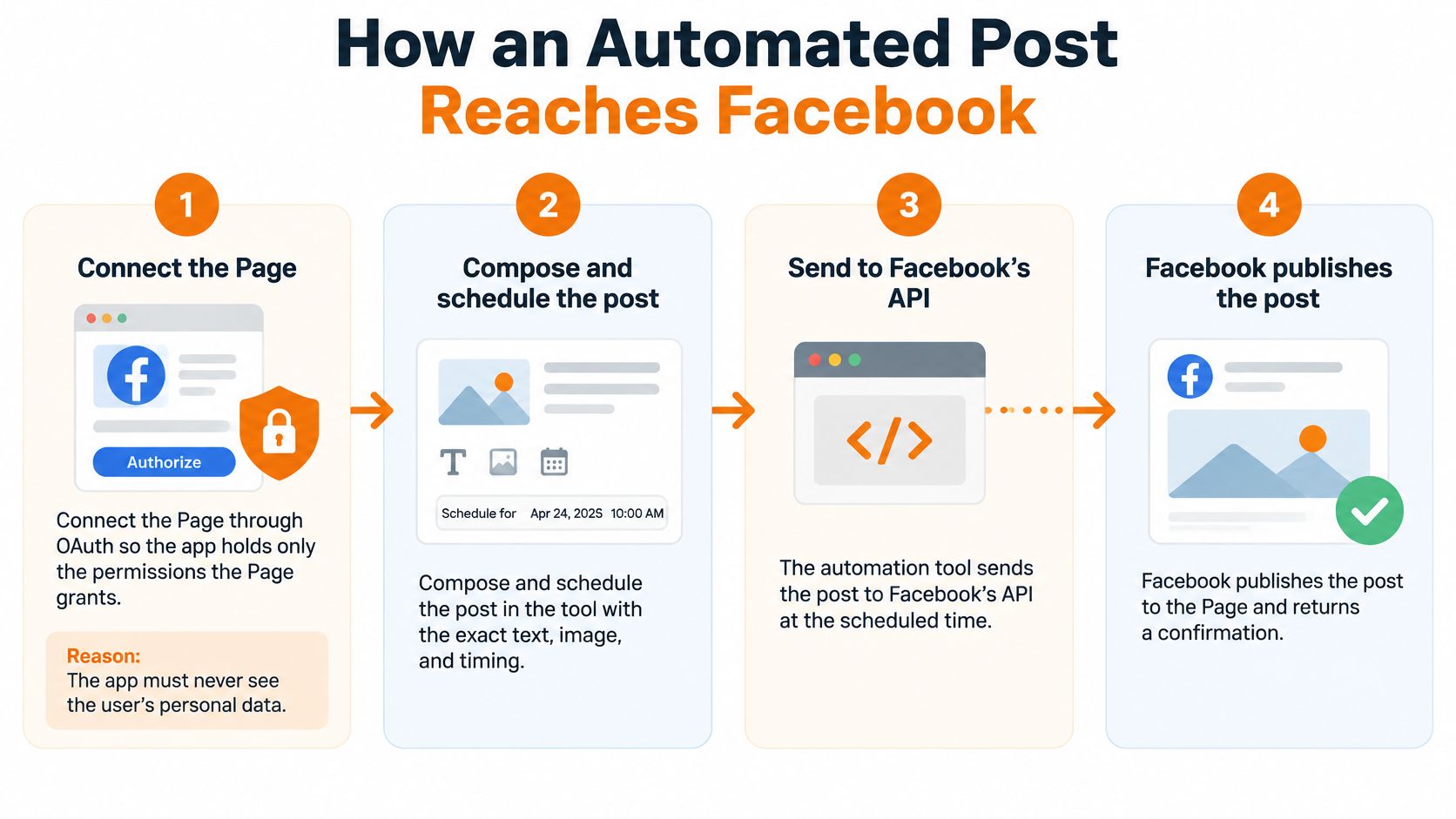
- Connect the Page through OAuth. The app receives a token scoped to what the Page owner approved, which is why it never sees a password. The common slip is approving far more scopes than the job needs, which widens the blast radius if the token leaks.
- Store the token encrypted and refresh it before expiry. Long-lived tokens still expire. Teams that skip the refresh job discover it the hard way when a queued post dies overnight and the morning slot is empty.
- Run a preflight check on the payload. Media type, file size, caption length and required scope get validated before the job is queued. Failing here is cheap; failing after the job is scheduled costs a slot.
- Queue the job with an idempotency key. The key is what stops a network timeout and an automatic retry from publishing the same post twice to the same Page.
- Send the request to the Graph API endpoint for that Page and post type, with the token attached.
- Classify the response. Success, expired token, permission error, rate limit or abuse signal are five different outcomes. An expired token needs a refresh, a permission error needs a scope change, a rate limit needs a pause, and an abuse signal needs a human look.
- Retry only transient failures, with exponential backoff and jitter, then log the outcome with the published post ID.
What a healthy job looks like
A finished job has three things attached: a status of published, a stored post ID and a log entry your team can audit months later. Anything less means you can't answer "did it go out?" without opening Facebook and squinting.
The same pattern carries over to analytics pulls and comment handling. Same token, same preflight, same classified errors, same idempotency logic.
Rate Limits and Permissions to Plan Around
A Page with frequent comments may support more API activity than a quiet Page, even if it has fewer followers. Facebook's rate limits depend on the type of token and recent engagement, so automation needs an API budget, not just a posting calendar.
| Limit | Figure or Formula | Window | What It Means for Automation |
|---|---|---|---|
| App-level Graph API calls | 200 calls multiplied by the number of users | Rolling one hour | Polling and retries count toward the same budget |
| Page or system-user token calls | 4,800 multiplied by Page users who engaged in the past 24 hours | 24 hours | Recent engagement affects the available call budget |
| Ad mutations | Meta enforces per-ad-account limits on campaign, ad set and ad edits | Varies by account and request | Put bulk edits in a paced queue rather than a tight loop |
| Permissions | The required permission must be granted for the Page and action | Checked when the call is made | A missing permission needs correction, not a retry |
The Graph API rate-limiting documentation describes the app-level allowance as 200 calls multiplied by the number of users in a rolling one-hour window. For Page or system-user tokens, the allowance is 4,800 multiplied by the number of people who engaged with the Page in the preceding 24 hours. Exceeding call, CPU or total-time limits can cause throttling or failed requests.
Why an engaged Page earns a bigger budget
Engagement is part of the Page-token formula. A smaller Page with recent activity can have more room for API calls than a larger Page with little recent engagement. That makes the available budget change over time.
A poorly paced workload wastes that budget. Frequent polling, immediate retries and one request per item can increase call volume while slowing recovery. Use webhooks where available, batch compatible reads, cache stable Page details and cap concurrent work per Page.
Practical rule: When Facebook signals that a quota is reached, pause the affected work. Continuing to send requests can prolong the disruption.
Planning rules that follow from each number
- Prefer webhooks to polling for new comments or messages when a webhook is available. A notification can replace repeated checks.
- Batch compatible reads and cache stable metadata, such as Page details, to avoid fetching the same information repeatedly.
- Limit concurrency per Page so one busy account does not use the app's entire available capacity.
- Keep job state in a durable queue so work can resume after a process restart without duplicating posts.
- Pace ad changes. Meta enforces per-ad-account limits on campaign, ad set and ad edits. Queue bulk changes instead of sending them in a tight loop.
Permissions are a separate constraint. A request that lacks the required permission will not succeed if sent again unchanged, and repeated attempts consume API capacity. Check that the connected account has permission for the requested Page action before sending the call. For context on the available endpoints and their role in Facebook publishing, see this guide to the Facebook API.
Benefits, Risks and AI Reply Guardrails
The most common misconception is that automation removes people from the conversation. In practice it moves them from typing to reviewing, which is a better use of their attention and a worse place to hide.
The benefits are real and unglamorous. Publishing stays consistent through busy weeks. First replies land in minutes rather than hours, which matters when a buyer is comparing two vendors. Moderation stops eating an afternoon. Reporting stops being a Friday scramble.
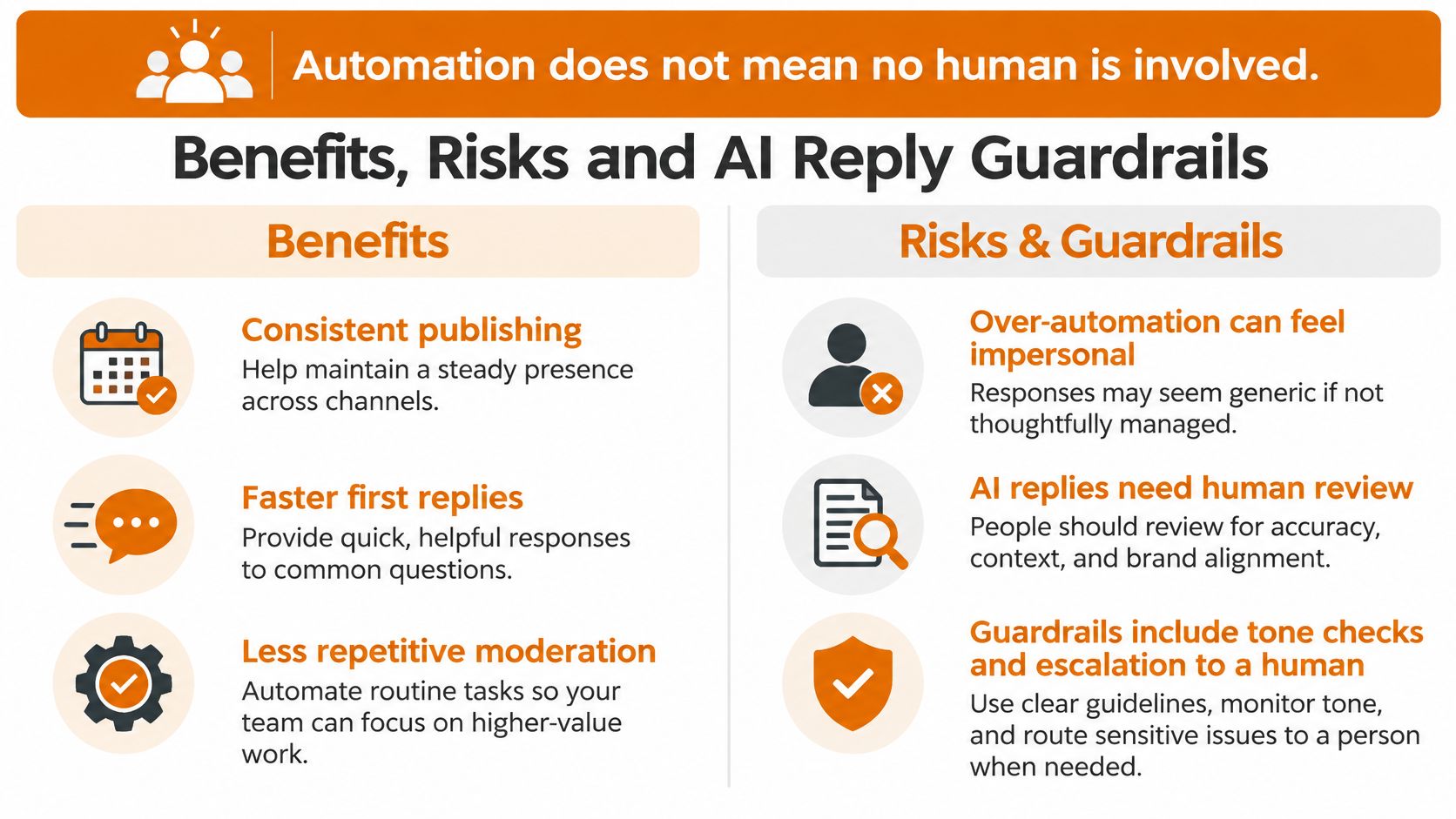
Then the risks arrive at the same speed. An AI reply that misreads a question doesn't make one mistake, it makes the same mistake under every comment the rule touches. Excessive reply frequency starts to look like inauthentic behaviour. Invalid engagement inflates a dashboard and teaches you nothing.
Where an AI reply does damage
The failure isn't usually a rude reply. It's a confident one on a topic the model should have deferred: a medication question, a refund dispute, a public complaint about a safety issue. Speed amplifies a wrong answer as efficiently as a right one.
Disclosure is the other exposure. Meta's community standard on misinformation requires disclosure for organic content containing photorealistic video or realistic-sounding audio that was digitally created or altered, and states that penalties may apply when required disclosure is omitted. Social-issue, election and political ads carry the same disclosure requirement for qualifying AI-created or AI-edited images, video or realistic audio, with removal and account penalties for repeat failures.
The guardrails that decide whether it's safe
- Escalate by category. Politics, health, crisis events, legal complaints, personal data and high-impact customer issues go to a person, every time, with no confidence threshold to override it.
- Set a confidence floor. Below it, the draft waits in an approval queue instead of publishing.
- Log every automated reply with the comment ID, the rule that fired and the timestamp, so a bad batch can be traced and reversed.
- Keep a kill switch per Page that pauses replies and publishing immediately.
Error handling belongs in the same list. The automated data collection terms note that common API failures include invalid OAuth tokens, permission errors and abusive-action responses, and a system that blindly retries all three turns a small problem into a flagged app. Classify first, then act.
If you're writing the reply rules themselves, our walkthrough on how to auto reply covers the escalation categories in more detail.
Tools and How Developer Platforms Implement Safe Automation
You'll meet three categories of tool, and they solve different problems.
Native Meta tools handle scheduling Page posts and basic inbox replies inside the platform you already use. Third-party schedulers and social suites such as Buffer, Hootsuite and Later add a calendar across several networks, bulk uploads and team approval flows. Developer-first platforms expose the API layer itself, so publishing, comments and analytics become functions your own product or workflow calls.
That third category is where engineering effort gets concentrated, because the hard parts are invisible in a demo: token refresh, idempotency, backoff, queue durability. Platforms such as Mallary.ai put that stack behind a single endpoint, built for products and automations that already have content and need reliable publishing and engagement APIs.
The same discipline shows up outside social. If you're already running warehouse or listing workflows, this look at scaling a POD business with automation covers how order and listing jobs get paced and deduplicated, which is the same queue problem in different clothes.
What to verify in vendor documentation
- OAuth connection with no stored passwords, and a visible scope list per action.
- Encrypted token storage with refresh before expiry, described as a scheduled job rather than a hope.
- Preflight validation of media type, size and caption limits before a job is queued.
- Queued jobs with idempotency keys, plus a stated retry policy.
- Classified error handling, not a single generic failure state.
- Pacing against the call budget, including per-Page concurrency limits.
- Approval thresholds, audit logs and a per-Page kill switch for AI replies.
Confirm every claim in the vendor's own documentation before you buy, then run the three-question checklist from earlier against it. Feature pages describe intentions; documentation describes behaviour.
If your team already builds in n8n or Make, this n8n social media automation guide shows where the publishing call belongs in a saved workflow.
Choose a Safe Setup Before You Automate
Here's the decision sequence that avoids most of the trouble, in the order it should happen.

Confirm the target. Publishing goes to Facebook Pages, and personal profiles aren't supported. If someone on your team plans to automate their own profile, stop that plan now.
Pick one job and run it for two weeks. Scheduled feed posts or Stories are the safest start. Watch the logs before you add replies or ads, because publishing failures are annoying and comment failures are public.
Write the escalation rules and the kill switch before turning AI replies on. Not after the first incident. The rule set is a business decision, and it's much easier to write calmly than at 11 p.m. during a pile-on.
Estimate the call budget from recent engagement, then set queue pacing to match. If your Page had a quiet fortnight, plan for the smaller number and let the budget grow with engagement.
Choose build or buy. Buying saves you the maintenance of OAuth, token refresh, retries and durable job queues. Building gives you control of every permission and error path, and a team with strict data requirements may want exactly that. Most marketing teams don't.
The two-week test: one Page, one job, fourteen days. If the error rate is low and the logs make sense to someone who didn't build it, add the next job. If you can't explain a failure from the log, fix that before expanding.
Then review. Open the log, count the failures, check that every published post has an ID attached, and read three AI replies at random as if you were a customer. Expand only when those three checks pass without effort.
Mallary.ai is built for the point where a content calendar stops being enough: one API for Facebook feed posts, Stories, comments and analytics, with OAuth, token refresh, rate-limit pacing, idempotency and durable job queues handled behind the endpoint. If your team already has the content and needs publishing and engagement that holds up under load, connect a Page and schedule your first post through Mallary.ai.
Try it with Mallary
STOP!
Want ChatGPT or Claude to post on Facebook for you?
Connect your social accounts one time. Then tell your AI what to write. It can make your posts, share them, and reply on social sites that allow replies. You do not need to write code.
Pick your AI





Connect once. Ask in plain English. Mallary does the work.


