
Written by Outrank. Published by Mallary Labs LLC.
Published .
Social Media Posting Tool: A Buyer's Guide to Publishing
You're probably here because your team has outgrown manual posting, but you're not excited about turning your product roadmap into a part-time social API maintenance project.
A launch is coming. Marketing wants scheduled posts across LinkedIn, Instagram, X, YouTube, Reddit, and Threads. Product wants this embedded inside your SaaS. Support wants replies routed somewhere sane. Engineering gets handed the messy part: OAuth scopes, token refresh, failed uploads, duplicate publishes, odd media rules, and rate limits that don't behave the same way twice.
That's why most advice on a social media posting tool is too shallow. Feature grids are fine for buyers comparing calendar views. They're useless if you have to ship a reliable publishing layer into a real product. If you're evaluating tools seriously, treat the posting stack as infrastructure. The right question isn't “can it schedule?” The right question is “can this survive platform churn without dragging my team into operational debt?”
Table of Contents
- What a Social Media Posting Tool Actually Does
- The Core Building Blocks of Every Posting Tool
- Platform Quirks Every Tool Has to Handle
- Build vs Buy the Posting Layer
- AI Replies, Webhooks, and the Engagement Layer
- Why Official APIs and Verified Partnerships Matter
- A Practical Checklist for Choosing Your Tool
What a Social Media Posting Tool Actually Does
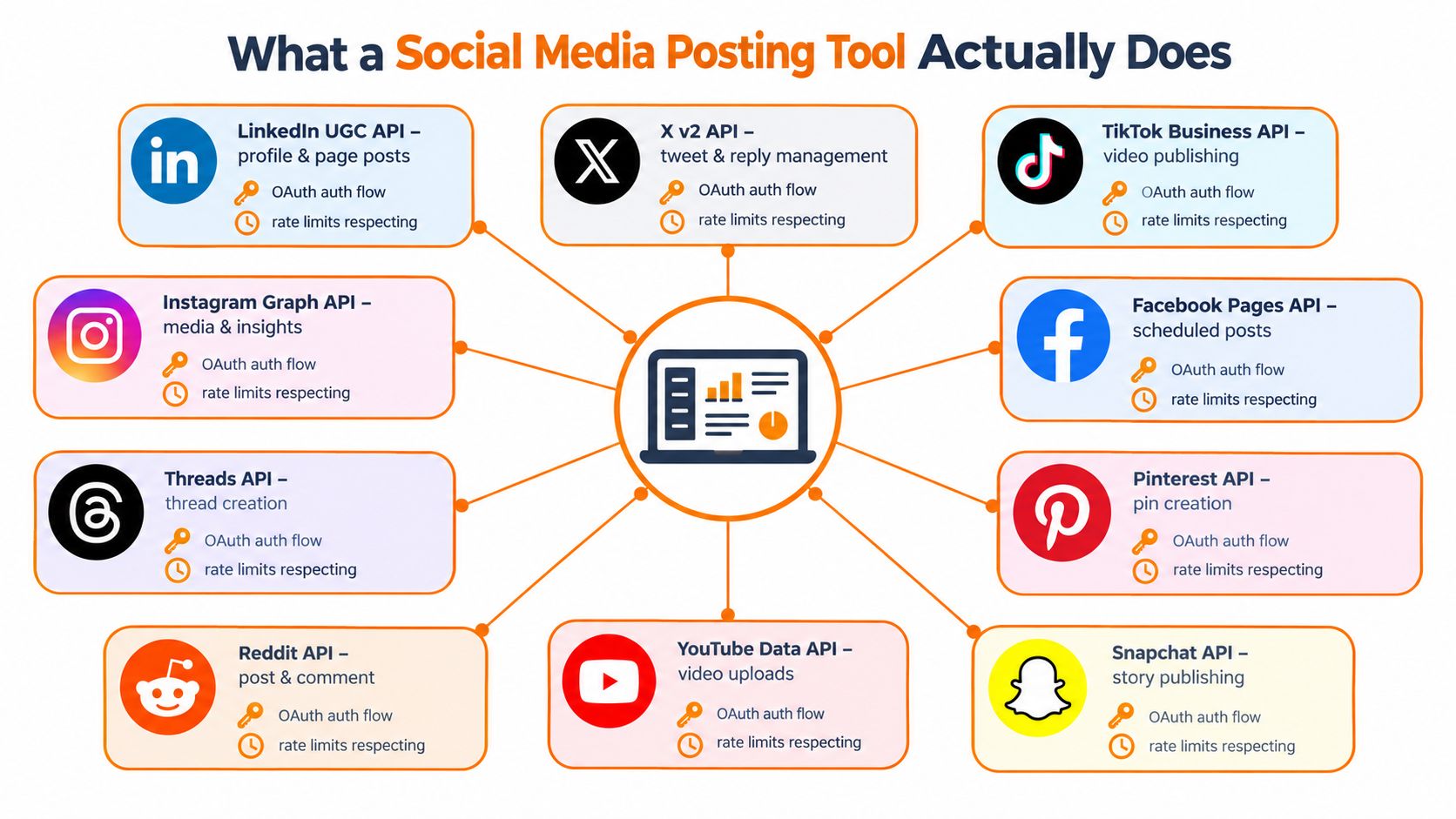
A real social media posting tool isn't a content calendar with a prettier UI. It's a translation layer between your app and a fragmented set of platform APIs.
On launch day, the ugly version looks familiar. One engineer is staring at Meta app settings. Another is debugging an expired token for a LinkedIn company page. Someone else is trying to figure out why one video passed upload checks on one network and failed on another. Meanwhile, the campaign owner just wants one thing: click publish once and trust it.
A serious posting tool collapses that sprawl. Your app sends one request. The tool handles platform-specific auth, media prep, scheduling, publish dispatch, and status reconciliation. Instead of ten adapters scattered across your codebase, you get one operational surface.
It reduces API surface area
The practical value is boring, which is exactly why it matters.
Your product team doesn't want to own every network's quirks forever. They want a publish button, scheduled jobs, delivery status, and a way to recover gracefully when a platform rejects a payload. A posting layer normalizes those concerns so your product logic stays about users and workflows, not about whether one network expects a container creation step and another expects a direct media upload.
Social usage makes that normalization necessary, not optional. Around 5.79 billion people used social media worldwide in April 2026, users spent about 18 hours and 36 minutes per week on social platforms and online video, and attention was spread across an average of 6.5 different networks per month, according to Neal Schaffer's roundup citing global usage figures. That fragmentation is why single-network workflows age badly.
It protects the rest of your product
The best way to think about a social media posting tool is as a boundary.
- Your app owns customer experience: compose flows, approvals, campaign logic, account selection.
- The posting layer owns delivery mechanics: token refresh, retries, queueing, media adaptation, webhook callbacks.
- Your data layer owns reporting and auditability: what was attempted, what published, what failed, and why.
If your team is also evaluating upstream content workflows, Bulk Image Generation's guide to top content creation tools for social media is useful context. Content generation and content delivery are different problems. Don't buy one assuming it solves the other.
Practical rule: If your engineers are reading raw API docs for every network just to ship a publish feature, you don't have a posting workflow. You have an integration maintenance problem.
The Core Building Blocks of Every Posting Tool
Under every polished dashboard, the architecture is the same. Vendors package it differently, but the moving parts don't change much. If one is weak, the whole system gets brittle.
The parts that actually matter
The first block is the scheduler. It stores jobs durably, accepts future publish times, and handles timezone logic without surprises. If a tool can schedule but can't explain how jobs persist, I assume trouble.
Next is the publisher worker. That's the process that wakes up, fetches due jobs, loads credentials, and sends payloads to network-specific adapters. Many DIY systems start simple and then collapse under retry logic and partial failures.
Then comes the media validator. This block catches bad payloads before they hit a platform API. Wrong aspect ratio, unsupported codec, file too large, missing thumbnails, invalid captions. You want those errors before the scheduled publish time, not after.
| Building Block | Primary Responsibility |
|---|---|
| Scheduler | Store and trigger posts at the intended publish time |
| Publisher worker | Dispatch due jobs to the correct platform adapter |
| Media validator | Run preflight checks on media and payload structure |
| Queue and idempotency layer | Prevent duplicates and manage safe retries |
| Analytics and webhook sink | Capture delivery states and downstream engagement events |
The hidden requirement is idempotency
Many teams underestimate the queue.
Retries are unavoidable. Networks timeout. Upload steps fail halfway through. Workers restart. If your posting tool doesn't attach idempotency keys and durable queue semantics, duplicate posts will happen. Not maybe. Eventually.
That's why I care more about job identity than about drag-and-drop calendars. The queue should know whether a retry is a legitimate continuation of a failed attempt or a second publish request that must be blocked. If a vendor can't explain this cleanly, I assume their reliability story is weak.
The output should be machine-readable
The final block is the analytics and event sink. I don't mean vanity charts. I mean structured delivery states and inbound webhooks your app can consume.
Good posting infrastructure emits clear states such as queued, validating, publishing, published, failed, and retrying. That's what lets your product show accurate customer status and trigger downstream automation. If you're evaluating API-first options, this guide to a social media scheduling API is a good lens for what a developer-grade scheduling surface should expose.
Buy tools the way you'd buy payments infrastructure. Nice UI helps. Reliable state transitions matter more.
Platform Quirks Every Tool Has to Handle
Every social network says it supports publishing. That does not mean they behave similarly. Any vendor that talks about “post everywhere with one API” without spelling out platform differences is hiding complexity, not removing it.
Rate limits are not one problem
A serious tool can't use one generic limiter for every destination. Platform quotas are metered in different ways.
Some APIs use rolling windows tied to user or impression activity. YouTube uses daily quota units. X uses request-based ceilings such as per-user or per-app posting windows. That's why a unified scheduler needs platform-aware token buckets, queueing, and backoff logic instead of one blunt global limiter, as explained in Bundle's breakdown of social media API rate limits.
If a vendor can't tell you how they back off per platform, expect support tickets when campaign volume spikes.
Publishing constraints also differ
Rate limits are only half the issue. Content validation and write ceilings vary too.
Official platform rules can cap publishing itself at about 100 API-published Instagram posts per 24 hours and around 10 write calls per 10 seconds for Pinterest, which is why robust systems need preflight checks, idempotent retries, and durable queues to absorb bursts without dropping or duplicating posts, according to Plugkit's API rate limit summary.
| Platform | Key Quirk | Required Handling |
|---|---|---|
| Meta and Instagram-style APIs | Rolling-window usage models | Per-account throttling with adaptive backoff |
| YouTube | Daily quota units | Quota budgeting before dispatch |
| X | Request-based posting ceilings | Per-user and per-app window tracking |
| Instagram publishing | Publish caps and validation sensitivity | Preflight checks and retry-safe queueing |
| Tight write-call windows | Burst control and paced dispatch |
Media rules are where “unified” tools break
Buyers get fooled by demos.
A vendor can show one compose box and still fail in production if they don't validate per-network media constraints before attempting publish. Different aspect ratios, caption rules, upload lifecycles, and asset preparation paths make “one post to all channels” much less clean than it looks in a sales call.
The value of a posting tool isn't that it ignores platform quirks. It's that it absorbs them cleanly enough that your app doesn't have to.
Build vs Buy the Posting Layer
Most SaaS teams should buy the posting layer. I'll say that plainly.
If social publishing is not your core product, building native integrations across major networks is usually a distraction disguised as control. It feels attractive at first because the MVP seems small. Then the long tail shows up: OAuth refresh bugs, changing scopes, webhook verification, media upload edge cases, quota handling, data processing concerns, support escalations, and breaking platform changes that arrive on someone else's timeline.
When building makes sense
Build in-house if posting is part of your product's differentiation, not just an accessory.
That usually means one of these situations:
- You need deep domain coupling: publishing logic is inseparable from your CRM, workflow engine, or proprietary content model.
- You have unusual deployment constraints: on-prem, strict regional isolation, or customer-managed infrastructure.
- You need network-specific behavior as a product feature: not just support for multiple channels, but custom mechanics that a generic layer won't expose well.
If that's your situation, accept the cost. You're not building “posting.” You're building an integration platform.
Buying wins in most product teams
Buying is the better move when speed, maintainability, and breadth matter more than bespoke control.
For multi-network support, a unified vendor can let your team ship one embedded social feature instead of a rotating list of partial integrations. That matters in a market that has moved well beyond hobby tooling. The global social media management market was estimated at USD 29.93 billion in 2025 and is projected to reach USD 171.62 billion by 2033, implying a 24.8% compound annual growth rate from 2026 to 2033, according to Grand View Research's social media management market report. That scale tells you posting, approvals, analytics, and automation are now infrastructure categories.
| Dimension | Build In-House | Buy a Posting Platform |
|---|---|---|
| Time to market | Slower, especially across many networks | Faster initial launch |
| Maintenance burden | Owned entirely by your team | Shared with vendor |
| Platform churn | Your engineers absorb every change | Vendor usually abstracts changes |
| Compliance overhead | You own audits, logs, and processor reviews | Vendor may already provide this surface |
| Product flexibility | Maximum control | Constrained by vendor abstractions |
| White-label embedding | Fully custom if you build it well | Often available sooner through API-first vendors |
My decision rule
Use a hard rule.
Build when posting is your product. Buy when posting is plumbing.
That doesn't mean all vendors are equal. Some are UI-first schedulers. Some are infrastructure-grade APIs. If you need an embedded layer, look for official API coverage, webhook support, queue durability, white-label capability, and clean delivery states. Tools like Hootsuite, Buffer, and Sprout Social are useful in their own categories, but they aren't always built for product embedding. API-first options such as Mallary.ai are closer to what SaaS teams need when the requirement is shipping a unified posting layer inside an app.
AI Replies, Webhooks, and the Engagement Layer
Broadcasting is the shallow end of the pool. The more interesting system starts after the post goes live.
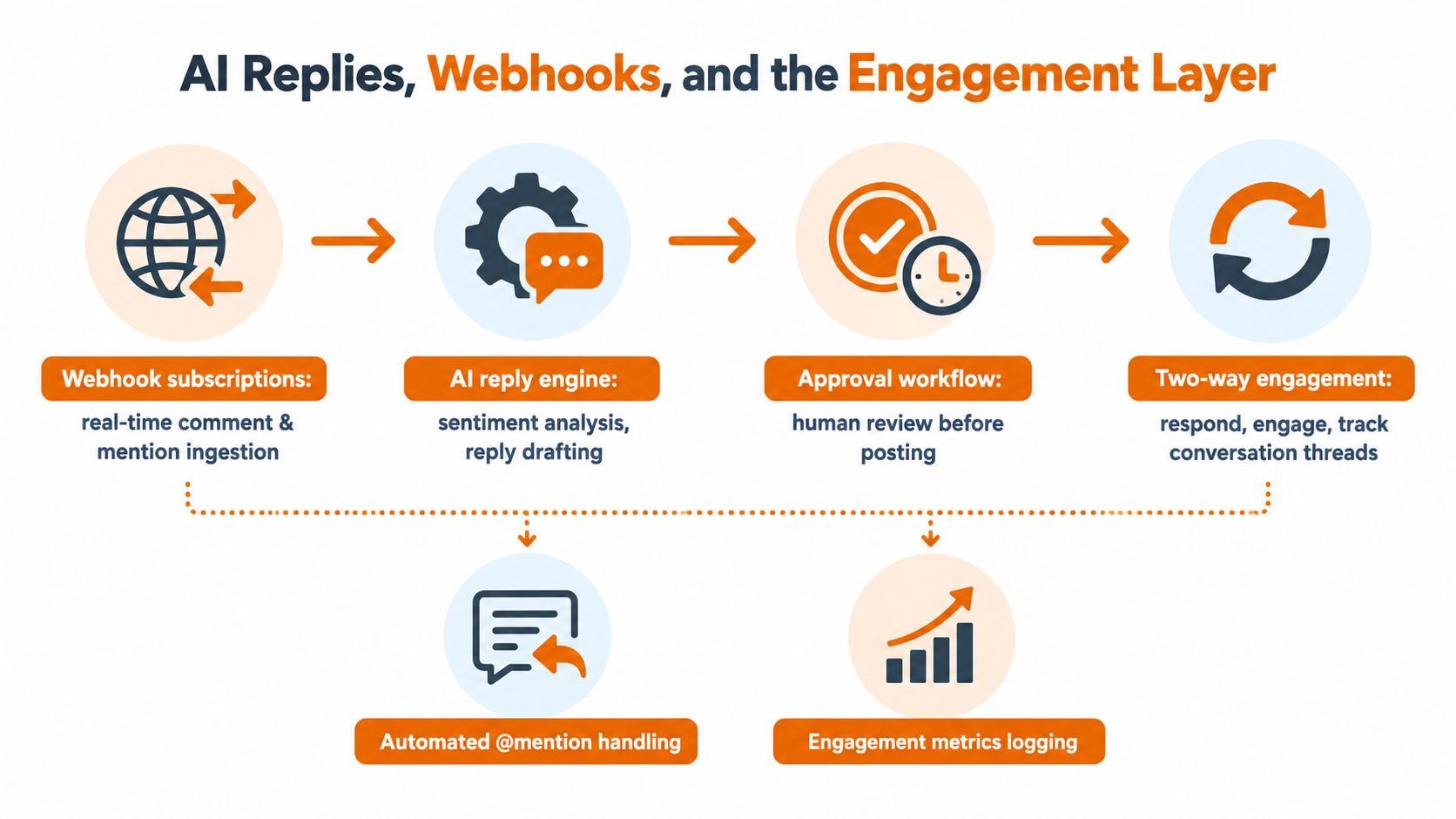
Modern teams don't just want scheduled publishing. They want comments, mentions, and follow-up questions to flow back into the same operational layer. That means your social media posting tool should also behave like an event-driven engagement system.
Treat inbound events as first-class inputs
The architecture is straightforward.
A platform emits a webhook for a comment, mention, or message event. Your tool ingests it, normalizes it, stores thread context, and decides what happens next. Maybe the system drafts a reply. Maybe it routes to a human queue. Maybe it triggers a support workflow because the sentiment is negative or the user asked a billing question.
That's why “AI” as a caption assistant isn't enough. The useful version is operational. It needs context, routing rules, approval logic, and safe publish mechanics on the way back out.
Recent trend reporting points in that direction. Short-form video remains the top content priority for 2026, marketers still rank authenticity and user-generated content as essential, and many teams are only scratching the surface with AI while video production and AI remain among the hardest skills to hire for, according to Sendible's latest social media trends report.
Replies should use the same reliability model
AI replies need the same infrastructure discipline as scheduled posts.
- Store thread context: without conversation history, reply quality falls apart.
- Use approval states: auto-reply only where the risk is low.
- Apply idempotency keys: duplicate reply attempts are just as damaging as duplicate posts.
- Respect platform quotas: engagement bursts can trigger the same throttling issues as publishing.
If you're designing these workflows, this guide on how to auto-reply is a practical reference for approval patterns and automation guardrails.
Here's a useful walkthrough of the broader operating model:
The right mental model
Don't build replies as a separate product surface.
Treat a reply as a scheduled outbound post with an inbound trigger. That keeps analytics, rate limits, moderation, retries, and audit logs in one system. Split those concerns and you'll create two stacks that disagree with each other.
Keep one queue, one event model, and one source of truth for outbound social actions. That's how engagement stays manageable.
Why Official APIs and Verified Partnerships Matter
A flashy demo built on unofficial scraping is a liability.
It may work today. It may even ship faster. But if your product depends on it, you've tied customer experience to an access path you don't control and can't defend during procurement. That's reckless for any serious SaaS team.
Scraping is not a foundation
Unofficial access methods tend to fail in the same way. At first, then all at once.
A platform changes enforcement. Login flows change. Terms tighten. A hidden endpoint disappears. Suddenly your “full-featured” integration turns into support debt, reputation damage, and awkward customer emails. None of that shows up in a feature matrix.
Official APIs are slower and more constrained, but they're real infrastructure. Vendors with verified partnerships usually get a cleaner path through deprecations, sandbox access, and policy changes. That matters more than one extra gimmick feature.
Compliance buyers care about paper, not promises
Once you sell into larger teams, security and legal questions arrive fast.
Expect requests for:
- Data processing terms
- Sub-processor disclosures
- Audit and access logs
- Breach notification commitments
- Proof of official API usage
- Clear retention and deletion behavior
If the vendor can't answer those cleanly, the technical conversation doesn't matter. Procurement will stall or kill the deal.
More companies are also bringing social operations in-house, while platform mix continues to shift. Independent reporting noted a 22% increase in companies with advanced social programs, 15% now say they do not know how social will develop at their company, that figure was up 24% year over year, and Reddit usage is up 63%, according to the 2026 Global State of Social Media Report from Meltwater. That's exactly why durable, compliant API access matters. Teams need tools that survive change.
The diligence question I'd always ask
Ask one direct question in every vendor review:
Show me proof of official API access and partner status for every network you claim to support.
If they dance around it, move on. For a broader view of what official, embeddable API access should look like, this overview of an API for social media is a useful benchmark.
A Practical Checklist for Choosing Your Tool
Most buying mistakes happen because the team evaluates the demo instead of the operating model.
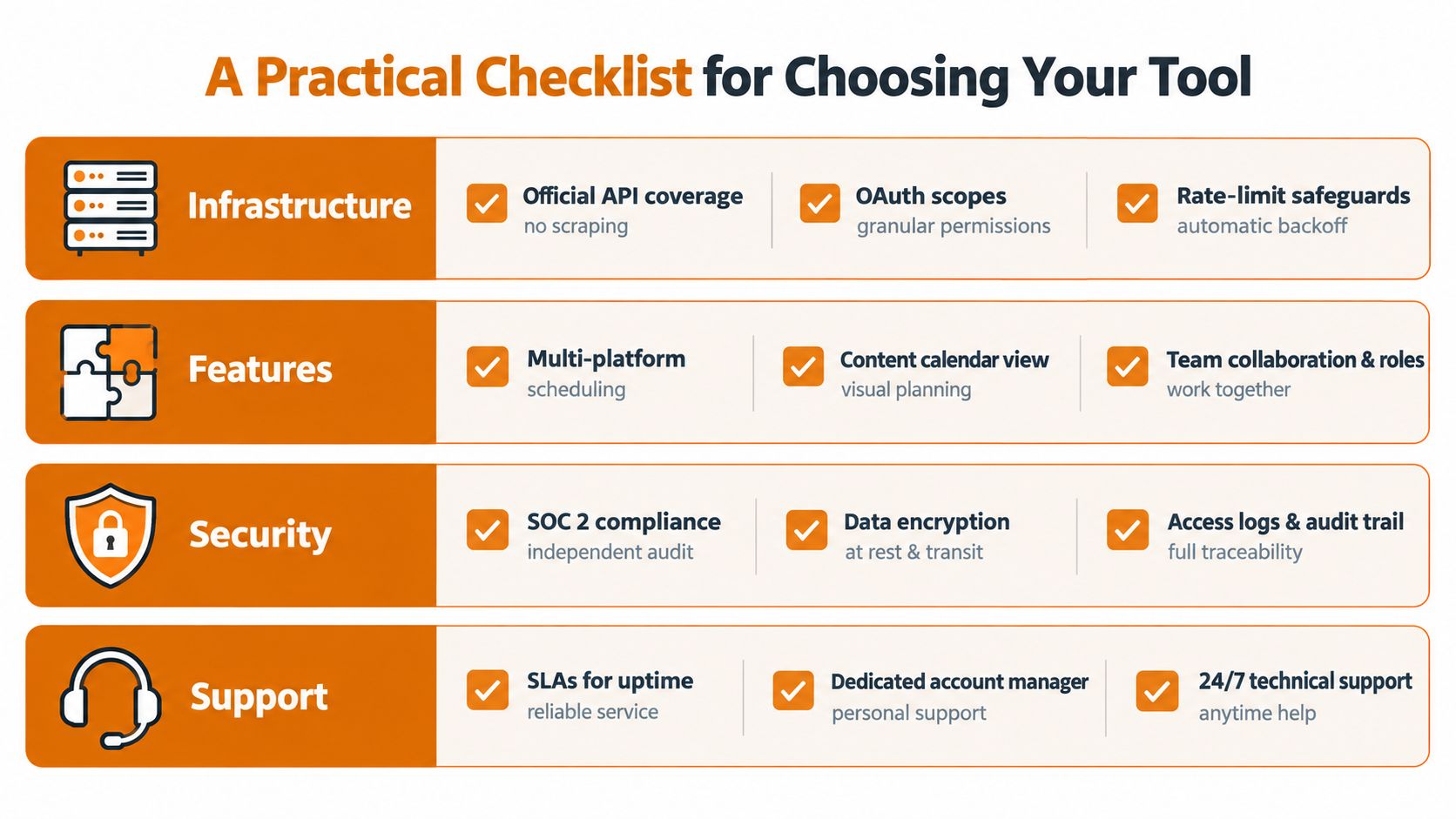
Run a short audit instead. One afternoon is enough to separate a real platform from a thin wrapper with nice branding.
Infrastructure checks
Start with hard pass-or-fail questions.
- Official API coverage: Does the vendor clearly state which networks use official APIs and which features depend on anything else?
- OAuth and token handling: Can they explain token refresh, account reconnection flows, and scope management without hand-waving?
- Rate-limit visibility: Do you get delivery statuses and useful failure reasons, or just “post failed”?
- Idempotent publishing: Can the system prevent duplicates during retries and worker restarts?
If these answers are vague, stop there. The rest doesn't matter.
Workflow and extensibility checks
Then test whether the product fits your actual operation.
| Bucket | Questions to ask |
|---|---|
| Workflow | Can you schedule by timezone, bulk queue content, and adapt copy per network? |
| Extensibility | Are webhooks available, is embedding supported, and does the SDK feel production-ready? |
| Governance | Are audit logs, role controls, and data handling practices visible and credible? |
| Portability | Can you export queued posts and account-level data if you leave? |
A few more questions I'd ask directly:
- Breaking-change discipline: Does the vendor publish updates when platform APIs change?
- Moderation hooks: Can inbound comments trigger approval or escalation logic?
- White-label support: If this sits inside your product, can you hide the infrastructure vendor cleanly?
For teams thinking beyond basic moderation, these trust and safety screening best practices are worth reviewing. Posting is only half the operational risk. The other half is what your system allows through.
The fastest real-world test
Don't commit from a sales call. Wire up a trial and force it through a realistic scenario.
- Connect real accounts: not just one sandbox profile.
- Schedule one multi-network campaign: use image, video, and text variations.
- Trigger failures intentionally: bad media, expired credentials, and duplicate attempts.
- Measure support quality: ask a technical question and see if you get a real answer.
You'll learn more in two hours of live testing than in two weeks of comparison shopping.
Buy the tool that makes failure boring. Success demos are easy. Operational recovery is the real product.
Mallary.ai gives product teams a unified way to ship social publishing, engagement, and analytics without maintaining separate integrations for each network. If you need official API-based posting, durable queues, webhooks, AI replies, and white-label embedding inside your app, visit Mallary.ai.
Try it with Mallary
STOP!
Want ChatGPT or Claude to post on social media for you?
Connect your social accounts one time. Then tell your AI what to write. It can make your posts, share them, and reply on social sites that allow replies. You do not need to write code.
Pick your AI





Connect once. Ask in plain English. Mallary does the work.


