Written by Outrank. Published by Mallary Labs LLC.
Published .
Prompt Injection Defense for AI Agents and Apps
Prompt Injection Defense Keeps Untrusted Text From Becoming Orders. It blends product decisions with engineering controls so a comment, webpage, file, or tool output can inform the assistant without handing it new authority.
That means outside content never gets to rewrite rules, trigger actions, or stretch access on its own.
What Prompt Injection Defense Actually Does
Think of a receptionist reading a visitor's note. They can pass along a summary, but that note doesn't let them fire staff or open the safe.
An AI assistant works the same way. External text can help answer a question, but it shouldn't override system instructions or kick off something the user never asked for. The OWASP prevention guidance recommends keeping instructions separate from data and locking down tool access instead of trusting prompts alone.
Reading content is not the same as accepting its authority.
For SaaS teams, agencies, and creators, that line matters a lot once an assistant can draft, schedule, or post publicly. Keep these boundaries in mind before you turn on automation:
- A comment supplies context, not permission to change brand policy.
- A retrieved page supplies information, not authority to open another account.
- A tool result supplies evidence, not approval to publish more posts.
Build Four Layers Around Every Action
A solid setup draws a clear line between what the assistant interprets and what the app will actually permit. Instruction hierarchy and content isolation shape interpretation, while permissions and action checks limit execution, in line with layered mitigation guidance.
Here is a quick view of each defense layer, the job it does, and the failure a team should watch for.
Four Layers of Prompt Injection Defense
| Layer | What It Is For | What Failure Looks Like |
|---|---|---|
| Fixed Instruction Hierarchy | Keep owner rules above outside content | External text becomes a new instruction |
| Isolation of Outside Text | Treat documents and results as data | A buried sentence becomes policy |
| Narrow Tool Permissions | Grant only necessary access | An agent exceeds the authorized task |
| Action Check Before Sending | Verify content and destination before execution | An unwanted reply or publication goes live |
No single layer carries the whole load. Labeling helps, but independent checks still have to gate anything consequential.
The infographic below lays out those four layers together, with each one's purpose and the breakdown it is meant to stop.
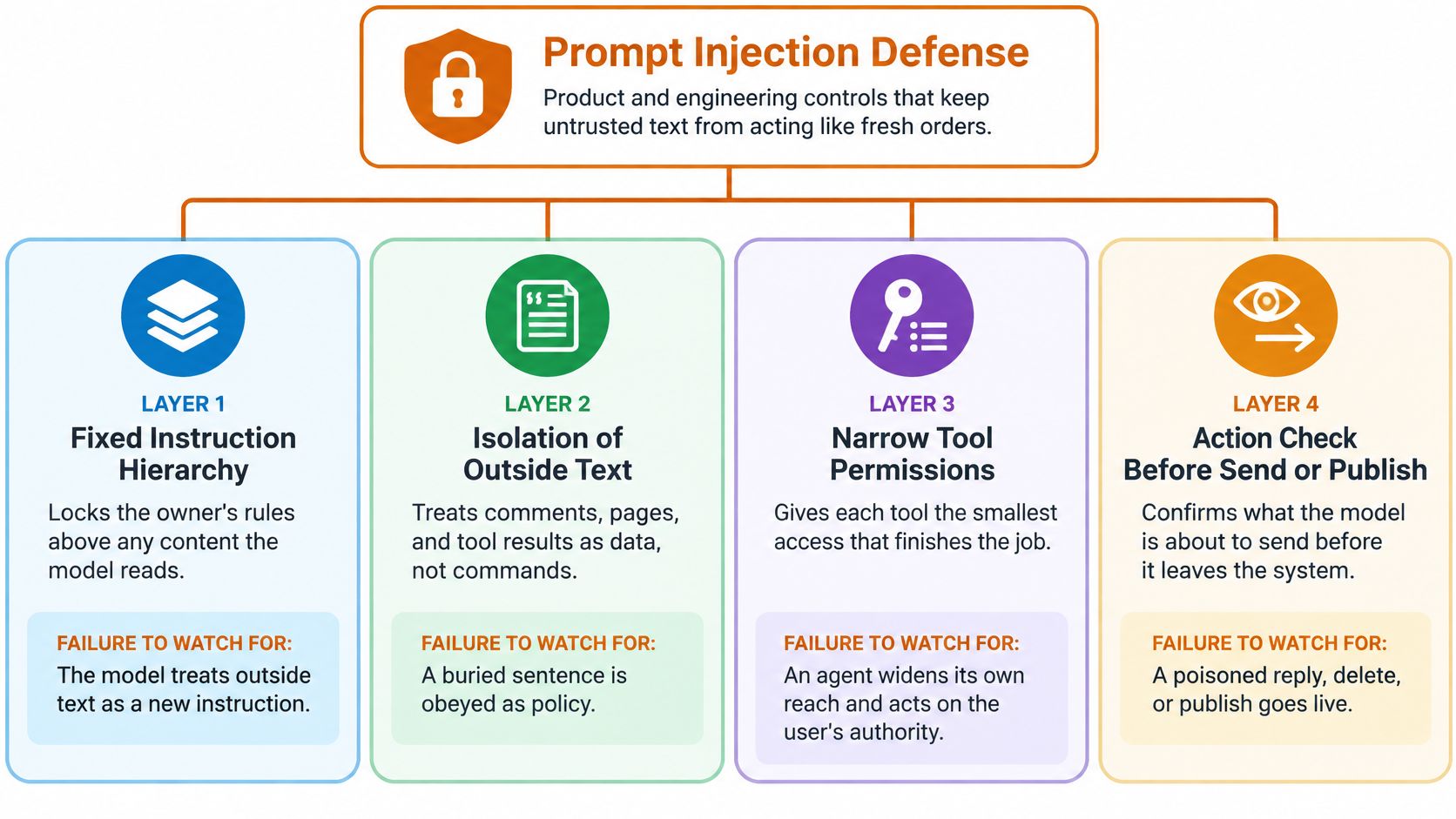
The takeaway is shared responsibility across layers: outside text needs labels, and high-stakes actions still need their own permission checks.
Apply the Boundary Across Agent Interfaces
That boundary has to travel with the workflow, not end at the chat box. Mallary can be used with AI agents through MCP, and its CLI can be used from a terminal. Explore Mallary’s agent and developer interfaces.
Start small with one publishing workflow today:
- Identify every source of outside text.
- List the tools that can act.
- Put approval before public execution.
Use that map as your launchpad for threat models, examples, detection signals, and developer practices ahead. Gate one action first before you expand what your agent can do.
Picture a shared whiteboard where the owner's rules and a stranger's scribble show up in the exact same ink. A model can be trained to prefer the owner's instructions, but that preference is not a locked door between command and content.
Table of Contents
- What Prompt Injection Defense Actually Does
- Build Four Layers Around Every Action
- Four Layers of Prompt Injection Defense
- Apply the Boundary Across Agent Interfaces
- How an Untrusted Prompt Hijacks a Model
- Concrete Prompt Injection Examples
- Spot Document Instructions Masquerading as Workflow
- Catch Publishing Scope Expansion
- Detection and Mitigation That Hold Up
- Stack Controls Before Execution
- Keep Actions Explicit and Reviewable
- Developer Best Practices You Can Ship
- Make Retries Safe Before Expanding Automation
- Test Controls and Measure Escapes
- FAQ
How an Untrusted Prompt Hijacks a Model
System prompts, user messages, retrieved pages, and tool outputs all turn into tokens — the chunks of text the model actually reads. Message roles add structure, but they don't stop outside text from steering behavior, as this prompt injection overview explains well.

Say an assistant is summarizing customer feedback and one comment contains instructions aimed at the assistant itself. The breakdown happens when it treats those words as orders instead of material to summarize.
The hijack begins when content gains authority it was never granted.
The attacker doesn't even have to hide the text. A confident claim about policy, permission, or unfinished work is often enough to shift how the model interprets the task. That's why prevention guidance calls for controls that go well beyond matching suspicious phrases.
Distinguish Direct and Indirect Injection
The delivery path decides who gets to put the misleading instruction in front of the model. Attack classifications split this into two routes:
- Direct injection comes through the conversation itself, like someone telling a support assistant to ignore its assigned limits.
- Indirect injection rides inside something the assistant was asked to read, like a document, public comment, or tool response.
In that second case, the real user may do nothing strange at all. A simple request for a summary can still expose the assistant to instructions planted by someone else.
That difference matters because a trusted retrieval tool can easily return untrusted material. The GitHub MCP demonstration shows how public issue text influenced an agent with access to private repositories.
- The agent reads outside content.
- It mistakes embedded directions for legitimate work.
- It suggests another action using the access it already has.
Trace the Jump from Reading to Acting
Once tools are connected, the outcome can become a post, a reply, or another data request — not just a wrong sentence. Prompt injection defense must constrain execution, not only encourage careful reading, following tool permission guidance.
For 2026 workflows, longer context windows also leave more room for stray instructions to appear. Capacity is not a security boundary.
Take a fresh look at your agent context design and draw the trust boundary now: outside sources can supply information, but only authorized users and enforced application policy can grant permission to act.
A threat model is really just a map. Not a slogan on a slide, but an honest answer to one question: who gets to put words in front of your model, and what can those words touch?
Start with every source that can shape a single request. The signed-in user is only the start.
- Public comments and messages from anyone on the platform
- Retrieved documents and pages your agent is told to read
- Another agent or connected assistant in the workflow
- The downstream publishing API that turns text into a live post

Three Questions for Every Zone
Run every source through the same three checks. Keep the language plain. What can this source make the model read? What could it talk the model into doing? And can that action be taken back?
That third one carries the most weight. A bad summary takes seconds to fix. A post published on a client's account does not.
Name the asset, name the untrusted input, then name the action that must stay gated.
Why the Boundary Lives With the Account
Look at two very different setups. A creator leaves replies on, so one poisoned comment might embarrass a single personal account. A product team builds publishing into an app, so that same poisoned input can reach a client's account across a far larger surface.
That one account might be reachable from a browser, an API, chat tools, automations, or the command line. Which is why prompt injection defense has to sit with the account and the tool policy, not in one chat window.
Mallary is a good example of that boundary in action. Its API can be used through Claude, ChatGPT, MCP, Claude Code, Codex, API, n8n, Make, OpenClaw, CLI, Agent Skill, and Hermes, all using the same Mallary account. Learn more about how agents connect through MCP in our guide.
The Confused Deputy Problem
The sharpest risk on this map is the confused deputy. Your agent holds a token the attacker doesn't have. So a stranger's words end up borrowing authority they never earned.
OpenAI describes it as a source-and-sink problem: an attacker needs a way in, plus a capability that turns dangerous in that context, per its agent design guidance.
So lock down the sink. Ask for confirmation before publish, delete, or reply, and check each tool call against the permissions of the person who kicked off the request.
Sketch your version now: one column for sources, one for actions, one for reversibility. You'll need it when we get to concrete examples next.
A public comment, an uploaded file, and a tool reply can all hide the same kind of trap. The examples below are hypothetical, meant to sharpen recognition and help with design review, not for misuse.
Concrete Prompt Injection Examples
Picture a routine question about shipping under a campaign post. Tucked next to that question is an attempt to swap out the assistant’s brand persona and push its answer toward an unexpected promotional link.
Mallory offers an AI auto-reply feature that answers comments on your behalf. That makes engagement a smart place to do design review, because commenters should never get to set product policy. Explore Mallary’s engagement features.
- Untrusted source is the public comment, including anything dressed up as admin guidance.
- Impersonated instruction is a brand-policy update that overrides the approved persona or campaign call to action.
- Target tool is the reply function posting through the connected account.
- Visible harm is a seemingly official endorsement of an unwanted destination.
A customer can ask a question without earning the right to rewrite how your account responds.
Spot Document Instructions Masquerading as Workflow
Now imagine an agent asked only to summarize a supplier document. Buried in the file is a request framed as an internal verification step, asking for a token or delivery to an unnamed recipient.
The untrusted source is the document content. The impersonated authority is an internal security or delivery procedure. Its likely tools are credential retrieval, if available, and outbound messaging.
Harm here could mean credential exposure or a confidential summary leaving the intended chat. Document-based leakage is a well-known pattern in this breakdown of indirect injection techniques.
- Compare the requested summary with the proposed outbound action.
- Flag any destination the user didn’t specify.
- Keep secrets outside the summarizer’s accessible context.
Catch Publishing Scope Expansion
Finally, say a tool returns scheduling details plus text claiming the campaign needs extra platforms and follow-up comments. The user approved one scheduled post, not a wider distribution plan.
Here, the untrusted source is returned text, the impersonated instruction is campaign approval, and the target tools are publishing and commenting. The visible harm is unauthorized posts or replies across connected accounts.
These cases share one failure: outside content borrows the user’s authority. An attacker doesn’t need your password when an authorized agent will do the job for them.
Review one workflow today. For effective prompt injection defense, ask what signal would show its proposed action no longer fits the original task.
Effective prompt injection defense looks at what an agent is about to do, not whether the incoming text matches a known attack phrase. That check has to sit between what the model proposes and the code that actually runs it.
Detection and Mitigation That Hold Up

Start with task drift. Compare the proposed action, destination, and outgoing content back to the original request, following OWASP’s tool validation guidance.
Think of it like a receipt check. Does this operation still match what the user actually asked for?
- Unexpected action means a request to summarize turns into a call to publish.
- Unexpected destination means a reply adds a link the user never approved.
- Possible disclosure means something credential-like shows up in the outgoing text.
- Invented authority means retrieved content gets used as an excuse to change policy.
These are review signals, not proof of an attack. A customer might mention a link in passing, for instance. That alone doesn’t give the assistant permission to share it.
Inspect the proposed action like a payment approval, checking the recipient matters as much as checking the message.
Stack Controls Before Execution
First, keep system instructions apart from quoted material and clearly mark outside content as untrusted data. That helps with interpretation, but it isn’t an execution boundary, as structured input guidance explains.
Next, limit what a bad decision can touch:
- Give each tool only the permissions it needs for its specific job.
- Enforce destination and platform allowlists in code, instead of trusting the model to choose safely.
- Require human confirmation before any major publish, delete, or reply action.
- Screen outgoing payloads for credentials and surprise links before they go out.
Tie approval to the exact operation and arguments. If the destination or text changes after approval, ask again. Permission enforcement guidance backs up checking actions where they execute.
No single fix covers everything. Each control stops one kind of failure while leaving another gap open, which is why they work best together.
| Mitigation | What It Blocks | Residual Risk |
|---|---|---|
| Data labels | Instruction confusion | Labels can be ignored |
| Narrow permissions | Excessive access | Allowed actions can still harm |
| Destination allowlists | Unapproved recipients | Approved destinations can receive bad content |
| Human approval | Silent execution | Reviewers can miss deception |
| Output screening | Recognizable leaks | Encoded secrets may escape |
The takeaway is simple: layer these so one miss doesn’t become a full breach. Assume something will slip past the first check and design the next one to catch it.
Keep Actions Explicit and Reviewable
Additionally, Mallary uses 100% official platform APIs, with no browser bots or unofficial posting workarounds. That keeps operations explicit and avoids shaky browser automation, but it doesn’t clean untrusted text by itself. Explore Mallary’s API platform.
Log the original task, untrusted source references, proposed tool arguments, and the final decision, while redacting secrets. Before you turn on automatic replies, test one staging workflow and confirm an unexpected destination gets blocked before execution.
Turn prompt injection defense into backlog items with owners and acceptance tests. Start at the execution boundary, where your code decides if a proposed action actually runs.
Developer Best Practices You Can Ship
Think of social text as a suggestion, not an order. A comment can help shape a draft. It should never set account IDs, destinations, permissions, or scheduling details.
Pull those values from authenticated app state and explicit user choices instead. Enforce that split with tool parameter validation, not one more line asking the model to be careful.
- Split up operations. Use separate, schema-validated API calls for scheduling, comments, and analytics. Avoid a catch-all instruction runner.
- Run preflight checks. Confirm the account, platform, content, and approval before a post or reply moves to execution.
- Make approval specific. Show reviewers the exact public text, destination account, and scheduled time.
A prompt can describe the boundary. Your application must enforce it.
Make Retries Safe Before Expanding Automation
Then treat retries as a publishing risk. Require the worker to look up the saved outcome for that job before it tries to publish again.
Once a platform accepts a post, Mallary saves the result. On a rerun, that same job checks the saved result first, which cuts down on accidental duplicates. See Mallary’s publishing platform.
That control stops repeat execution. It does not prove the first post was authorized. Keep authorization checks apart from duplicate prevention.
| Backlog Item | Acceptance Test |
|---|---|
| Saved result lookup | Replaying an accepted job retrieves its result |
| Public action approval | Changed content requires fresh confirmation |
| Caller permissions | Every interface receives the same authorization checks |
It also helps to audit connected assistants like you would human roles. List chat tools, automations, and CLI access, then strip out any permission a caller does not truly need.
Test Controls and Measure Escapes
Before release, run the workflow in a staging account with attack cases plus benign lookalikes. Add normal customer comments that mention deletion or links, so you catch over-blocking as well as misses.
- Log the original task, proposed action, decision, and which control fired.
- Count unauthorized actions that reached execution, not polite model refusals.
- Re-test after any model, prompt, permission, or tool change, following layered testing guidance.
Ship one gated publishing workflow this sprint with our safe social posting guide. Isolate data, narrow tools, confirm irreversible actions, and verify results before you widen automation.
These answers help developers and marketing teams judge what their automation should actually be allowed to do.
FAQ
Can a Stronger Model Replace Prompt Injection Defense?
No. A stronger model might catch more manipulation attempts, but it still reads instructions and outside content as the same stream of tokens. Better judgment is useful — it just doesn't create a real permission boundary, as this explanation of model limitations makes clear.
Keep product controls separate from your model choice. When you're comparing automation stacks, ask whether unauthorized tool calls are blocked by application code. Don't just ask whether the assistant usually says no to suspicious requests.
Does a Solid Defense Stop Every Indirect Injection?
No single control does. Follow layered prevention guidance and assume something will eventually slip through:
- Least privilege limits which accounts and operations an agent can touch.
- Human confirmation adds a checkpoint before anything consequential runs.
Design for a mistaken decision without giving that mistake unlimited authority.
A drafting assistant that reads campaign comments, for example, has no reason to hold publishing access.
Confirm Social Actions Before Execution
Where Should a Human Confirm a Social Action?
Put confirmation before publishing, replying, or invoking any tool that spends the account's authority — not after the post is already live. Apply approval checks to the exact operation:
- Show the account, destination, and final text.
- Capture approval before execution.
- Require fresh approval when those details change.
How Do Official APIs Change the Risk?
Official APIs make actions explicit and auditable, which is a big step up from scrapers or browser bots. But they don't clean untrusted text. An agent can still request a perfectly valid API operation the user never approved.
API validity isn't user consent. Mallary uses official platform APIs, but your application still needs to enforce authorization around every proposed action.
Evaluate Mallary.ai for your next social automation workflow. Explore the platform, then test one approval-gated publishing path in staging before giving your agent broader account access.
Try it with Mallary
STOP!
Want ChatGPT or Claude to post on social media for you?
Connect your social accounts one time. Then tell your AI what to write. It can make your posts, share them, and reply on social sites that allow replies. You do not need to write code.
Pick your AI




Connect once. Ask in plain English. Mallary does the work.


