Written by Outrank. Published by Mallary Labs LLC.
Published .
How to Post Facebook Posts to Instagram the Smart Way
It's Monday morning. Three posts are already live on Facebook, Instagram has been quiet since the weekend, and the marketing lead is trying to work out whether an Accounts Center setting is off or whether those posts can't be shared to Instagram. The team needs the answer before its next campaign goes out, not after another round of manual uploads.
“Post Facebook posts to Instagram” sounds like one action. In practice, it's a set of decisions: which Facebook content is eligible, which publishing route supports it, whether the media needs adaptation, and how to measure each destination without double-counting. A linked account alone won't resolve every content or permission mismatch. The reliable approach is to treat each post as a payload that needs to be checked and translated for its destination.
Table of Contents
- The Monday-Morning Cross-Posting Problem
- Why Cross-Posting Exists and Why It Still Feels Hard
- Which Facebook Posts Can Actually Reach Instagram
- Media Compliance and the Pre-Publish Checks That Save You
- Native Meta Tools Compared to a Unified Developer API
- What Changes When Content Crosses Networks
- Troubleshooting the Cross-Posting Failures Nobody Warns You About
The Monday-Morning Cross-Posting Problem
Start with the posts themselves. One might be a text-only announcement, another a photo with a link preview, and the third a video. They can look equally ready in Facebook's composer, yet that doesn't make them equally suitable for Instagram. Instagram feed publishing requires media, and Facebook's original attachment, caption, and audience settings don't automatically transfer as-is.
The account setup can be just as confusing. A teammate may have connected a personal profile through Accounts Center, while the content they want to publish belongs to a business Page. That distinction matters because Meta documents the Accounts Center sharing flow for personal-profile posts and stories, not posts and stories made on business Pages. A connected Instagram account therefore doesn't guarantee that the Facebook object in front of you is eligible.
Before choosing a workflow, get the team to answer four questions:
- What is the source object? Identify whether it's a personal-profile post, a Page post, a group post, or content being drafted for a specific publishing surface.
- What does it contain? Separate text-only posts, images, carousels, videos, Reels, Stories, and links instead of treating them all as a generic “post.”
- Which publishing route applies? Accounts Center, Meta Business Suite, and the Instagram Graph API support different workflows and offer different levels of control.
- What should Instagram's version say and do? Decide whether to rewrite the caption, change the media, remove link-preview expectations, or schedule a separate destination post.
Practical rule: Confirm the account and content type before you troubleshoot the toggle. That's where many apparent connection problems begin.
Once the team can classify its posts this way, it can stop asking only, “Why didn't Facebook copy this?” and start asking the useful question: “Which Instagram publishing path supports this content, and what does the payload need before we send it?”
Why Cross-Posting Exists and Why It Still Feels Hard
Meta's cross-platform publishing developed over time rather than arriving as one unified feature. Instagram introduced cross-posting Instagram Stories to Facebook in October 2017. In March 2020, Facebook was publicly testing the reverse direction, including a “Share to Instagram” option for Facebook Stories and the possibility of sharing future Facebook posts. That history shows a gradual effort to reduce repetitive publishing, not a guarantee that every format and account combination works the same way (TechCrunch's coverage of the Facebook-to-Instagram test).
The distinction matters to product teams. Two services can share a parent company and still have separate publishing surfaces, permissions, audience expectations, and media requirements. A Facebook post isn't automatically a valid Instagram post just because both accounts belong to the same organization. A workflow has to account for what the destination accepts and how its users consume the content.
The audience scale explains why teams keep building these workflows despite the friction. By 2025, Facebook and Instagram each had approximately 3 billion monthly active users, and Meta reported 3.48 billion daily active people across its family of apps in July 2025 (CNBC's report on Instagram's audience milestone and Meta's figures). Those totals don't represent distinct people across the two platforms; audiences overlap. Still, publishing to both can put a campaign in front of communities that use different Meta apps.
Distribution is shared, behavior isn't
The practical benefit is broader distribution from a coordinated publishing operation. The trade-off is that one creative may need more than one treatment. A link preview that makes sense on Facebook may not work as expected in an Instagram feed post, and a caption written for one audience may need editing for the other.
That makes cross-posting a platform translation problem, not merely a duplication feature. Teams that design for the destination can reuse the core idea while changing the caption, media treatment, and call to action. Teams that copy blindly may publish something technically valid but poorly adapted.
The history of Stories sharing followed by feed-publishing tests helps explain today's uneven experience. Meta's services have moved toward interoperability, but an operational workflow still has to handle the differences between accounts and content formats. Cross-posting is a meaningful distribution system, and the quality of the result depends on how well the team handles those boundaries.
Which Facebook Posts Can Actually Reach Instagram
Eligibility depends first on who owns the Facebook source, then on what kind of content it is. Meta's Accounts Center documentation describes sharing posts or stories from a personal profile to Instagram. It doesn't support posts or stories made on Facebook business Pages through that specific flow (Meta's Accounts Center guidance). Page publishing may use Meta Business Suite or a developer integration instead, with the available options varying by format.
Use this matrix as a routing guide, not as a promise that every account will show the same controls. Native options can vary by account setup and content type, so check the actual composer before planning a campaign around a particular route.
| Facebook source | Account type | Eligible for Instagram | Recommended Meta surface |
|---|---|---|---|
| Post or Story | Personal profile | Documented through the Accounts Center sharing flow | Accounts Center |
| Post or Story | Business Page | Not supported through the Accounts Center flow | Check Meta Business Suite; use a developer workflow if its supported formats and controls fit |
| Post | Group | Don't assume group content can be sent directly to Instagram | Publish separately through an eligible account |
| Shared link | Personal profile or Page | A Facebook link preview shouldn't be expected to behave like an Instagram feed post | Create an Instagram-appropriate post with media and a suitable caption |
| Single image | Personal profile or Page | Depends on account ownership and the publishing surface | Accounts Center for eligible personal-profile sharing; otherwise check Business Suite or API eligibility |
| Carousel | Page or personal profile | Don't assume the full carousel transfers through a native cross-post control | Verify the destination composer or publish separately |
| Video or Reel | Page or personal profile | Requires destination-specific media checks; availability depends on the route | Check Business Suite or use an API workflow with format validation |
| Story | Personal profile or Page | The Accounts Center flow covers personal-profile Stories, not Page Stories | Use the surface that supports the source account and format |
The matrix highlights a common dead end: teams link a Page and an Instagram account, then expect every Facebook post to appear on Instagram. Account connection doesn't override the limits of a publishing flow. A Page post may need to be scheduled separately in Business Suite or sent through a developer integration that explicitly supports the destination and content type.
Choose the route before composing
For an eligible personal-profile post, start with Accounts Center and confirm that sharing is enabled for the right content. For Page content, check Meta Business Suite's available publishing options for the specific format. If you're building a repeatable product workflow or need controlled retries and logging, evaluate the API route rather than assuming a native toggle will cover the long tail.
Text-only Facebook posts are a special case: they can't become Instagram feed posts through an API workflow that requires media. A shared link also needs a different treatment. Instead of expecting a Facebook preview to transfer, prepare an image or video and write a caption that makes sense on Instagram.
Media Compliance and the Pre-Publish Checks That Save You
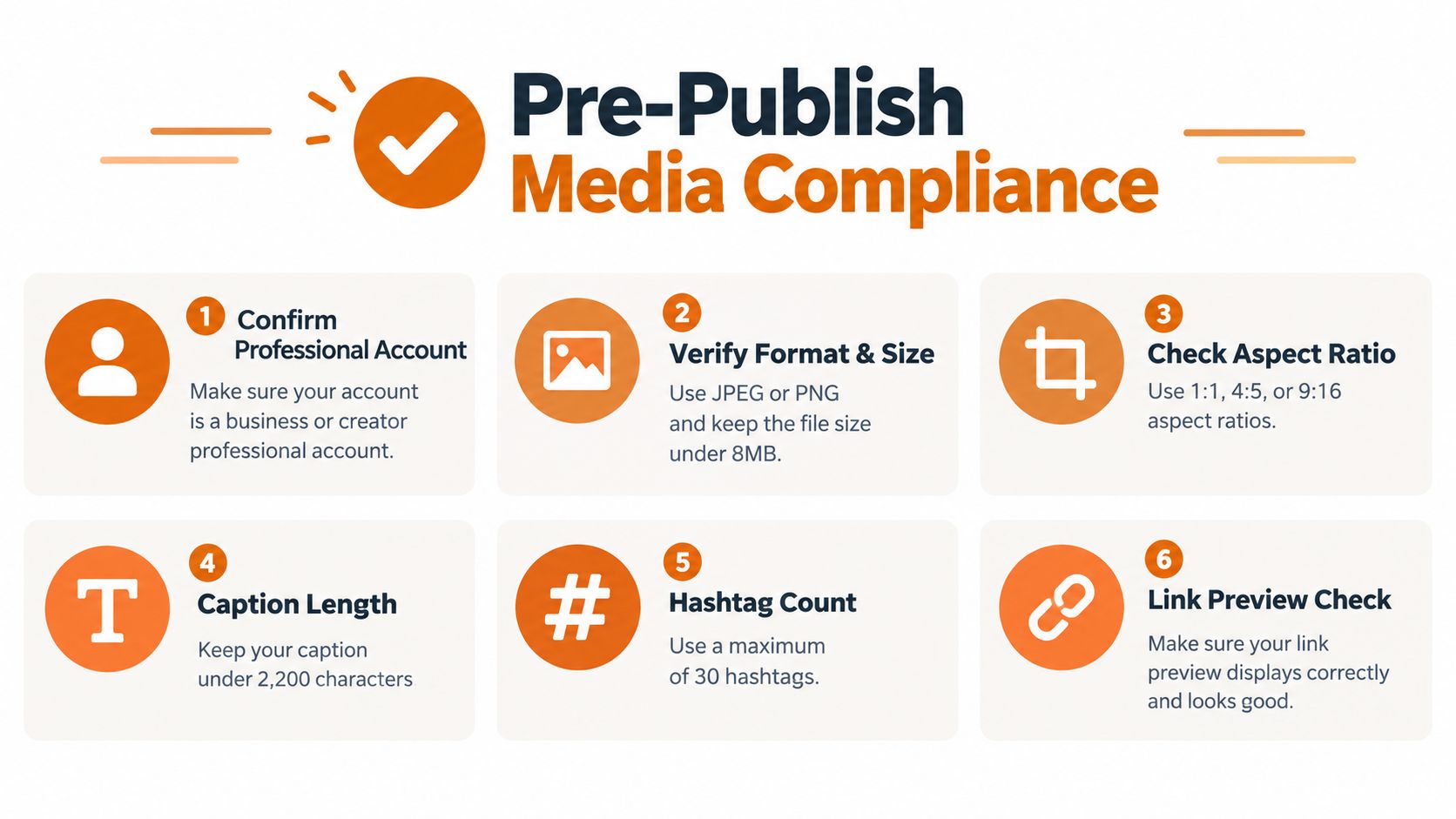
A production workflow should validate the Instagram destination before it creates a media container. Use an Instagram Professional account: Business or Creator. Instagram Login does not need a linked Facebook Page. Facebook Login needs a Page linked to the Instagram account. Then confirm that your approved Meta app has the permissions required for publishing. If the account type, connection, or permissions don't match, reject the job before it enters the queue.
Validate media before upload
For feed images, check that the file uses an accepted image format and fits Instagram's supported aspect-ratio range of 4:5 to 1.91:1. Don't rely on a Facebook crop or attachment being suitable for Instagram. Generate a destination-specific derivative when needed, then record its cryptographic hash so retries can recognize that they're processing the same asset.
Videos and Reels need their own checks. Validate codec, audio, duration, dimensions, and container metadata before submission; don't assume a Facebook-hosted playback URL is a suitable upload source. The media URL must be reachable by Meta over the public internet and remain available throughout ingestion and processing. Private storage, authentication-dependent redirects, expired signed URLs, and temporary files that disappear early can all break an asynchronous job.
Run a HEAD or GET preflight before queuing the publish request. Confirm that the response returns bytes and an expected content type, and check that the URL won't expire during processing. Teams building these safeguards can use this preflight checklist for publishing workflows as a starting point. For regulated teams adapting the same operational discipline to advisor content, the compliance checklist for advisor social posts offers a useful companion resource.
Make retries safe
Key idempotency on the source Facebook post ID plus the Instagram account ID. Persist the media container ID and the final published-media ID, so a network timeout doesn't cause a retry to create a duplicate. Preflight should also reject missing permissions, incompatible account types, inaccessible URLs, and unsupported media before the job reaches the publishing stage.
Check the account's publishing capacity before sending queued posts. Use GET /{ig-user-id}/content_publishing_limit?fields=quota_usage,config to read current usage and the account's quota. A carousel counts as one post. Spread jobs out and show quota errors clearly. See Meta's content publishing guide for the current rules.
Native Meta Tools Compared to a Unified Developer API
The right publishing route depends on how much control the team needs. Accounts Center is the lightest option for personal-profile sharing that the flow supports. It asks little of a developer, but it doesn't solve Page publishing through that same path or provide a full automation pipeline. Meta Business Suite is more relevant for Page workflows and manual scheduling, but teams still need to verify whether the composer supports their content format and operating needs.
The Instagram Graph API is the developer route when the product needs explicit validation and publishing behavior. Choose your login flow before requesting permissions. Instagram Login uses instagram_business_basic and instagram_business_content_publish. Facebook Login uses instagram_basic, instagram_content_publish, and pages_read_engagement; check Meta's requirements for your account setup. Get the app review and access level needed to serve your users. Publishing is an asynchronous, two-step process: create a media container with POST /{ig-user-id}/media, then publish it with POST /{ig-user-id}/media_publish after processing completes (Meta's Instagram APIs documentation). The trade-off is control in exchange for implementation work: OAuth, permission management, media adaptation, queueing, status polling, and retry safety are yours to build.
| Route | Permission overhead | Retry resilience | Media adaptation | Scheduling and analytics |
|---|---|---|---|---|
| Accounts Center | Low for eligible personal-profile sharing | Basic user-driven workflow | Limited control | Simple sharing, limited instrumentation |
| Meta Business Suite | Account and Page access setup | Manual recovery | Composer-dependent | Useful for Page scheduling, verify format availability |
| Direct Instagram Graph API | Approved app and publishing permissions | Fully engineerable | Explicit validation and transformation | Custom scheduling and separate metrics require implementation |
| Unified developer API | One integration surface, with platform authorization still required | Can centralize retries and job tracking | Can apply destination-specific preflight rules | Can coordinate publishing and preserve per-network records |
A unified API can be a shortcut for teams that already maintain social infrastructure or don't want to own a separate integration for each network. Mallary.ai is one option in that category: it provides a unified publishing interface, manages OAuth and queued jobs, and supports media validation and adaptation across connected platforms. Its social media posting API is relevant when a product needs one workflow for Facebook and Instagram rather than separate publishing code paths.
That convenience doesn't remove the need to design the content correctly. A wrapper can centralize authentication, retries, and publishing, but teams still need to decide whether the source asset makes sense on Instagram and how to represent the destination post in their data model.
What Changes When Content Crosses Networks
A cross-post isn't always an equivalent copy. Captions may need rewriting, hashtags may behave differently, and Facebook link-preview expectations don't carry over cleanly to an Instagram feed post. The two audiences may also encounter the content under different account identities, while each destination has its own permalink. Preserve the original idea, but adapt the pieces that depend on the platform.
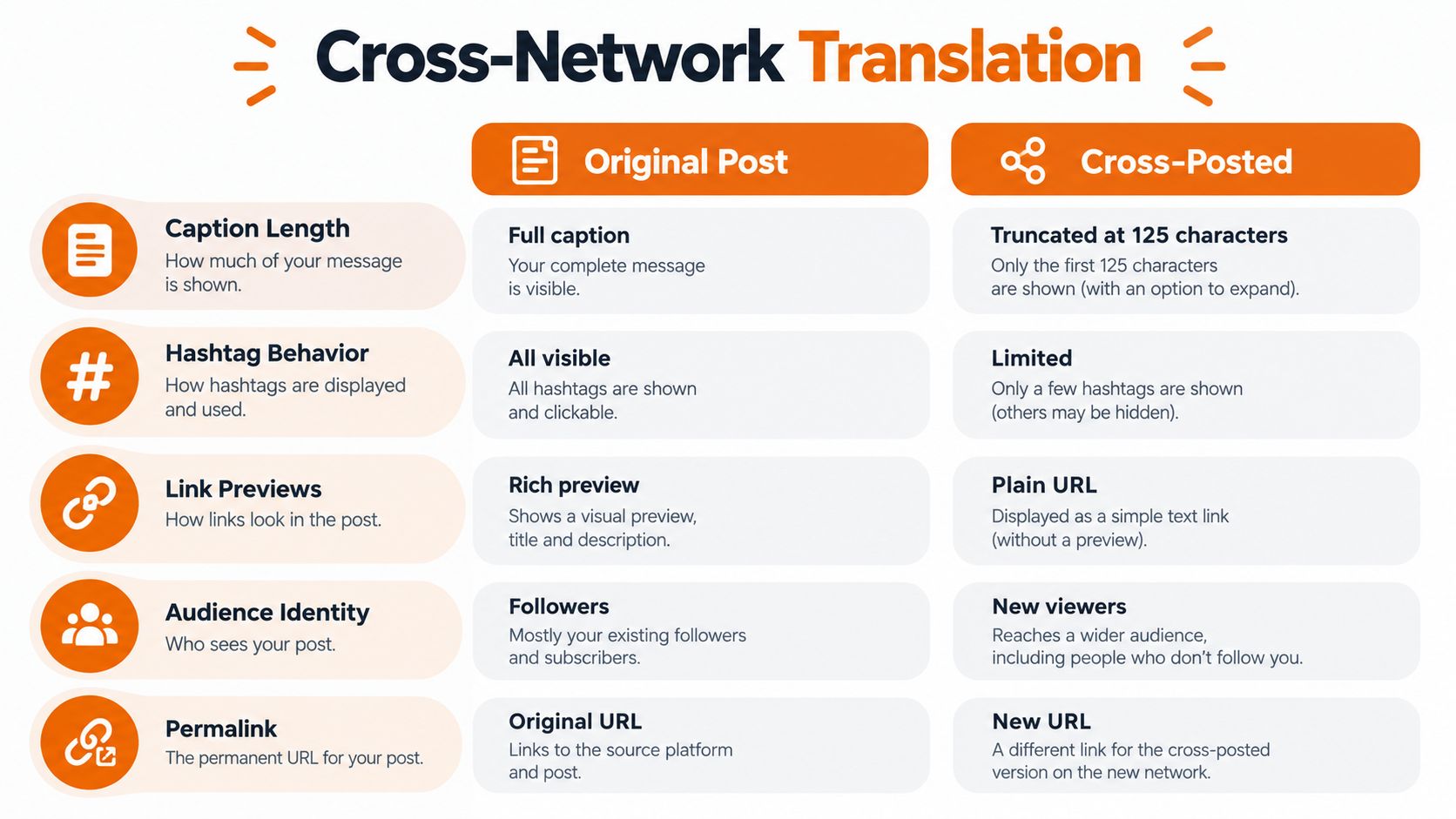
Teams should decide what to retain and what to transform before publishing. A campaign caption may need a shorter opening, a different call to action, or hashtags chosen for the destination. Check music and rights portability rather than assuming that an audio choice available on one platform will travel with the file. Treat comments, edits, and deletions as separate platform events unless the integration explicitly synchronizes them.
For marketers reviewing their broader channel strategy, BEDHEAD's social media marketing tips provide additional context for thinking beyond simple duplication.
Keep destination metrics distinct
The analytics model deserves the same care as the publishing model. For Reels cross-posted to Facebook, Meta's Marketing API distinguishes crossposted_views, which represents total views across Instagram and Facebook, from facebook_views, which represents views from Facebook users only (Buffer's cross-posting guidance). If a dashboard treats those combined views as an Instagram total and then adds Facebook views again, it can double-count activity.
Store the source Facebook post ID and the Instagram media ID as separate records linked by a shared campaign or source identifier. Keep per-network metrics separate from aggregated cross-post metrics, and label the scope of each field in reports. That lets a team compare native performance without mistaking combined views for platform-specific results.
A duplicated creative also doesn't create a clean apples-to-apples experiment. Captions, audience composition, placement, and platform-native behavior differ. Record which version each network received, then interpret engagement in the context of those differences instead of attributing every change to the channel alone.
Troubleshooting the Cross-Posting Failures Nobody Warns You About
A publish job can fail after the file appears to upload correctly. The media container may still be processing, the source URL may have expired, or the video may fail a destination check. Make the system's state visible rather than treating “request accepted” as “post published.”

Poll the container status with bounded exponential backoff and a clear deadline. Keep transient processing states separate from terminal errors, and retry only stages that are safe to repeat. If the publish request times out, check the stored container and published-media IDs before sending another request; otherwise, a network hiccup can become a duplicate post.
Signed storage URLs are another common trap. If a URL expires while Meta is still fetching or processing the asset, the job can fail asynchronously even though the preflight request initially succeeded. Use a stable, publicly reachable URL for the full processing window, and classify errors by stage: authorization, container creation, processing, or final publishing.
For a practical overview of the manual sharing path and its constraints, see the Growth 4 Trades Facebook-to-Instagram sharing guide. If the failure appears to be on Facebook rather than Instagram, this guide to troubleshooting Facebook publishing issues can help narrow the source.
A concise runbook should verify account eligibility, validate media and URL access, check permissions and publishing capacity, persist IDs for idempotency, poll processing status, and record the final outcome separately for each network. The following walkthrough covers the same kind of cross-posting flow in action.
Reliable cross-posting comes from handling the edges: unsupported source objects, media that needs conversion, asynchronous processing, and retries that must not duplicate content. Build those checks into the workflow before teams depend on it for scheduled campaigns.
Mallary.ai gives product and marketing teams one API and dashboard for publishing across connected social accounts, with preflight validation, queued jobs, and retry handling for workflows like Facebook-to-Instagram sharing. If you're ready to replace a fragile copy-and-paste process with a trackable publishing workflow, visit Mallary.ai.
Try it with Mallary
STOP!
Want ChatGPT or Claude to post on social media for you?
Connect your social accounts one time. Then tell your AI what to write. It can make your posts, share them, and reply on social sites that allow replies. You do not need to write code.
Pick your AI





Connect once. Ask in plain English. Mallary does the work.


