Written by Outrank. Published by Mallary Labs LLC.
Published .
OAuth vs API Key: When Each One Fits Your App
The most repeated advice in this debate is that OAuth is the secure choice and API keys are a legacy shortcut to retire as soon as you can. Applied without a second question, that advice produces worse outcomes than the keys it replaced, because it skips the thing that decides the design: whose permission does this call represent?
A key and a token can both be pasted into a curl command and both can leak into a GitHub commit. What separates them is blast radius, recovery behavior, and how much infrastructure your integration can afford to run. AI agents now add a third factor, since an autonomous worker holding a credential is a different risk object than a cron job holding one.
Table of Contents
- OAuth vs API Keys at a Glance
- What Each Credential Proves and How It Authenticates
- Security Trade-offs and Blast Radius
- Access Control, Scopes and Token Lifetimes
- Use Cases and When Each Credential Fits
- Using Both Together and Migrating from Keys to OAuth
- Pick the Credential Your Integration Needs
OAuth vs API Keys at a Glance
An API key proves which application is calling. OAuth proves that a person approved what that application may do. Every other difference, from lifetime to revocation, follows from that split.
| Criterion | API key | OAuth 2.0 |
|---|---|---|
| What it identifies | The application or project making the call | The application acting for a specific user or account |
| Who approves access | Whoever issues the key | The account owner, through a consent screen |
| Credential lifetime | Usually long-lived until rotated or revoked | Access tokens short-lived; refresh tokens last longer |
| Scope control | Set per key, often broad | Scopes granted per connection |
| Revocation | Manual disable or rotation of the key | Revoke a single connection or token |
| Password exposure | Not applicable to the key itself | The user's password is never shared with the app |
| Typical use | Server-to-server calls and metered access | Third-party apps acting on user accounts |
| Setup effort | One header, minimal logic | Redirect URIs, code exchange and refresh handling |
Read the table as a filter. The rows where OAuth leads all concern user-owned data and delegated actions: consent, per-connection scopes, token expiry, revocation of one account without touching anyone else. The rows where API keys lead concern setup simplicity and server-to-server calls where no human is involved and nobody needs to approve anything.
The standard in force is OAuth 2.0, defined in RFC 6749. OAuth 1.0 has been replaced, so any library or guide still walking you through signature nonces and HMAC-SHA1 request signing is describing a retired protocol, not a current alternative.
The line that decides it: neither credential is automatically safer; the right one depends on whose permission the call represents.
The table is a starting filter, not a verdict. Each row gets tested later against leak behavior, request flow, permission granularity, and latency, and some rows flip once you look at how a credential fails rather than how it authenticates.
When you're mapping credentials across several providers at once, it helps to see how other teams structure multi-provider integrations before you commit to a shape. It's worth taking a moment to compare API integration service providers so the credential model you pick fits the rest of your stack instead of fighting it.
What Each Credential Proves and How It Authenticates
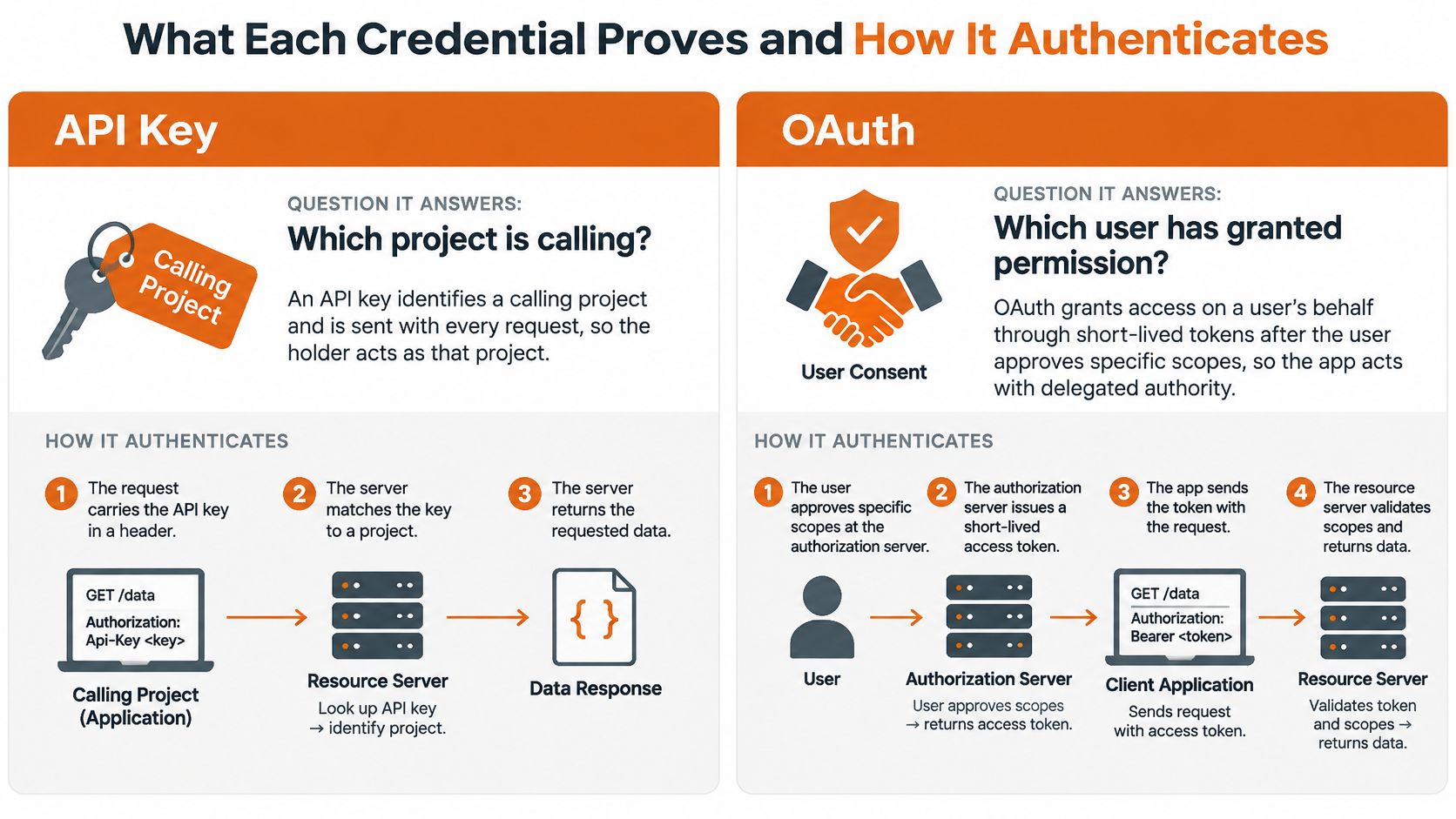
An API key answers one question. OAuth answers a different one, and the difference shows up in the request flow rather than in the protocol name.
The question an API key answers
An API key identifies the calling project, and it travels with every request. Whoever holds it acts as that project, with every permission the key carries. The flow is short:
- Issue one key per project. Not one key for the whole company. A key per service is what makes rotation and revocation survivable.
- Store it in a secrets manager. Not in the repository, not in a build log, not in a mobile binary.
- Send it in the Authorization header as a Bearer credential. Headers stay out of access logs in a way query strings don't.
- Let the server look up the key, check its permissions and quota, then answer or reject.
Calling Mallary's posting endpoint with a Bearer API key looks exactly like this. One header, no redirect, no consent screen, no second network call.
The question OAuth answers
OAuth separates four things an API key fuses together: client identity, the authorization grant, the access token, and, where applicable, the refresh token. That separation is what lets it carry consent. The OAuth 2.0 specification, RFC 6749, published in October 2012, replaced OAuth 1.0 (RFC 5849, April 2010) and defines a framework in which a third-party app gets limited access to an HTTP service either through an end-user approval interaction or on its own behalf. It also requires the authorization server to stop attackers guessing access tokens, authorization codes, refresh tokens, resource-owner passwords, and client credentials.
That retirement matters practically. RFC 6749 established the model behind every modern "Sign in with" button and account connection screen, which is why actions taken on behalf of a person use OAuth while server-to-server identification still fits a key.
The authorization code flow with PKCE, step by step
- Generate a code verifier and challenge. The challenge is a hash of the verifier; only the app that started the flow holds the original.
- Redirect the user to the authorization server with the scopes you need, not the full menu.
- The user approves consent and sees exactly what the app is asking for.
- The app receives an authorization code at its registered redirect URI.
- Exchange the code plus the verifier for an access token and a refresh token. PKCE binds the code to the client that started the flow, so an intercepted code is useless to anyone else.
- Call the API with the bearer token.
- On expiry, use the refresh token to get a new access token without asking the user again.
- If the grant was revoked, the refresh fails. That's the most common error teams hit in production, and the only fix is a reconnect prompt for the user.
When no user is present
The client credentials grant covers machine-to-machine calls: the app authenticates as itself and gets a short-lived, scoped token instead of holding a permanent secret. It keeps the lifecycle benefits of OAuth in cases where consent is meaningless.
An API key answers which app is this. OAuth answers which app is acting for which person, with what permission. Get the second answer wrong and no amount of key hygiene will fix it.
Security Trade-offs and Blast Radius
A leaked secret's damage is set by what it can still do after it leaves your process, not by whether the protocol has a cleaner name. Keys and OAuth tokens both show up in git history, mobile binaries, and log lines. The difference is how far one copy reaches, and what ends the access.
Public reports on API marketplaces keep finding live keys in GitHub repos and Android apps, often still accepted long after the commit. That pattern does not make every key unsafe. A key that only a backend holds, bound to an IP allowlist and a quota, is a different object from a key compiled into an APK or pasted into a chat an agent can read.
OAuth does not erase this class of failure. Client secrets and refresh tokens leak too. Skip PKCE, request every scope on the menu, or store refresh tokens in whatever column was handy, and the implementation gives back the controls it was supposed to buy.
Where each credential's exposure lands
| Exposure scenario | API key outcome | OAuth outcome |
|---|---|---|
| Key committed to a public repository | Stays valid until someone rotates or disables it, and can reach the whole account | A client secret is the durable risk; access tokens expire on their own |
| Token found in a mobile app binary | Full access within the key's permissions | Access token is short-lived; a public client should not hold a client secret |
| Request header captured in logs | Reusable until the key is revoked | Access token expires; revoke the grant to stop refreshes |
| One customer account compromised | A shared key may cover every customer on the platform | Only that user's grant is revoked |
| Refresh token stolen | Not applicable | Persistent access until the grant is revoked; needs secure storage and rotation |
Recovery is the column teams underestimate. A leaked API key stays valid until a human notices and disables it. Discovery often arrives as a billing spike or a support ticket, not an alert. A leaked access token expires by design. A leaked refresh token sits in the middle: it keeps minting new access, so revoking the grant is what stops it. Waiting on expiry does not.
Practical rule: the credential you can revoke in one call, for one tenant, is worth more than the credential with the cleaner protocol name.
Agents change where the secret lives. A key copied into a chat is a reusable credential the conversation, and any log of it, can retain. Mallary's ChatGPT plugin and Claude Connector use OAuth, so you sign in without copying an API key into the chat. In Claude Code, setup installs the Mallary CLI and the agent skill, then signs in through a browser approval and does not hand an API key to the agent. Blast radius stays on that user grant. Revoke the grant and the agent loses the ability to post, without rotating a key that every tenant shares.
The same controls shrink blast radius for either credential: keep secrets on trusted backends, issue per-project keys instead of one shared key, hash keys at rest so a database dump is not a credential dump, and rotate on a schedule you keep. In a multi-tenant system, isolate by tenant. One universal key that can act for every customer turns a single leak into a platform-wide incident. A walkthrough of credential management for multi-tenant platforms covers how to structure that isolation before you need it.
Access Control, Scopes and Token Lifetimes
Scope granularity is where OAuth earns its complexity in a user-facing product. A connection can request permission to publish and read analytics without ever being able to delete the account. An API key usually carries whatever permissions were set when it was created, and in most codebases that set was chosen once, early, and never revisited.
Token lifetimes follow the same logic. Access tokens are short-lived and refreshed in the background; API keys last until someone rotates or disables them, which makes revocation a manual operation unless the platform builds automation around it.
The scope request that saves you later
Request the narrowest set that supports the feature. A scheduler that publishes posts needs publish permission for the target platforms and read access to its own analytics. It does not need follower lists, direct messages, or account settings.
Store what you were granted, not what you asked for. Providers downgrade requests, and code that assumes its full scope list will break the first time a user unchecks a box on the consent screen.
Treat scope changes as migrations. Adding a permission means every existing connection has to re-consent. Design the reconnect path before the marketing team asks for a new feature that needs one.
Where the latency really comes from
The performance difference between the two credentials isn't serialization or cryptographic overhead per call. It's whether authorization needs a remote decision while the request waits. Self-contained signed tokens can be validated locally, so steady-state latency is roughly the same as a key lookup plus TLS and your own permission checks. Opaque tokens validated through RFC 7662 token introspection may need a network call to the authorization server on every request or every cache miss.
RFC 7662 permits caching introspection responses to cut authorization-server load, and that permission buys a trade-off rather than a solution. Longer cache TTLs reduce traffic and latency but delay recognition of revocation or a scope change. Shorter TTLs improve liveness and increase calls.
Benchmark the actual behavior instead of quoting an overhead number: p50, p95 and p99 latency with cold and warm caches, what happens when the authorization server is down, behavior at token-expiry boundaries, and how long revocation takes to propagate. For a high-volume publishing queue, the shape that holds up is local validation where the token type allows it, bounded introspection caching for revocable credentials, and refresh happening outside the request path so a slow token endpoint never stalls a post. If you're tuning that path, this guide to OAuth token refresh in practice goes deeper into scheduling and failure handling.
A key can still be simpler and slightly more predictable on the auth path. It just doesn't solve rotation or revocation for you, and a compromised key stays usable until a person intervenes.
Use Cases and When Each Credential Fits
The useful question is not which credential is “better.” It is what exposure you create, how far a leaked credential can reach, and how quickly you can shut it down. On that basis, the fit is usually clear.
| Scenario | Choose | Why |
|---|---|---|
| Your app posts to customers' social accounts | OAuth | Each customer grants its own scopes and can revoke access |
| Backend service calls your own internal API | API key | One trusted caller; simple rotation in a secrets manager |
| High-risk machine-to-machine call with no user present | OAuth client credentials | Short-lived, scoped tokens replace a long-lived key |
| Script run by one developer on their own data | API key | Low setup and no consent flow needed |
| AI assistant acting for a signed-in user | OAuth | The user approves scopes without pasting a key into the chat |
| Public client such as a mobile app | OAuth with PKCE | No client secret can be stored safely inside the app |

The last two rows deserve more attention than they usually get. A mobile app cannot keep a secret, so any design that depends on one gives an attacker everything needed to impersonate the app. An AI assistant is similar in practice. Once a key enters a prompt, transcript, tool log, or agent memory store, you have to assume it can be copied into places your secret manager never controlled.
The AI agent changes the question
Agent workflows widen the leak surface because credentials move through more systems. API keys have been found in public GitHub commits, and Key Vault Edge's summary of API key leaks on GitHub covers that pattern. The exact figures matter less than the operational lesson: static secrets spread through automation.
Replacing keys with OAuth does not remove secret management. Client secrets, refresh tokens, and access tokens still leak through source code, logs, prompts, agent memory, CI output, and browser extensions. OAuth changes the cleanup path. A short-lived access token expires on its own, a scoped grant limits what the token can do, and a per-user connection gives you a specific authorization to revoke.
The comparison is blast radius and recovery behavior. A static key stays useful until someone rotates it. A narrowly scoped token expires quickly and caps the damage. A stolen refresh token or a broadly authorized integration still hands over persistent access, which is why the grant, not the token, becomes the unit you revoke.
What to ask any agent workflow: which credential gives this worker the least privilege, the shortest lifetime, the strongest provenance, and the fastest revocation? The protocol label is secondary.
In practice, use per-job credentials instead of one shared key. Redact anything the agent can write to, record which grant made which call, and alert on traffic that does not match the job. Mallary's ChatGPT plugin and Claude Connector both use OAuth, so a user signs in through a browser approval instead of copying an API key into the chat. In Claude Code, setup installs the Mallary CLI with npm and the Mallary agent skill, then signs in through a browser approval without sharing an API key with the agent.
For teams building the publishing layer itself, this overview of a social media posting API built on OAuth shows how per-connection isolation fits with a social posting API. Mallary's posting API endpoint, https://mallary.ai/api/v1/post, uses a Bearer API key in the Authorization header, while its dashboard, API, MCP, CLI, ChatGPT, and Claude paths share the same profiles and connected accounts. If you are evaluating MCP-style tooling against plain REST credentials, the same division of work appears in this integration guide for crypto bot builders, though social publishing still needs provider-specific consent, scopes, platform rules, and token recovery.
Using Both Together and Migrating from Keys to OAuth
Most platforms end up running both credentials, and that's the correct end state rather than a compromise. Keep API keys for your own trusted backends and internal jobs; use OAuth for every customer-facing connection.
A bearer token is usable by anyone who possesses it, so its security properties resemble a key unless you add controls. RFC 6750 on bearer token usage requires protection against disclosure in storage and transit for exactly that reason, and OWASP recommends confining a bearer token to a single resource server where possible. OAuth's real gains are lifecycle and authorization: short-lived access tokens, refresh workflows, delegated consent, scopes, audience restriction, and centralized revocation.
The migration sequence
- Inventory every key, its owner, and the endpoints it reaches. If you can't produce that list today, that's the first problem to fix.
- Map each key-backed call to the identity it really represents. An app acting for a person, or an app acting for itself. The answer decides the flow.
- Add the authorization code flow with PKCE for the person-acting calls, requesting the narrowest scopes that support the feature.
- Run both behind a credential-type check at the gateway, so old and new clients coexist without a flag day.
- Issue per-tenant grants so one leaked credential no longer reaches every customer.
- Set the old keys to expire and watch for traffic still using them. That traffic is your list of clients that missed the memo.
- Hash keys at rest, rotate on a schedule, and test revocation before you switch keys off entirely. A revocation path you haven't exercised is a theory.
Client credentials grants cover the machine-to-machine calls that never needed a user, with short-lived scoped tokens replacing long-lived keys. Pay the OAuth infrastructure cost when the integration is multi-tenant or touches user-owned data. Keep keys where a single trusted caller already removes the consent need.
Pick the Credential Your Integration Needs
The wrong credential choice rarely fails on day one. It fails months later, when a leaked key reaches every customer at once, or when a revoked grant has no reconnect path and your integration stops posting. So decide by blast radius and recovery behavior, not by which option sounds more secure.
Work through these questions in order and stop at the first answer that fits:
- Whose permission does the call represent? A person's account or your own service. Everything downstream depends on this.
- Acting for someone's account means OAuth. Authorization code flow with PKCE, narrowest scopes, and a reconnect path for revoked grants.
- Calling your own resources from a trusted backend means an API key. Per project, in a secrets manager, hashed at rest, rotated on a fixed schedule.
- No user present but the call is high risk means OAuth client credentials. Short-lived tokens beat a permanent secret.
- An AI agent acting for a user means per-job, short-lived credentials with audit logging and a revocation path you have tested.
That last point is where credential decisions are heading. An agent holding a long-lived key can act on it at any time, in ways its operator never intended, and the key cannot tell you which job used it. A browser-approved OAuth grant flips the recovery math: revoke one grant and the agent loses access while every other integration keeps working.
For a platform connecting many social networks to many customers, the default is OAuth for every customer account and API keys only for the platform's own clients. Pay the infrastructure cost once it buys risk reduction you can point to: multi-tenant access, user-owned data, or a compliance requirement that mandates time-limited access. That cost is often smaller than the estimate suggests. Mallary refreshes tokens automatically and handles retries and rate limits automatically, and it uses 100% official platform APIs with no browser bots or unofficial posting workarounds, which removes most of the token plumbing a team would otherwise build and maintain. The remaining work is the part only you can do: deciding what each connection should be allowed to touch.
Before shipping, verify four things. Scopes match the feature, with nothing requested just in case. Secrets stay off the client, including mobile binaries, front-end bundles, and agent prompts. Refresh tokens are stored with the same care as passwords, encrypted and access-controlled. Revocation and expiry are tested, not assumed, with one real disconnect run through the whole path. Read-only data feeds are the legitimate exception to this consent-first instinct. A key-gated read service like the Solana Data API shows how far a well-scoped read credential can go without a consent flow, which is a useful benchmark for where your own key-only endpoints should stop: data you own, read access only, nothing user-specific behind them.
Mallary.ai gives you one endpoint for publishing and engagement across ten social platforms, with OAuth handled for you and tokens refreshed automatically, so you can spend your effort on the integration instead of the credential plumbing. Connect your accounts once, then post from the dashboard, REST API, MCP, or CLI using the same profiles, whether the call comes from your backend or an AI agent. Start with the 14-day free trial at Mallary.ai and see what your own blast radius looks like when OAuth is the default and keys are reserved for the callers that need them.
Try it with Mallary
STOP!
Want ChatGPT or Claude to post on social media for you?
Connect your social accounts one time. Then tell your AI what to write. It can make your posts, share them, and reply on social sites that allow replies. You do not need to write code.
Pick your AI





Connect once. Ask in plain English. Mallary does the work.


