
Written by Outrank. Published by Mallary Labs LLC.
Published .
How to Schedule Instagram Reels Without Missing a Post
You finish editing a Reel at 10:47 p.m., set a reminder to post it the next morning, and then miss the window because a client message, a meeting, or real life gets in the way. That's the moment many realize manual posting isn't a content strategy. It's a gamble.
Scheduling fixes the part of Reels publishing that usually breaks first: consistency. Not creativity, not editing, not ideas. Just the last mile.
Table of Contents
- Why Scheduling Reels Beats Posting Manually
- What You Need Before You Can Schedule Reels
- How to Schedule Reels in the Instagram App and Meta Business Suite
- How to Schedule Reels Programmatically With an API
- Choosing the Best Time to Publish Your Scheduled Reels
- Verifying Publishing and Fixing Common Scheduling Issues
Why Scheduling Reels Beats Posting Manually
Instagram Reels didn't start as a mature publishing surface. Reels began as a test in Brazil in November 2019, expanded to India in June 2020, and launched globally on 5 August 2020, which matters because scalable scheduling workflows only became commercially useful after Reels became a worldwide format when Reels launched globally. Before that, scheduling was mostly a workaround problem. After global rollout, it became an operations problem.
That distinction matters if you're trying to learn how to schedule Instagram Reels for one brand, ten clients, or an app that publishes on behalf of users. The task looks simple on the surface. Upload video, write caption, pick a time. In practice, your scheduling path determines how much control you have when things get busy.
The three scheduling paths that actually matter
There are three real ways to schedule Reels today.
The first is the Instagram app. This is the fastest path for a solo creator or a small team that works natively on mobile. It's good when the same person edits, captions, and publishes.
The second is Meta Business Suite. That's usually the better fit when a business account needs desktop planning, shared access, or a cleaner queue for upcoming content.
The third is programmatic scheduling through an API. That's the route agencies, SaaS teams, and automation-heavy operators use when they want repeatable workflows, cross-account publishing, or to connect scheduling into tools like n8n, Zapier, or Make.
Practical rule: If one person is posting a few Reels a week, native scheduling is usually enough. If multiple people, multiple accounts, or multiple platforms are involved, manual workflows start breaking fast.
I've seen the same pattern repeatedly. Teams don't switch to scheduling because they love calendar software. They switch because missed posts create downstream chaos: campaign timing slips, approvals get messy, and “we'll post it later” turns into “we never posted it.”
For managers juggling client calendars, this gets even more obvious. A good primer on scheduling Reels for social media managers is useful if you're comparing native options with more process-driven workflows.
What works better than reminders
Phone reminders are fine for one-off posts. They're weak for recurring content. Saved drafts help with preparation, but drafts aren't scheduled posts. A draft still depends on someone being present at publish time.
Scheduled publishing changes the workflow:
- Creative work gets batched so editing and captioning happen in one block.
- Publishing gets separated from production, which reduces last-minute mistakes.
- Timing gets intentional because you can line up delivery with audience activity instead of your own availability.
- Teams get visibility into what's queued, what's approved, and what still needs work.
The big win isn't convenience. It's reliability.
What You Need Before You Can Schedule Reels
A Reel can look fully ready in the content calendar and still fail at the last step. I see that happen when the scheduling method, account setup, and asset prep were never aligned in the first place.
The check is different depending on how you plan to publish. Native app scheduling is account-level. Meta Business Suite adds role and workspace considerations. API scheduling adds connection health, token scope, and stricter workflow discipline. If you use all three, set the rules once before the queue fills up.
The requirements that block scheduling most often
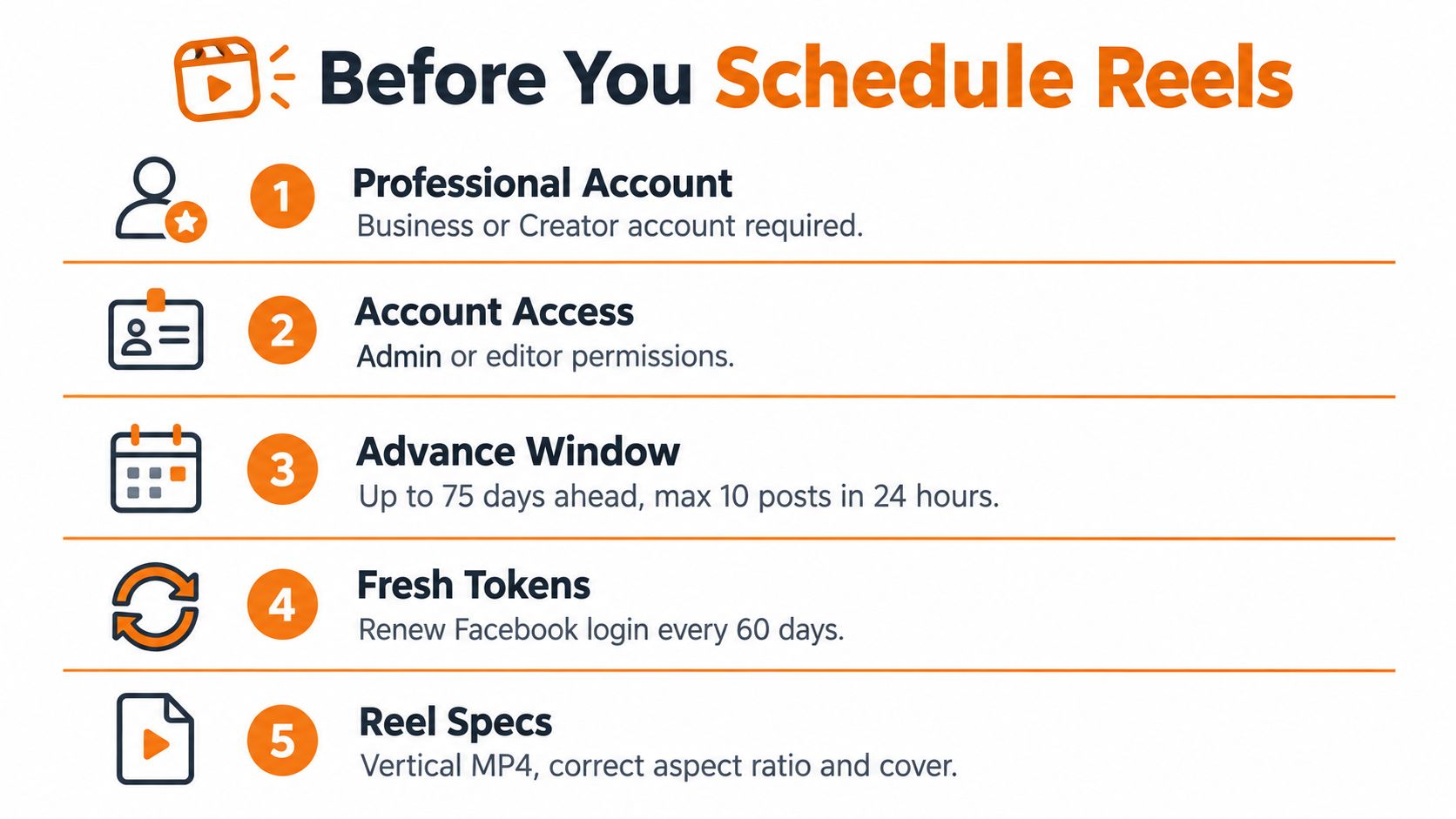
Start with account type. Instagram scheduling is tied to a professional account, so a personal profile usually stops the workflow before anything else does.
Then check permissions. In solo creator workflows, this rarely causes trouble. In agency and brand setups, it causes trouble constantly. Someone can have enough access to upload, comment, or review, but not enough to schedule inside the connected Meta environment.
Scheduling window is the next place teams get caught. Meta Business Suite is commonly described as allowing scheduling roughly 29 to 30 days ahead in this Brandwatch scheduling guide. Native Instagram scheduling may allow a longer runway, but the point is operational: do not build one publishing calendar and assume every surface supports the same future date range.
Volume caps matter too. Native scheduling also has practical limits on how many Reels you can stack in a day, so high-volume campaign days need to be planned instead of stuffed into one queue. Agencies feel this first, especially when several client approvals land at once.
A practical preflight checklist
Use this before anyone starts uploading files:
- Professional account status: Confirm the Instagram profile is set to Business or Creator.
- Publishing surface: Decide whether this Reel will be scheduled in the Instagram app, in Meta Business Suite, or through an API. That choice affects permissions, scheduling window, and who can manage changes later.
- Correct access: Verify the person or system doing the scheduling has the right Meta role and account connection.
- Media readiness: Check aspect ratio, export quality, duration, and cover image before upload. If you need a quick spec check, this guide on Instagram Reel resolution is useful before invalid exports start piling up.
- Timezone rule: Set the publish timezone based on audience location, not the editor's laptop clock or the agency's local time.
- Connection health: In API and third-party workflows, confirm the account connection is current. Expired sessions and stale tokens are a common reason scheduled posts never publish.
That timezone point deserves more attention than it usually gets. If a creator edits in Los Angeles, the client approves in London, and the audience is in Sydney, somebody needs to own the final timezone rule. Otherwise the Reel technically publishes on time and still misses the intended viewing window.
Drafts are not scheduled posts
Drafts help production. Scheduled posts control publishing.
That distinction matters in mixed workflows. A creator may save a Reel draft in the Instagram app, a manager may expect it to appear in Meta Business Suite, and an automation layer may be waiting for approved assets that were never submitted for scheduling. Those are three different states, and teams often treat them like one.
Use a simple status model instead: draft, approved, scheduled, published. If your team cannot see that status clearly, missed posts are a process problem, not a timing problem.
If the content itself still needs work before it enters that pipeline, this step-by-step Instagram Reels guide is a useful production reference for turning image-based assets into something worth scheduling.
How to Schedule Reels in the Instagram App and Meta Business Suite
A common handoff looks like this. The creator cuts the Reel on a phone, the account manager wants approval on desktop, and the client assumes the post will go out at the planned local time. Instagram and Meta Business Suite can handle that workflow, but they do not behave the same way, and teams run into trouble when they treat them as interchangeable.
If speed matters, use the Instagram app. If visibility, rescheduling, and queue management matter, use Meta Business Suite.
Scheduling directly in the Instagram app
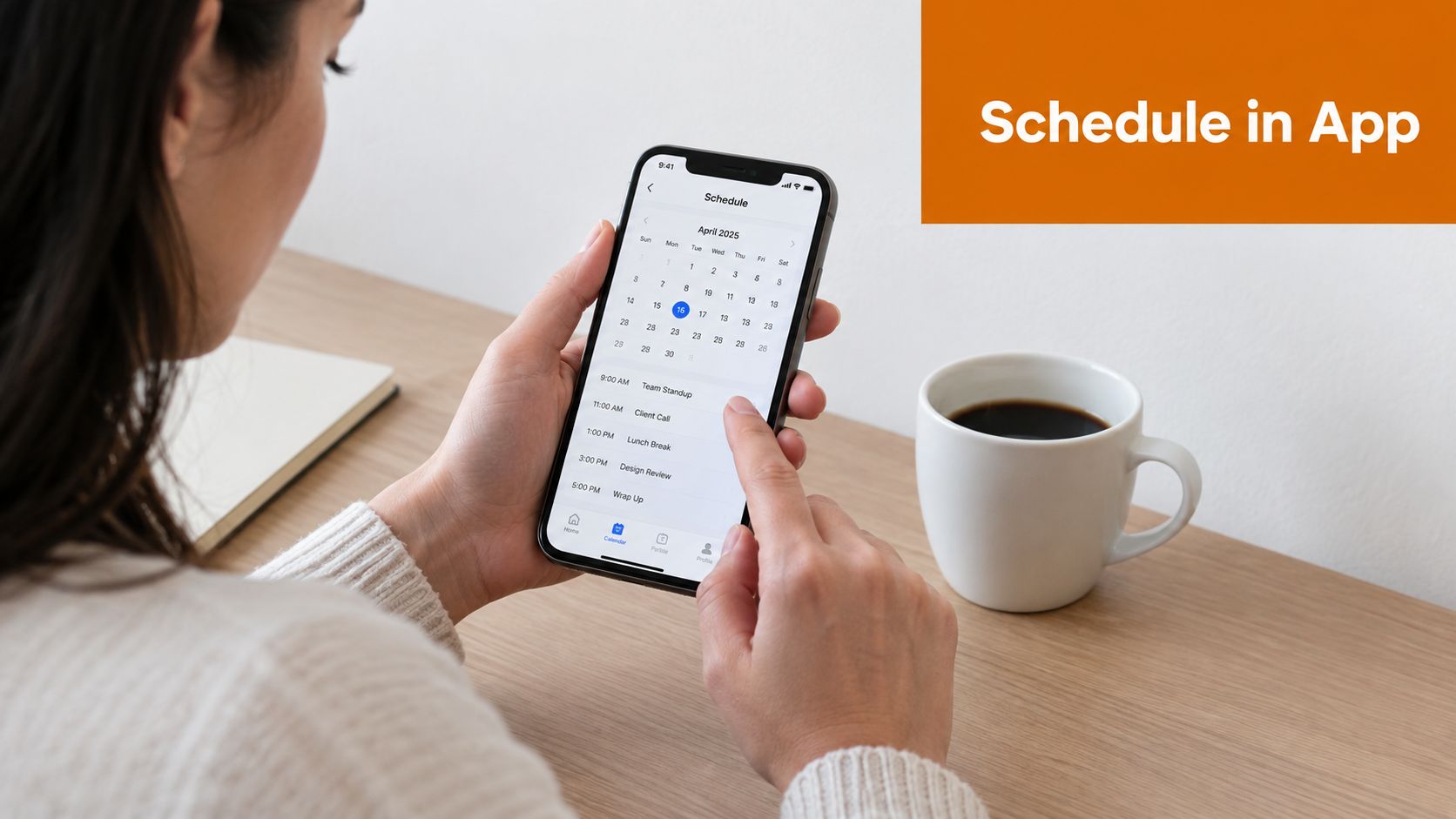
The native flow is the fastest way to schedule a single Reel that is already edited and ready to publish. Create the Reel, add the caption, cover, and tags, then open Advanced settings and turn on Schedule this reel. Instagram lets you set the date and time directly in the app, as shown in Meta's own help documentation for scheduling posts and reels on Instagram.
That mobile-first path works well for solo creators and small teams because the asset stays where it was made. No exporting, no re-uploading, no desktop detour.
The trade-off is operational, not technical. Review is lighter, shared visibility is limited, and managing a week of scheduled Reels across multiple brands is slower on a phone than people expect.
Finding and managing scheduled Reels
After you schedule, open Instagram's Scheduled content area and confirm the post is in the queue. I still recommend this even for experienced operators, because the mistakes are usually boring ones: the wrong cover, the wrong date, or a saved draft that never became a scheduled publish.
Run a quick verification pass:
- Scheduled time: confirm the intended publish slot
- Cover image: check how it will look on-grid
- Caption formatting: review line breaks, mentions, and hashtags
- Queue status: make sure it shows as scheduled, not saved or drafted
If the Reel still needs cleanup before approval, stronger editing discipline helps more than another scheduling tool. Teams that publish at volume usually standardize captions, cover style, audio levels, and exported versions before the post enters the queue. This guide to social media content post-production is a useful reference for that stage.
Scheduling through Meta Business Suite
Meta Business Suite is usually the better fit once more than one person touches the publishing process. You upload the Reel, enter the post details, choose Schedule, set the publish time, and confirm from the planner or composer. Meta documents the desktop workflow in its Business Suite publishing help.
The advantage is control. A manager can review upcoming content on desktop, shift dates without reopening the creator's phone, and see Instagram activity alongside Facebook scheduling in the same workspace.
That matters for agencies and in-house social teams. If the campaign includes multiple approvals, launch coordination, or a mixed Meta calendar, Business Suite usually creates fewer handoff errors than native mobile scheduling.
Here's the practical split:
| Workflow need | Instagram app | Meta Business Suite |
|---|---|---|
| Quick mobile scheduling | Strong | Slower |
| Desktop planning | Limited | Better fit |
| Shared visibility | Basic | Better fit |
| Multi-post queue review | Basic | Easier to manage |
One caution. Business Suite is better for planning, but it is not a replacement for a true automation layer. It helps humans manage a queue. It does not solve bulk ingestion, API retries, or cross-platform publishing logic.
This walkthrough shows the flow in motion:
Picking between the two
Use the Instagram app when the creator owns the post from edit to publish and the schedule is simple.
Use Meta Business Suite when a second person needs to review, when the calendar is easier to manage on desktop, or when Instagram is only one part of the campaign.
In practice, many teams use both. Creators prepare and sometimes schedule natively. Managers monitor the broader queue in Business Suite. Once that starts feeling repetitive across too many accounts, the next step is usually programmatic scheduling rather than trying to force every workflow through one interface.
How to Schedule Reels Programmatically With an API
Manual scheduling breaks first in the same places every time: too many accounts, too many handoffs, too many repeated uploads, and too much dependence on one interface. That's when API-based scheduling starts making sense.
For developers and automation teams, the goal isn't just “post this Reel later.” It's building a publishing system that keeps working when accounts disconnect, uploads fail, or several hundred assets need queueing across channels.
What API scheduling changes
An API workflow gives you a place to handle the messy parts once instead of rebuilding them in every internal tool. OAuth, token refresh, media validation, retries, duplicate protection, and queue durability all belong here.
That's why teams often prefer a unified publishing layer instead of maintaining separate platform integrations. One example is programmatic Instagram scheduling workflows, where scheduling data, timezone handling, and publish logic sit behind one interface instead of being scattered across app-specific code.
If you're embedding this in a product, a unified API also helps when Instagram isn't the only destination. Reels rarely live in isolation. Teams often pair them with Shorts, TikTok, Facebook, or LinkedIn video in the same campaign window.
A clean payload pattern
A practical API request for a scheduled Reel usually includes:
- Destination account: Which Instagram professional account should publish.
- Post type: Reel, not a feed image or Story.
- Media asset: The uploaded vertical video and optional cover reference.
- Caption payload: Main caption and any structured metadata your system supports.
- Scheduled publish time: A timestamp plus explicit timezone handling.
- First comment logic: Optional, but useful if your workflow attaches one at publish time.
- Idempotency key: So retries don't create duplicates if a request is repeated.
The timezone field matters more than is commonly expected. “Schedule at 6 p.m.” is ambiguous unless you define whose 6 p.m. you mean. A strong API workflow treats timezone as a first-class input, not a UI assumption.
Reliability features that save you from silent failures
The API itself is only part of the solution. The queue around it determines whether the schedule is durable.
What I look for in production scheduling systems:
- Preflight checks: Validate media, account eligibility, and required fields before the post enters the publish queue.
- Retries with guardrails: Temporary failures happen. Retries should be deliberate, not infinite.
- Idempotency: The same job retried twice should still produce one published Reel.
- Webhooks: Delivery status should come back to your system so users aren't guessing whether a scheduled job succeeded.
- Queue visibility: Operators need to see pending, failed, published, and retried jobs clearly.
If your automation can schedule but can't explain failures, it isn't production-ready.
In multi-account environments, I also prefer failover logic around volume and workflow routing. If one path hits a platform limit or an account loses access, the queue should tell an operator what to fix instead of dropping the publish job.
Where this fits in real workflows
API scheduling is the right move when content comes from somewhere else first. Common examples include an internal CMS, a client portal, a creator marketplace, or an automation layer in n8n, Zapier, or Make.
For that use case, Mallary.ai is one option that provides a unified API and dashboard for scheduling social posts, including Instagram Reels, while handling platform-specific validation, OAuth, retries, and queue mechanics behind the scenes.
That kind of setup is less about convenience than control. You get one publishing surface, one job model, and one place to inspect what happened when something fails.
Choosing the Best Time to Publish Your Scheduled Reels
A Reel scheduled for 9:00 a.m. can still miss the audience if that audience is active at 9:30, or if half your followers are in another timezone. Timing gets more complicated once you schedule through more than one path. The Instagram app, Meta Business Suite, and API-based tools all let you queue the same asset, but none of them picks the right publish window for you.
Start with your own audience data.
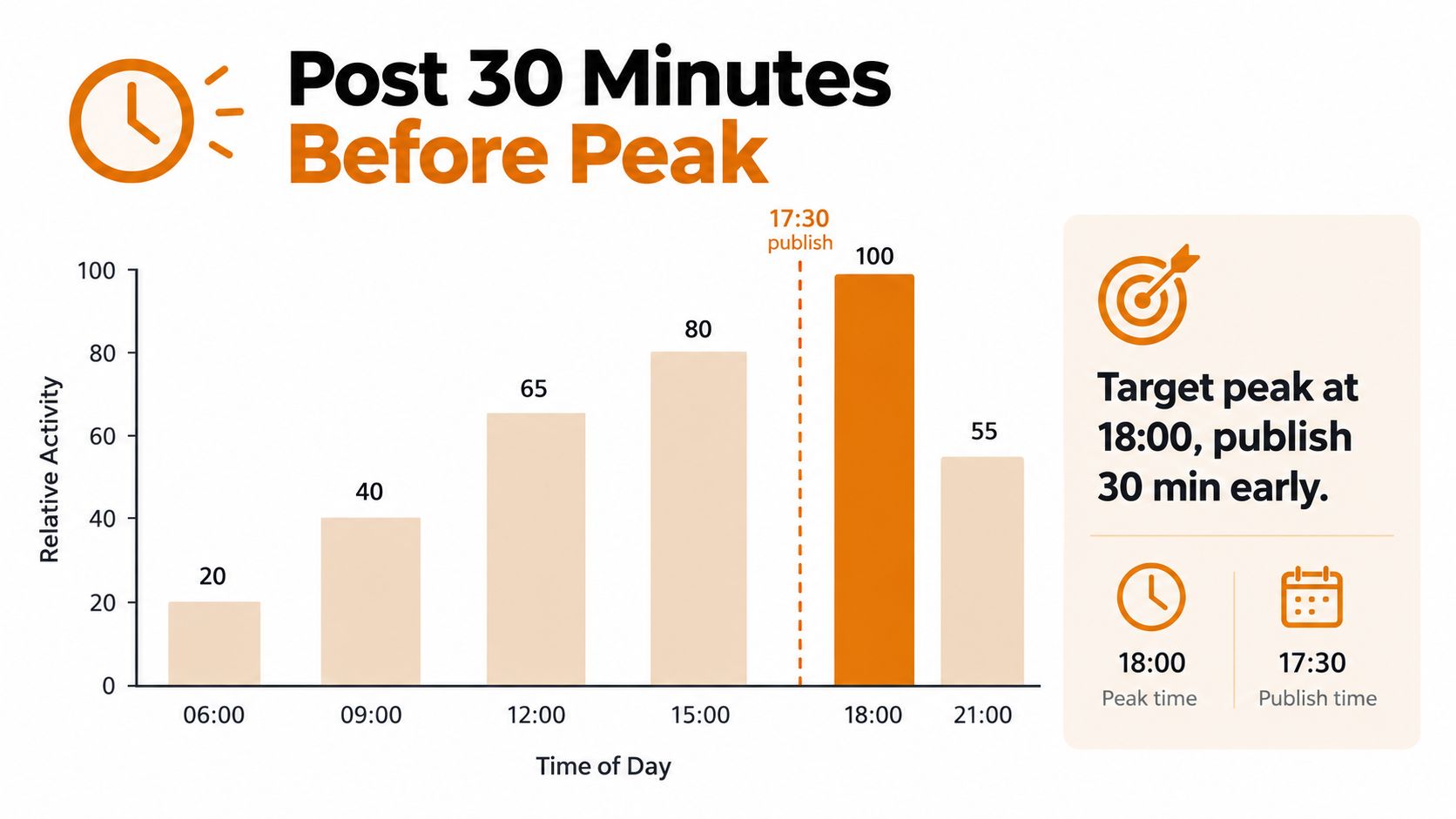
Use Instagram Insights to find follower activity patterns, then queue the Reel slightly before the busiest window so it is live before that audience wave hits. The exact lead time will vary by account, but the operating idea is simple. Publish early enough to be available when people open the app, not right after they already did.
After that, use industry timing studies as test lanes, not final answers. Buffer's analysis points to weekday morning, midday, and evening windows as common starting points for Instagram testing, especially midweek patterns and later-day engagement blocks in Buffer's timing overview.
That gives you a starting grid, not a winner.
The mistake I see in agency queues is treating “best time to post” as one account-level rule. It breaks fast in multi-region publishing. A creator with a mostly U.S. audience can usually optimize around one primary timezone. A brand with audiences in North America, the UK, and Australia usually needs segmented scheduling, duplicate creative tests, or separate publish waves by region.
Use a simple test plan:
- Audit recent Reels by publish time, topic, hook style, and completion signals.
- Group results by audience timezone, not just your team's local clock.
- Test at least a few recurring windows for two to four weeks before changing the schedule.
- Judge outcomes with reach, plays, shares, saves, and watch time, not likes alone.
This matters more when you schedule through automation. Native app scheduling is fine for one account and one operator. Meta Business Suite works well for shared team workflows. API scheduling is where timezone mistakes multiply, because a bad default can hit dozens of queued posts at once. I prefer storing the intended publish timezone with each job instead of relying on account locale or server time. That one choice prevents a lot of preventable misses.
Content quality still decides how far the Reel travels.
A strong slot helps distribution, but weak retention usually points to the creative itself. If people drop in the opening seconds, changing Tuesday to Thursday will not solve the problem. Review timing and retention together so you can tell whether the issue was schedule selection, audience fit, or the Reel's opening hook.
Verifying Publishing and Fixing Common Scheduling Issues
The final check is operational. Don't stop at “scheduled.” Verify that the Reel is queued correctly, likely to publish, and supported by the account state you expect.
A simple verification routine
When I'm reviewing a scheduled queue, I check three things first.
The first is whether the Reel appears in the correct scheduled list. The second is whether the displayed publish time matches the intended audience timezone. The third is whether the uploaded media and cover look exactly right in the final queued state.
That catches most preventable misses before they become support tickets.
The issues that usually cause failures
Some failures are straightforward. The account isn't professional. The scheduling window was exceeded. The daily queue limit was hit. The asset exported incorrectly.
Other failures are more annoying because they look successful until publish time. Cross-posting behavior can be inconsistent across native and business workflows, especially when teams assume mobile and desktop behavior match exactly. If your campaign depends on coordinated release across accounts or channels, test the path before the campaign day.
A useful operating habit is to treat high-volume scheduling as a queue design problem, not a posting problem. That means building bulk workflows with clear states, deliberate retries, and visible failure reasons. Teams working with automation should also understand rate-control behavior, because bursts can create avoidable job delays or failures. This primer on API rate limits in publishing systems is helpful if you're building or debugging that layer.
The durable checklist
Use this before you call a Reel “ready”:
- Queue check: Confirm it appears in the scheduled list, not just drafts.
- Timezone check: Verify the rendered publish time against the audience region.
- Limit check: Make sure the schedule falls inside the allowed window and volume rules for the tool you used.
- Media check: Review caption, cover, and final asset render in the queue.
- Performance check: Pair scheduling with hook testing and retention review so you're not optimizing the calendar while ignoring the content.
Reliable Reel scheduling is less about one button and more about a publishing system that holds up under repetition.
If you're managing Reels across accounts or building scheduling into a product, Mallary.ai gives you a single API and dashboard for social publishing workflows instead of piecing together separate platform logic. It's a practical fit when you need timezone-aware scheduling, durable queues, validation, and automation that goes beyond posting one Reel at a time.
Try it with Mallary
STOP!
Want ChatGPT or Claude to post on social media for you?
Connect your social accounts one time. Then tell your AI what to write. It can make your posts, share them, and reply on social sites that allow replies. You do not need to write code.
Pick your AI





Connect once. Ask in plain English. Mallary does the work.


