Written by Outrank. Published by Mallary Labs LLC.
Published .
CLI vs API: When Each Interface Wins
The most popular advice on CLI vs API is to pick a winner. Ship the API because it is "the primary interface," or hand agents a shell because a local command is faster. That advice fails the first time a publish job has to survive a bad token, a partial batch, or a model that retries the wrong thing.
A command-line interface (CLI) is a set of commands a person, script, or agent runs in a terminal. An API is a stable contract that software calls over the network. Speed of one call is not the same as the cost of the whole task. Tokens, retries, approvals, and incidents usually outweigh a few milliseconds. A narrowly scoped CLI can be safer than an overprivileged API token, and an agent that both checks files locally and publishes for other people usually needs both.
I would start from the consumer and the control plane, not from which technology feels newer.
Table of Contents
- CLI vs API Side by Side
- Reliability and Latency in Real Workflows
- Security Controls That Matter More Than the Interface
- What Each Interface Is Built For
- Embedding Social Publishing in an App
- A Hybrid Automation Pattern That Holds Up
- Choose CLI API or Both for Your Workflow
CLI vs API Side by Side
The useful question is who is calling, not which surface was invented later. A measurement cited by dotnet.rest's overview of REST found that 86% of web-API developers used REST in everyday work, down from 92% a few years earlier as other styles gained ground. REST is still the contract most products embed. It is not a reason to throw away the terminal.
Command-line automation for product teams is a useful companion when you are deciding what stays in a terminal versus what a product must call. The scan below is the decision, before the long explanation.
| Decision | CLI | API |
|---|---|---|
| Who calls it | A person, shell script, or agent in a terminal | An app, dashboard, workflow tool, or backend service |
| What comes back | Terminal text, or JSON if the CLI is built for machines | Structured JSON with HTTP status codes |
| Where credentials live | Local session, environment variable, or short-lived token on that machine | Server-held key, OAuth, and per-action authorization |
| How failure is signaled | Process exit code | Explicit retryable versus permanent errors |
| Best cadence | Debugging, one-off posts, and low-frequency jobs | Bulk scheduling and concurrent account work |
| Can another product embed it | Poor fit as the only interface | Required contract for a multi-tenant product |
Who calls it, and what comes back
A developer on a laptop publishes one test post from a shell to see the caption, the image, and the exit status. That caller is a person or a script sitting at a terminal. The same post, scheduled for thousands of customer accounts, is an app or backend calling a contract. It should not scrape a progress bar out of human text.
If the CLI is built for machines, it can print strict JSON. If it is built for a person, it prints sentences. An API returns structured JSON and an HTTP status the caller can branch on without guessing which line changed in the last release.
IP With Ease's API versus CLI comparison draws the split cleanly.
A CLI is optimized for humans and scripts at a terminal, while an API is optimized for software and large-scale orchestration.
Credentials, failure, and cadence
On a laptop, the credential is a local session, an environment variable, or a short-lived token on that machine. You publish a single draft, the process exits 0 or not, and you read the message. In a product, the key stays on the server, OAuth is per customer, and each action is authorized on its own. A failed bulk schedule should say whether the error is retryable or permanent, not leave a shell loop to guess from a sentence.
Low-frequency work fits the CLI: a debug post, a one-off client check, a job you run a few times a day. Bulk scheduling and concurrent accounts fit the API. Another product cannot embed "run this binary on our server" as its only interface. It needs the contract.
A CLI can sit on top of that contract. It should not grow a second copy of authentication, validation, or retries. Those belong on the server. If you are choosing controls, match them to scale. If you are choosing speed, separate one call from the whole job. If you are embedding, the API is the boundary and the CLI is the operator console. If an agent does both local checks and public posts, use both.
Reliability and Latency in Real Workflows
Reliability fails first in the parser, not in the network round trip. An API hands back JSON or XML, an HTTP status, and a distinction between errors you may retry and errors you must not. A script that reads a sentence breaks when a version rewraps the line, a locale translates the word "failed," pagination adds a header, or a quote in a caption is eaten by the shell.
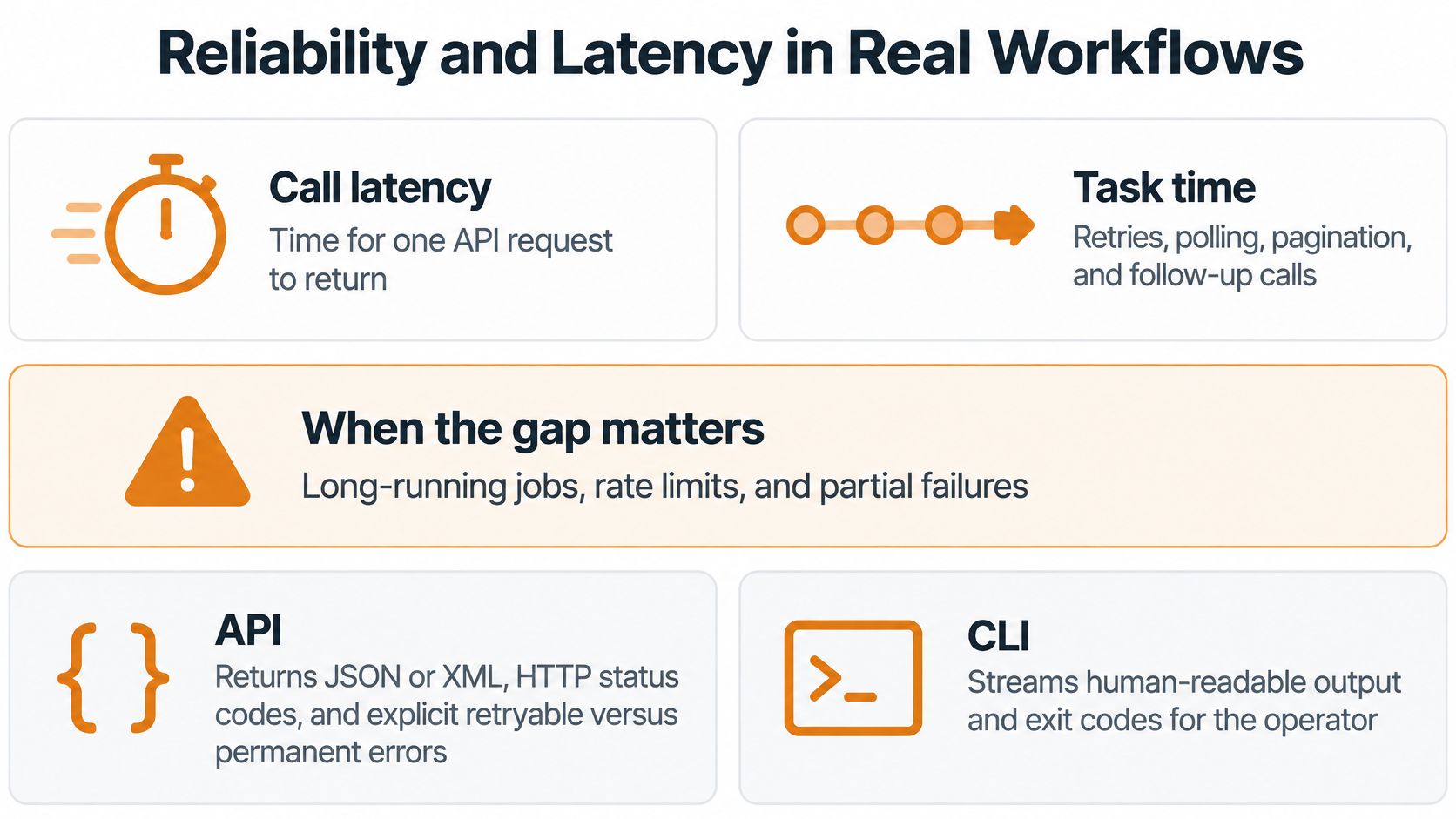
Put authentication, validation, rate limits, retries, and queues on the server. Keep the CLI a one-to-one client: the same operation the API exposes, strict JSON on stdout when a machine is listening, and an exit code that means what the docs say. Business rules should not live in a bash function that drifts from the server.
Call latency is not task time
The expensive part of a CLI call is usually the process and the serialization, not the publish itself. In one subprocess CLI benchmark, average tool-call latency was 28.8 ms for CLI execution versus 1.8 ms for in-process direct function calls and 4.6 ms for an MCP server. Total task time was nearly the same: 10.3 seconds for the CLI, 10.8 seconds for direct calls, and 10.0 seconds for MCP, because model or network latency dominated.
| Interface | Average call latency | Total task time |
|---|---|---|
| Subprocess CLI | 28.8 ms | 10.3 seconds |
| In-process direct call | 1.8 ms | 10.8 seconds |
| MCP server | 4.6 ms | 10.0 seconds |
Tens of milliseconds do not matter for a debug post or a low-frequency agent task. They stack when a shell starts one process per item for a bulk schedule or a dashboard that fans out across accounts. Subprocess creation, stdin and stdout JSON, environment setup, and shell isolation all add up under concurrency. Our notes on performance benchmarking are the place to time the whole job, not only the first byte.
Production rules for a CLI that stays honest
- Batch the work: expose one operation that accepts many posts, instead of a loop that forks once per caption.
- Return a handle: a job id, or a stream of progress, so the caller is not blocked on a silent process.
- Retry on the server: a shell
untilloop will replay a permanent rejection and double-post the ones that already succeeded. - Keep output machine-readable: JSON fields with stable names, and exit codes that do not change because a warning string grew longer.
Interface choice alone does not set what a person waits for when the remote call and any model time dominate. Choose the CLI when the human or the agent is the bottleneck and the job is infrequent. Choose the API when you need concurrency and errors a caller can trust without reading prose.
Security Controls That Matter More Than the Interface
An API is not automatically governable, and a CLI is not automatically unsafe. Repello's analysis of MCP versus CLI argues that prompt injection, privilege escalation, secret leakage, and inadequate audit logging hit both. The transport changes the shape of the attack. It does not remove it.
A container, seccomp, AppArmor, a command allowlist, a short-lived credential, and an approval gate can pin a CLI down. An API token with every scope, or a handler that trusts tool output it did not validate, is still dangerous. The question is which controls are mandatory at your scale.
| Scale | Prefer | Mandatory controls |
|---|---|---|
| Local single user | Narrowly scoped CLI | Container or sandbox, command allowlist, short-lived credential |
| CI or CD | CLI or API with a job identity | Dedicated identity, secrets kept out of logs, approval before a public post |
| Multi-tenant SaaS | API | Server-held tokens, per-action authorization, tenant audit trail, idempotency keys |
| Autonomous agent | Governed CLI or API, not a raw shell | Least privilege, no key in the prompt, input validation, approval for high-impact posts |
Four scales, seven controls
A local script can live in a sandbox with an allowlist and a credential that dies with the session. Identity scope is one operator. Rollback is "don't run it again," which is acceptable only because nobody else is in the blast radius.
CI is different. Give the job its own identity. Do not print a long-lived secret into the log. Require a human approval before a post goes public. Idempotency still matters: a retried pipeline should not publish twice. If that pipeline also emails you when a publish fails, check DKIM with mailX so a spoofed alert cannot impersonate your own ops mail.
A multi-tenant product should keep customer tokens on the server, authorize each action, and keep an audit trail the tenant can review. Idempotency keys and a real rollback path (unpublish, or a compensating post) belong here because a bug is no longer one person's laptop. How to store and rotate those secrets is covered in our credential management guidance.
An autonomous agent should not receive a broad API key inside its prompt. In Claude Code, our setup installs the CLI with npm and the agent skill, then signs in through a browser approval that does not share an API key with the agent. Least privilege, input checks, and a human gate on high-impact posts stay mandatory. A raw shell with ambient credentials is the wrong default once the agent acts for someone else.
A narrowly scoped CLI can be safer than an overprivileged API token, while an API with server-held credentials is easier to govern across many users.
Mark this for your scale
- Identity scope: one user, one job, one tenant, or one agent acting for a tenant.
- Credential location: on the machine, in the CI secret store, on your server, or never in the model context.
- Sandboxing: container, syscall filter, or an allowlist of commands and tools.
- Idempotency: a key the server honors, not a hope that the script won't rerun.
- Human approval: required before a public or destructive post at CI and agent scale.
- Auditability: who authorized the action, not only which command string ran.
- Rollback: a server-side undo or a clear "this cannot be undone" before you allow the call.
If you cannot tick the row for your scale, the interface you prefer does not matter yet.
What Each Interface Is Built For
A CLI stays useful because commands can be scripted, composed, logged, and run without a graphical session. A 2023 Warp survey of more than 1,500 developers found that 69% always kept a terminal open and made significant use of it, and 69% identified Zsh as their preferred shell. That is an operational surface for repeatable publishing, deployment, batch checks, tests, and agent-driven automation. It is not a leftover from before windows and mice.
An API is the durable contract other software calls. Fields stay stable, errors are explicit, and authorization still makes sense when the caller is another team or another tenant. Akinda's fintech API guide makes the same point in payments: the contract is what another product can rely on, not the screen a single operator happens to use.
Name the consumer before the tool
Say one social account is live on your laptop and inside a product.
- Operator: you publish a test post, confirm the media, and stop. The CLI is the console.
- Product: the same caption is scheduled for thousands of customer accounts, with an audit row per tenant. The API is the boundary apps, dashboards, workflow tools, and agents call.
Products ship both because the consumers differ, not because one replaced the other. The CLI may call the API. It should not invent a second model for auth, validation, or retries.
If the caller is a person or a low-frequency script, start with the CLI. If the caller is another product or a concurrent multi-account job, start with the API. Security controls, latency, and the embed path all hang off that first name.
Embedding Social Publishing in an App
The trap is maintaining a private stack for every network. YouTube, Facebook, Instagram, TikTok, LinkedIn, X, Pinterest, Threads, Reddit, and Snapchat each bring their own OAuth, rate limits, media rules, and payload shape. A homegrown shell script that posts "everywhere" breaks the week one network changes a limit or rejects a file the script did not check.
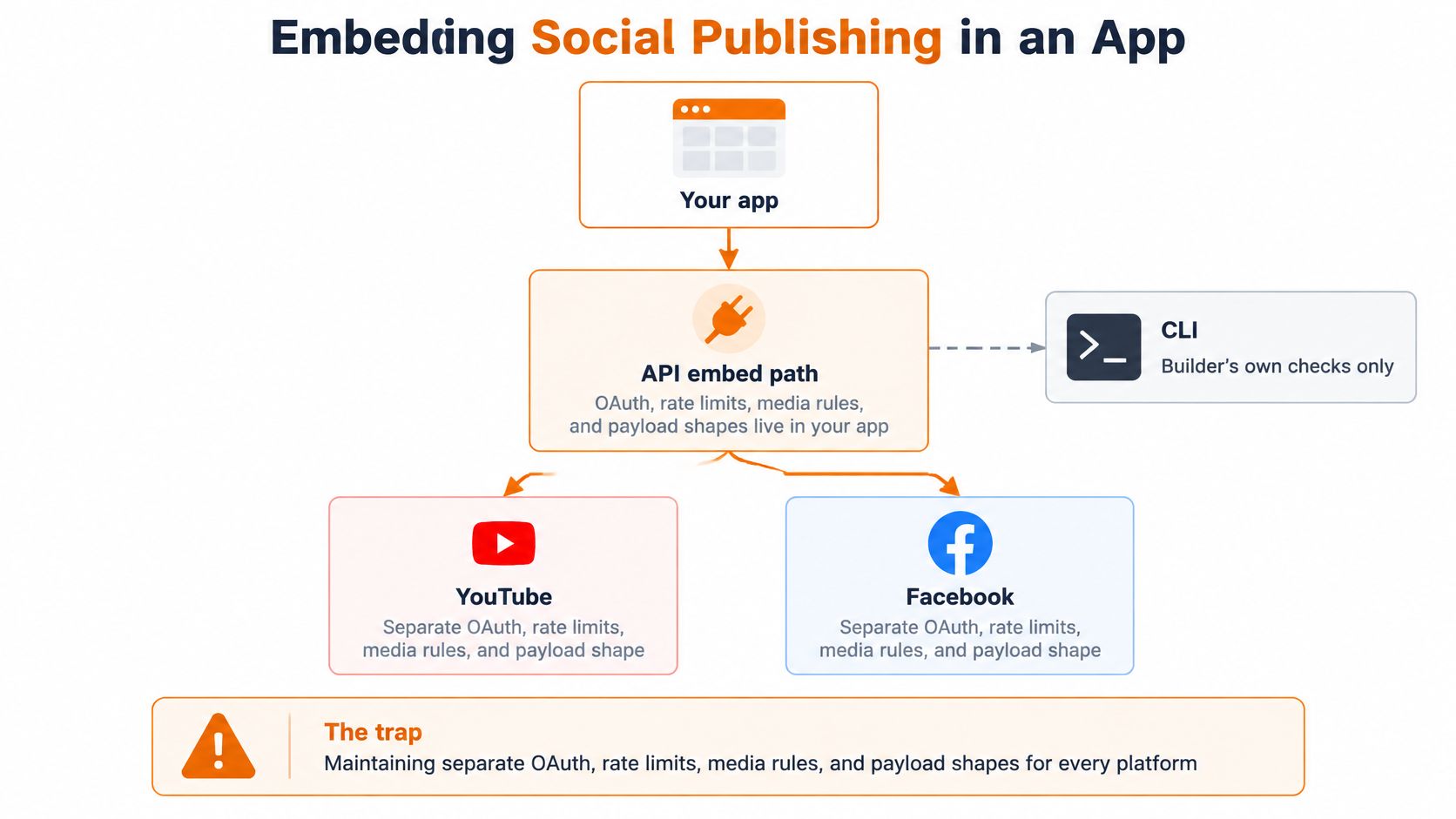
Connect each customer account once. After that, your app posts through one contract while we refresh tokens, queue jobs, and adapt payloads. The posting API covers those 10 platforms and is described as cutting development time by about 90%. Mallary uses the official APIs from each social platform, which removes scraping risk. Comments can be read and replied to on the same service when you are ready for engagement, not only the first publish.
One call, held on your server
The posting endpoint is POST https://mallary.ai/api/v1/post, and you send a Bearer API key in the Authorization header, from the same account the dashboard already uses. Store the job that comes back. Do not shell out from the request path of your app. The social media posting API write-up is the longer map of scheduling, media, and webhooks around that call.
Official platform APIs plus server-side media checks beat a homegrown shell script that breaks when one network changes a limit.
Three workflows, one account
A SaaS scheduler calls the API from its backend, keeps the returned job id, and lets a webhook say when the post is done. The CLI is not in that path. Customer tokens never sit in the browser or in a build log.
An agency operator uses the CLI for a single client test on a machine they control. Once the payload is proven, the roster moves to the API so concurrent accounts share one queue, one retry policy, and one audit trail. The test command is not copied into a cron that loops over every client.
An indie creator can stay in the dashboard until volume justifies code. The dashboard, API, MCP, and CLI share the same profiles and connected accounts, so the first script does not mean connecting every network again.
The API is the embed boundary. The CLI is the operator console for your own checks, not the interface your customers' apps should depend on.
A Hybrid Automation Pattern That Holds Up
A hybrid pattern works because the control plane decides where each action runs. A narrow CLI scope can be safer than a broad API token when a person or local process stays in charge. AI agents often need both. Tokens, retries, and incidents cost more than the difference between a fast local call and a slower remote one.
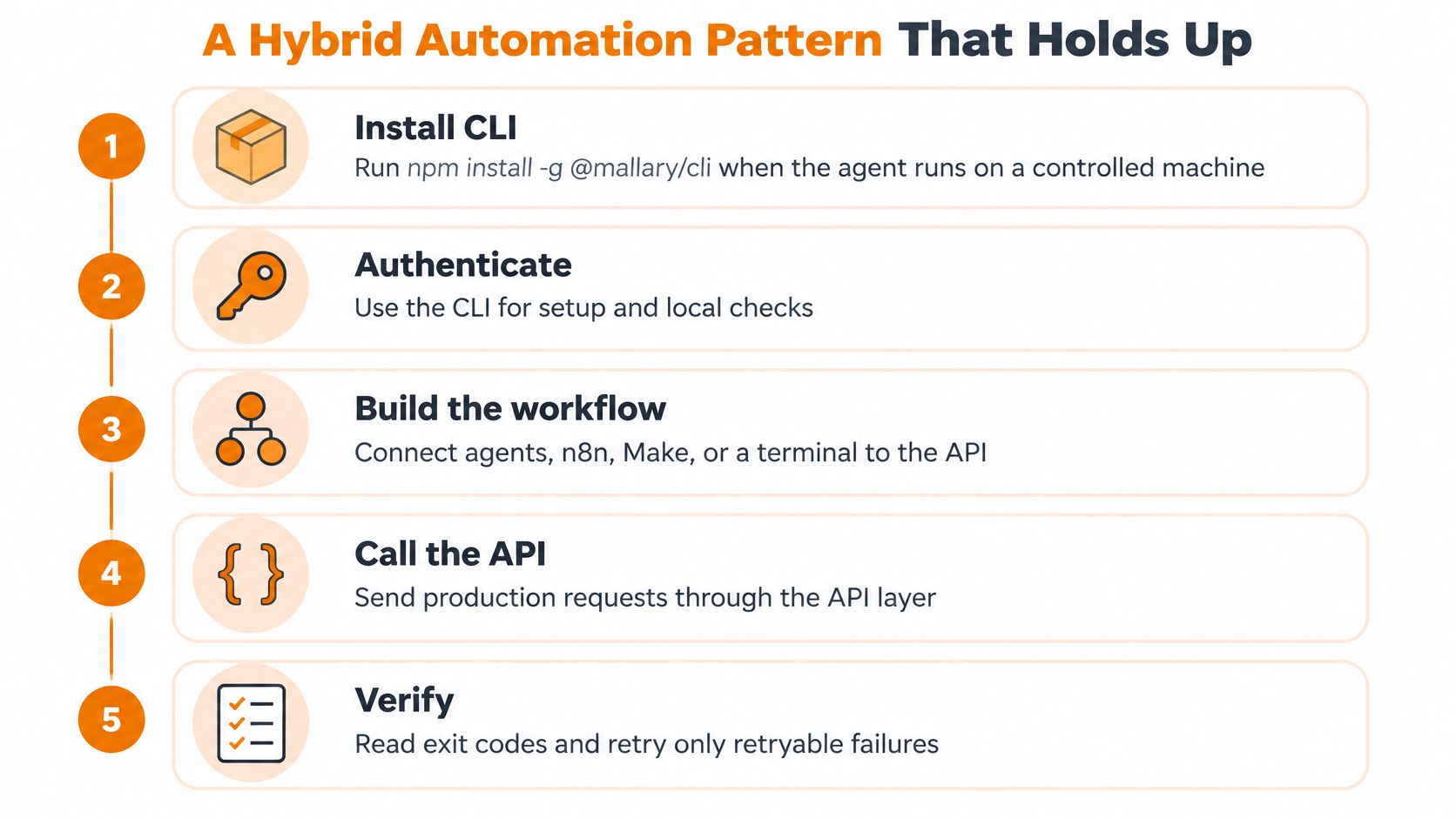
- Install the official CLI with
npm install -g @mallary/cliwhen the agent runs on a machine you control. That is the starting step for OpenClaw and Hermes as well. - Sign the CLI into the same profiles the dashboard and API already use. You connect each social account once. Dashboard, API, MCP, CLI, ChatGPT, Claude, n8n, and Make share those profiles.
- Keep local, deterministic, high-frequency checks on the CLI. File reads and dry runs belong here because they stay on the machine and keep remote credentials out of routine checks.
- Keep the agent's tool surface small. Give the agent the few tools the task needs instead of loading every available schema into the model. Extra tools add context cost before any post is sent.
- Send remote, multi-user, or public actions through the API, with idempotency keys and a durable job id. A chat transcript is not a queue.
- Run a preflight on file type, file count, video length, image shape, and text length. Mallary checks platform media rules before publishing and returns a clear message when a rule fails. Stop there. Do not publish a rejected asset and hope the network accepts it.
- Let webhooks report completion. Do not hide retries inside a shell loop. Paid plans include the REST API, MCP, CLI, and webhooks against that shared account, so the agent and the app are not two integrations.
When the split is the point
Local and deterministic stays on the CLI, where a process on your machine is faster and the blast radius is you. The action that leaves the machine goes through the API, where authorization, idempotency, and a job id survive a crashed shell. The split also makes credential scope easier to reason about: a local check can run without handing the agent a broad publishing token, while the remote action carries the credentials needed for the actual post.
The trade-off is extra plumbing. You own the queue state, the retry policy, and the mapping between a local task and the job the API returns. That overhead is worth it when several users share one account, when a failed post could duplicate a public action, or when an incident review needs a record that is more durable than terminal scrollback. If the workflow is one person, one account, and a single test, keep it simple and stay closer to the CLI until the task outgrows the machine.
Choose CLI API or Both for Your Workflow
Embedding social publishing into a product usually starts with credentials. API access is included in plans starting at $15 per month, and a 14-day free trial gives a team room to prove the integration before paying. The dashboard, API, MCP, and CLI share the account, so the trial covers one set of profiles and connected accounts.
Create the account, connect each network once, and call POST https://mallary.ai/api/v1/post from the product backend with a Bearer key held on the server. Store the returned job id, send idempotency keys, and let webhooks report completion so the app does not depend on a shell process staying alive. This is the right path when several users, tenants, or services can trigger publishing at the same time, because the API token has a clear server-side boundary and the job state survives a crashed request.
For your own accounts, install the CLI with npm install -g @mallary/cli against that same account. Use it for a single test post, a local check, or a controlled one-off action where the operator is the person running the command. Move public, scheduled, or multi-account actions to the API after a preflight on file type, file count, video length, image shape, and text length.
The practical split is simple. Choose the CLI when a person or a local script is the bottleneck. Choose the API when concurrency, tenants, retries, or audit history matter. Choose both when an AI agent needs quick local checks and governed publishing once the action leaves the machine.
Mallary.ai gives product teams one account for a dashboard, REST API, MCP, CLI, and webhooks, so social publishing does not fork into a shell script and a separate integration. The same connected accounts can be used from the dashboard, API, MCP, CLI, ChatGPT, Claude, n8n, and Make. Visit Mallary.ai to open the trial and publish through the endpoint or the CLI against the accounts you connect once.
Try it with Mallary
STOP!
Want ChatGPT or Claude to post on social media for you?
Connect your social accounts one time. Then tell your AI what to write. It can make your posts, share them, and reply on social sites that allow replies. You do not need to write code.
Pick your AI





Connect once. Ask in plain English. Mallary does the work.


