
Written by Outrank. Published by Mallary Labs LLC.
Published .
How to Build a Social Media App in 2026
The popular advice says that building a social media app starts with profiles, feeds, likes, and a polished mobile interface. That advice is incomplete. The interface is the visible part of the product, but the difficult work sits underneath it: rate limiting, feed delivery, moderation, media processing, identity management, webhooks, and platform policy changes.
A social product also has to earn repeat usage quickly. As of April 2026, about 5.79 billion social media user identities existed worldwide, and 96.7% of internet users aged 16 and above across 54 major economies used at least one social network or messaging platform each month. The typical user actively used 6.5 social platforms monthly, according to Sprout Social's analysis of global social media usage. For builders, that makes interoperability and retention part of the core product, not a later growth feature.
Table of Contents
- The Hidden Costs of Social App Infrastructure
- Designing a Scalable Backend Architecture
- Optimizing for Retention and Engagement Loops
- Navigating Multi-Platform API Fragmentation
- Embedding Social Capabilities with Mallary.ai
- Launch Checklist and Long-Term Maintenance
The Hidden Costs of Social App Infrastructure
Building the screens is rarely the part that breaks a social app. A team can produce a convincing feed prototype quickly, then discover that the actual system must support fan-out, media processing, abuse controls, notification delivery, account recovery, search, moderation queues, analytics, and data deletion workflows. Every feature creates background jobs, failure states, and operational decisions that users never see.
The usual MVP approach also creates a misleading sense of progress. A team may implement posting directly into its own database, add a basic comments table, and ship a timeline that works for early testers. That design becomes expensive when users post media at the same time, popular accounts attract large audiences, or a moderation decision must propagate across cached feeds and notifications.
Developer guidance on social app infrastructure places the burden of messaging, feed systems, video, and moderation among the areas that can be better served by APIs. The same guidance estimates that building those capabilities in-house can cost $36,000 to $520,000 before ongoing maintenance, as described in this social media feature infrastructure guide. The exact cost for a product depends on its scope, team, compliance requirements, and traffic profile, but the architectural lesson is consistent. Infrastructure that looks like a small feature often becomes a permanent product area.
Why basic MVP thinking fails
A feed isn't just a query that orders posts by date. It may combine follows, recommendations, muted accounts, blocked users, privacy rules, deleted content, sponsored material, ranking signals, and unread state. A messaging feature isn't just a pair of user IDs and a text field. It needs delivery guarantees, retries, attachment handling, abuse reporting, presence behavior, and a clear policy for messages that arrive while a device is offline.
Moderation creates another layer of cost. Automated classifiers can flag content, but the product still needs review queues, appeals, enforcement actions, audit records, and escalation paths. A social app that ignores those workflows doesn't have a simpler architecture. It has an unfinished one.
Practical rule: Treat every social feature as a combination of a user interface, a data model, an asynchronous workflow, an abuse model, and an operational dashboard.
The same principle applies to third-party networks. If your product publishes to several platforms, each connection brings its own OAuth flow, token lifecycle, media constraints, permission review, quota behavior, error format, and policy interpretation. A feature that appears to be “publish everywhere” is actually a collection of integrations that must keep working after external teams change their rules.
Scope the first release around the loop
A smaller release is useful only when it protects the product's central engagement loop. Choose one clear action that users can take, one reason to return, and one measurable outcome. Avoid building live video, advanced recommendations, creator monetization, community groups, and a large advertising system before you know whether users will post, respond, and return.
A sensible first scope often includes:
- Identity and permissions: Registration, login, account recovery, privacy controls, and clear ownership of content.
- A narrow content model: Support the post types that make the product distinctive instead of copying every format from established networks.
- A dependable interaction path: Posting, replying, following, reporting, and notification delivery should work before decorative features expand.
- Operational visibility: Log failed jobs, moderation decisions, webhook events, and permission errors from the first release.
The goal isn't to avoid complexity forever. It's to avoid owning expensive complexity before the product has evidence that it needs it.
Designing a Scalable Backend Architecture
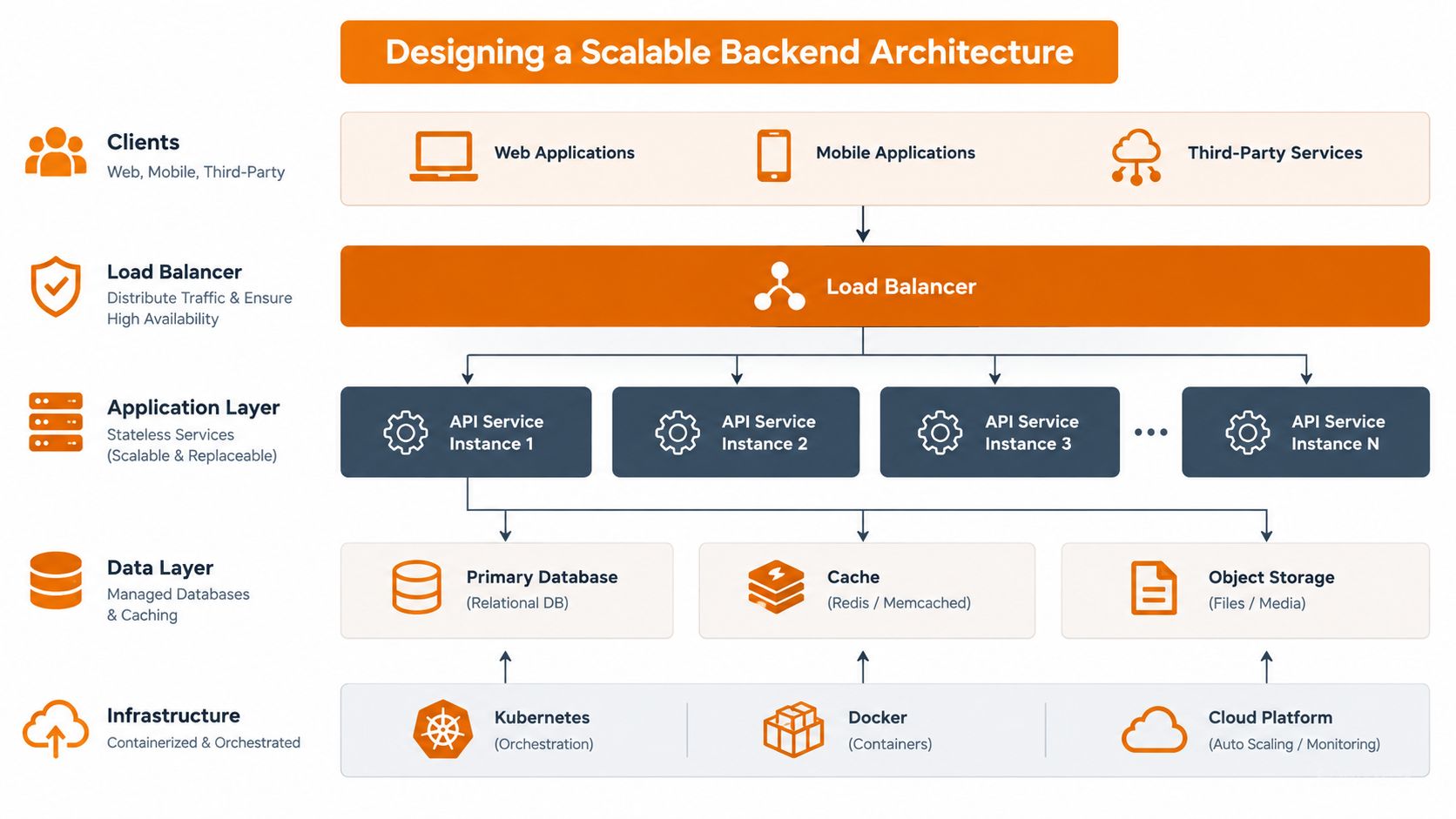
A scalable social backend starts with boundaries, not a long list of cloud services. Put an API gateway in front of the application and make authentication, request routing, and rate limiting explicit responsibilities. Behind it, separate the services that change for different reasons.
A practical arrangement looks like this:
- Identity service manages accounts, sessions, credentials, permissions, and device-level security.
- Social graph service manages follows, blocks, mutes, memberships, and relationship queries.
- Content service stores post metadata and coordinates media storage, validation, and processing.
- Feed service builds timelines from graph relationships and ranking inputs.
- Notification service delivers in-app, push, email, or webhook events.
- Moderation service handles automated checks, human review, reports, and enforcement.
- Messaging service manages conversations, delivery state, attachments, and real-time connections.
Use asynchronous work deliberately
Don't make a user's request wait for every downstream operation. A publish request should validate ownership and content, persist the canonical post, enqueue distribution work, and return a clear status. Feed updates, notification fan-out, media transcoding, and moderation enrichment can then run through durable workers.
A pub/sub backbone such as Redis Pub/Sub, Kafka, or NATS can connect these services. The choice depends on delivery guarantees, replay requirements, team familiarity, and operating constraints. Pub/sub isn't a substitute for durable state. Keep the source of truth in appropriate databases, and use events to tell other services what changed.
Real-time messaging needs a connection registry when multiple application servers handle WebSocket connections. The registry lets the system locate a recipient's active connection without assuming that sender and recipient share a server. If the recipient is offline, the messaging service should persist the event and let a notification worker handle the fallback.
Teams embedding these patterns into a larger product can also review multi-tenant SaaS architecture patterns, particularly where account isolation and delegated access matter.
Rate-limit the endpoint, not the whole application
A single global throttle is easy to implement and wrong for most social products. Login attempts, follows, feed reads, media uploads, comments, and administrative actions have different abuse patterns and different effects on the user experience.
One technical guide recommends endpoint-specific examples such as about five login attempts per minute, velocity detection that can flag 100 follows in an hour, and 100 to 200 read requests per minute for infinite-scroll access. These figures are implementation starting points, not universal policies, and the guidance appears in this social app backend architecture reference.
Use separate dimensions for each limit:
| Endpoint class | Main risk | Useful control |
|---|---|---|
| Authentication | Credential stuffing | Account, device, and network-aware limits |
| Follows and reactions | Automation and graph pollution | Velocity checks and behavioral review |
| Feed reads | Scraping and resource exhaustion | Cursor pagination and read budgets |
| Media uploads | Storage abuse and processing spikes | File validation, quotas, and queued processing |
| Moderation actions | Coordinated abuse | Privileged access controls and audit logs |
Return rate-limit metadata so clients can back off gracefully. Use cursor pagination rather than offset pagination for feeds, because inserts and deletions can otherwise cause duplicate or missing results during scrolling. Cache carefully, but don't let stale caches expose deleted or private content.
Optimizing for Retention and Engagement Loops
A social app can have a technically sound backend and still fail because users don't reach value quickly. Retention should shape the first release more than feature count does. If a new user can't understand whom to follow, what to do, or why to return, an expanded settings page won't solve the problem.
One compiled mobile-app benchmark reports average retention of 25% to 26% on day one, 11% to 13% on day seven, and 5% to 7% on day 30. A social-media-specific benchmark in the same source reports about 45% seven-day retention for social media apps. These figures come from the mobile app retention benchmark compilation, and they should be treated as directional benchmarks rather than promises for a particular product.
Design the first session around activation
Activation is the moment a user experiences the product's distinctive value. It might be joining a focused community, receiving a useful reply, publishing a first post, or discovering a stream that feels personally relevant. Define that event before you build the onboarding flow.
Instrument the path from installation or account creation to activation. Record where users abandon the flow, whether they find relevant accounts, whether their first post receives a response, and whether notifications bring them back. Cohort analysis matters more than a single aggregate retention line because a change in onboarding can help new users while leaving existing cohorts untouched.
Low-friction actions usually outperform elaborate creation flows at this stage. Let users reply without navigating through multiple screens, preserve draft content, make media upload failures recoverable, and show a meaningful empty state instead of a blank feed. Every interruption between intent and action is a chance to lose the user.
Build a loop, not a feature catalogue
A durable loop has a trigger, a simple action, a social response, and a reason to return. Notifications can be part of that loop, but only when they represent useful activity. Sending alerts for every minor event trains users to ignore them and creates a notification problem rather than an engagement strategy.
Prioritize the events that prove the network is alive:
- A relevant first connection: Recommend people, communities, or topics that match the product's purpose.
- A fast response: Help early posts receive a reply, reaction, or other meaningful acknowledgment.
- A visible consequence: Show users how their contribution affected a conversation or community.
- A controlled return prompt: Notify users about activity they're likely to value, with granular preferences.
The best retention work often removes a delay rather than adding a feature.
Measure repeat sessions, posting frequency, reply completion, notification open behavior, and the percentage of users who reach activation. Likes can provide context, but saves, shares, replies, completed conversations, and return visits usually tell you more about whether the product has a reason to exist.
A broad roadmap creates the illusion of momentum. A focused roadmap makes it possible to identify which behavior keeps the network active.
Navigating Multi-Platform API Fragmentation
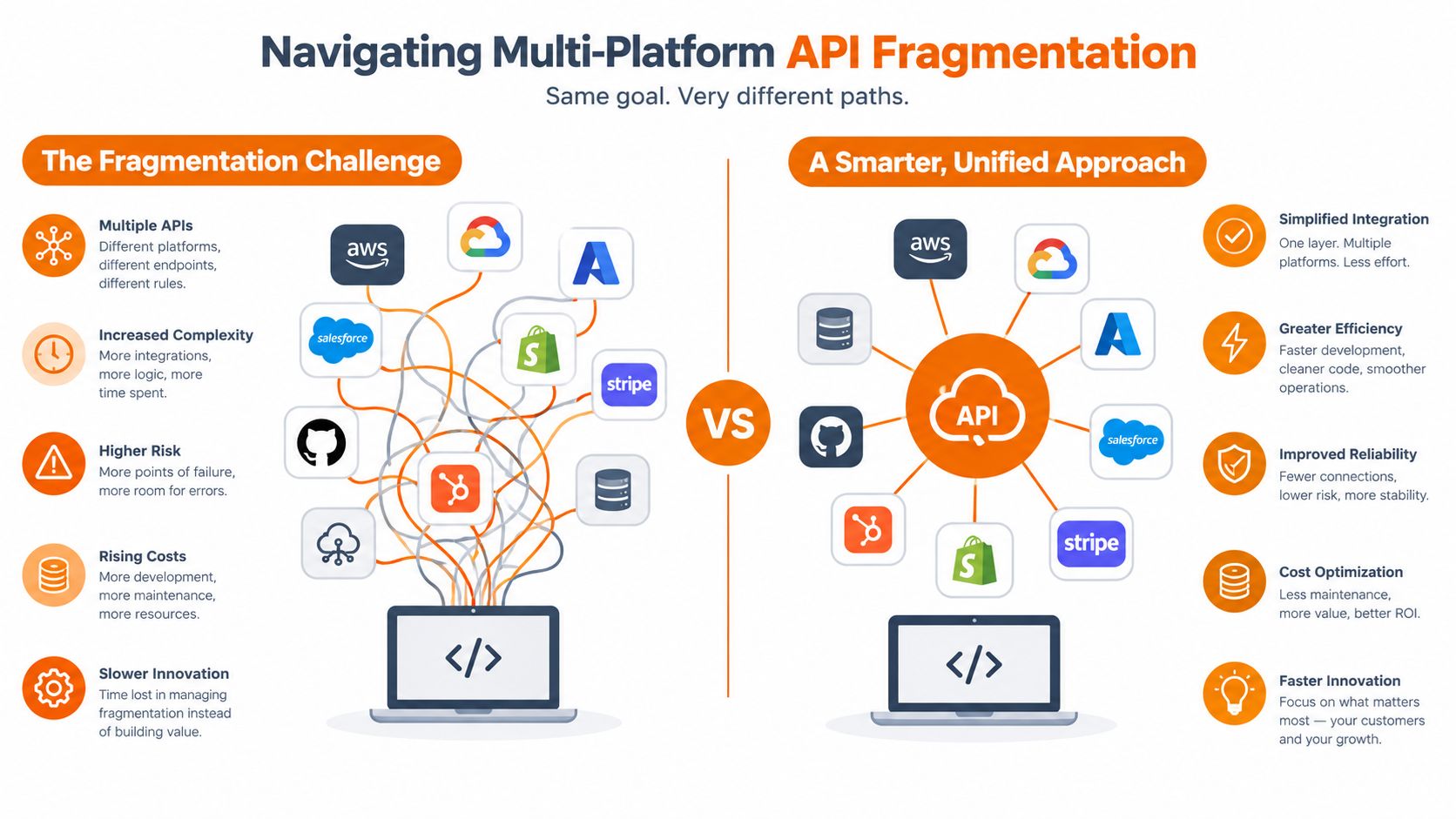
A social app that connects to established networks inherits their constraints. The integration isn't complete when OAuth succeeds. It must continue working when a platform changes permissions, alters review requirements, limits read access, rejects a media format, changes a response payload, or introduces a new quota policy.
Current independent API guidance describes a fragmented environment. X charges for read access, Meta requires app review, Reddit meters commercial use, and LinkedIn restricts deeper access. It also notes that Instagram's Basic Display API was sunset in December 2024, as documented in this overview of major social media APIs. These policies make platform integration an ongoing maintenance responsibility, not a one-time engineering task.
Building each connector yourself
Owning the connectors gives you control. Your team can expose platform-specific capabilities immediately, choose its own abstraction boundaries, and respond directly to API changes. That approach makes sense when one network is central to the product, the integration is itself a competitive advantage, or the organization already has dedicated compliance and platform-relations capacity.
The cost is not just code. You must maintain separate authorization screens, callback behavior, token refresh handling, permission scopes, media validation, publishing states, error mappings, retry policies, and support documentation. You also need tests for each network and a process for detecting silent permission or payload changes.
A common mistake is to model every network as if it supports the same object. A “post” may have different media rules, visibility options, comment behavior, scheduling support, and response semantics depending on where it is published. A generic internal model should preserve a shared core while allowing explicit platform-specific capabilities.
Using a unified integration layer
A unified API reduces the number of platform-specific concerns exposed to the rest of your application. Your product can work with a common publishing request, account connection model, job state, and webhook format while the integration layer handles differences below that boundary.
That abstraction doesn't remove platform policy risk. It changes who owns the maintenance work and how your team consumes it. You still need to understand permissions, consent, user disclosures, platform limits, failed publication states, and the capabilities available to each connected account.
For SaaS teams, a multi-platform social API architecture offers a useful way to think about this boundary. Build versus buy should be decided by strategic value, not by whether the first connector looks easy. If publishing to a network is your product's unique advantage, own more of the stack. If social publishing supports a broader workflow, a maintained integration layer can leave your engineers focused on the workflow users pay for.
Embedding Social Capabilities with Mallary.ai
A unified social layer works best when it sits outside your core domain model. Your application should own users, workspaces, permissions, campaigns, and product-specific workflows. The integration layer should own connected accounts, platform-specific payloads, publishing jobs, retries, and external status changes.
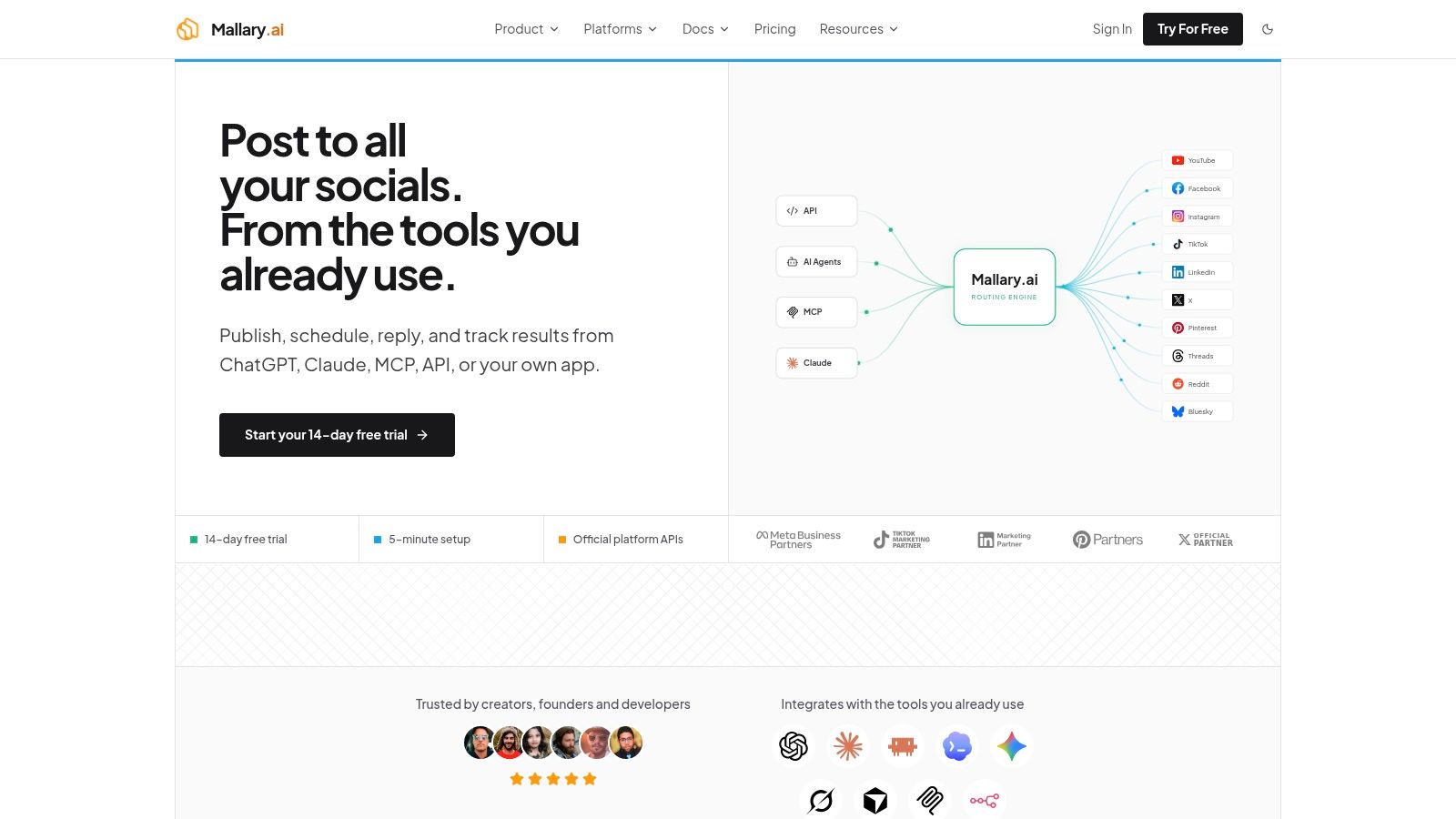
Mallary.ai provides one option for this arrangement. It unifies publishing, engagement, and analytics behind an API and dashboard, with support for a single endpoint, MCP agent interface, or CLI across networks such as YouTube, Facebook, Instagram, TikTok, LinkedIn, X, Pinterest, Threads, Reddit, and Snapchat. The product description states that it manages OAuth, rate limits, token refreshes, idempotency, retries, durable job queues, and platform-specific media validation.
Keep publishing asynchronous
Your own API shouldn't wait for a social network to finish processing a request. Accept a publish command, validate the user and workspace, create an idempotency key, and enqueue the job. Return a durable job identifier that your frontend can display as queued, processing, published, or failed.
Idempotency is essential when clients retry after a timeout. Without it, the same user action can create duplicate posts. Store the idempotency key with the intended operation and return the original result when the client submits the same command again.
Webhooks should update your internal state, not replace it. Verify the event, record the provider event ID, ignore duplicates, and process the update through a worker. Keep an event history so support staff can explain why a post failed or why an account needs reconnection.
Expose useful controls to your customers
A SaaS product should make connected-account behavior visible without exposing every underlying platform detail. Give workspace administrators controls for account authorization, posting permissions, approval flows, content previews, scheduling, and failure notifications.
Preflight checks should run before a job enters the queue. Validate required text, media type, dimensions, duration, destination account, and permission state. If one platform rejects a format that another accepts, explain the problem before the user waits for publication.
For teams building automation into an existing product, a social media scheduling API can support scheduled content, bulk uploads, webhooks, and integrations with tools such as n8n, Zapier, and Make. The same infrastructure can support multiple first comments at publish time and AI-assisted replies, but those features still need permission boundaries, review controls, and clear customer settings.
White-label the capability carefully
White-labeling should preserve your product's identity while keeping infrastructure ownership clear. Use your own workspace and role model, present connection flows in your application, and map external account IDs to internal records without leaking provider-specific identifiers into customer-facing workflows.
Start with publishing and status visibility. Add analytics, engagement automation, and agent interfaces only after you have reliable consent handling and observability. A richer surface is valuable when it reduces customer work, but it also increases the number of actions that require review, logging, and support.
Launch Checklist and Long-Term Maintenance
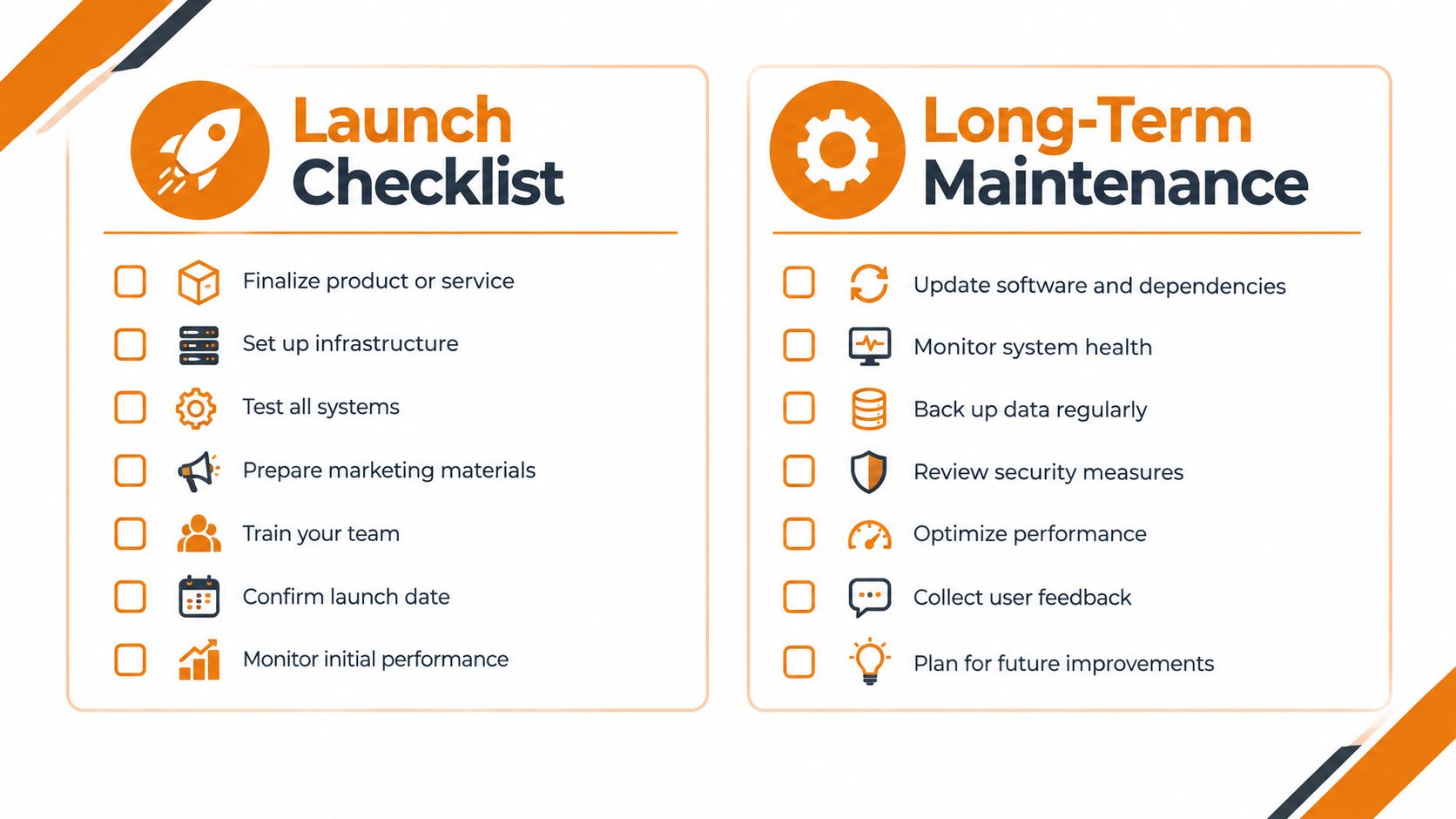
A launch checklist should test behavior under failure, not just confirm that the happy path works. A post that publishes successfully in development proves very little if the same request can be duplicated after a timeout, accepted with invalid media, or left in a processing state after a worker restarts.
Use the following preflight sequence before opening the product to real accounts:
- Test identity boundaries: Verify workspace isolation, role permissions, account disconnects, credential recovery, and deletion requests.
- Exercise the publish lifecycle: Test queued, retrying, published, partially failed, and permanently failed states.
- Replay webhook events: Confirm signature checks, duplicate handling, out-of-order delivery, and recovery after downtime.
- Probe abuse controls: Test login attempts, automated follows, rapid comments, oversized uploads, scraping behavior, and report floods.
- Review moderation operations: Confirm that flagged content enters a queue, reviewers can act, appeals are recorded, and enforcement is auditable.
- Measure activation: Track the first meaningful action, first response, notification behavior, and cohort retention from launch day.
Operate the product after launch
Day-one monitoring should include request errors, queue age, worker failures, webhook delivery, authentication failures, moderation backlog, media processing failures, and publishing success by destination. Break dashboards down by endpoint and platform. An aggregate success rate can hide the fact that one connector is failing for every customer.
Support needs an operational history. Store enough context to answer which account was connected, which permissions were granted, what payload was submitted, when the external service responded, and whether a retry occurred. Don't store sensitive credentials in logs, and restrict access to account and moderation data.
Long-term maintenance also includes product decisions. Review cohort behavior, customer complaints, rejected media, disconnected accounts, and notification opt-outs. Remove features that create support burden without strengthening the central loop. Expand only when the current workflow remains reliable under real usage.
A social app isn't finished when the first user publishes. It's ready when the team can diagnose the tenth failure without guessing.
The strongest architecture combines a focused product loop with replaceable infrastructure boundaries. Own the user experience and domain logic that differentiate your app. Standardize the jobs, events, permissions, and failure handling that let external networks participate without taking over your roadmap.
Mallary.ai provides a unified API and dashboard for social publishing, engagement, analytics, scheduling, webhooks, and automation across multiple platforms. If you're building a social media app and want to reduce connector maintenance while keeping your team focused on retention and product workflows, visit Mallary.ai to evaluate the integration.
Try it with Mallary
STOP!
Want ChatGPT or Claude to post on social media for you?
Connect your social accounts one time. Then tell your AI what to write. It can make your posts, share them, and reply on social sites that allow replies. You do not need to write code.
Pick your AI





Connect once. Ask in plain English. Mallary does the work.


