Written by Outrank. Published by Mallary Labs LLC.
Published .
A Practical API Automation Example for Devs
You're probably staring at a script that works in Postman, works in local dev, and then falls apart the first time a real content calendar depends on it. The request times out, the platform still publishes the post, your retry creates a duplicate, and now someone on the marketing team is asking why the same video appeared twice.
That's the gap most API automation examples miss. They show a clean POST request, maybe a webhook, and stop there. Real social automation is messier. Tokens expire, media validations differ by network, moderation events arrive out of order, and a “simple integration” turns into a maintenance tax across YouTube, Instagram, LinkedIn, X, TikTok, and whatever comes next.
Table of Contents
- The Reality of Production API Automation
- Configuring the Unified Social Endpoint
- Executing Multi-Platform Publishing and Scheduling
- Engineering Resilience with Idempotency and Retries
- Handling Webhooks for AI Auto-Replies
- Choosing Between REST, Webhooks, and MCP Agents
The Reality of Production API Automation
Most tutorials treat API automation like a single request followed by a single success response. That's not how social systems behave once users, schedules, and multiple platforms are involved.
A production workflow usually spans several failure domains:
- Your app builds the payload and decides when to publish.
- The orchestration layer validates auth, media, and destination rules.
- The destination platform may accept, reject, queue, or partially process the request.
- The callback path reports final state later, often through events rather than an immediate response.
That means a good API automation example isn't “send JSON to endpoint X.” It's “send JSON once, survive retries, observe state transitions, and avoid duplicate side effects.”
Why fragile scripts fail fast
The most brittle pattern is a direct integration per network. One codepath for LinkedIn. Another for Instagram. Another for X. Each one stores its own tokens, refresh logic, rate limit behavior, and media quirks. It works for a while, then maintenance starts dominating feature work.
Common breakpoints show up quickly:
- Expired OAuth state: A token that looked valid yesterday fails when the scheduled post runs.
- Platform-specific media rules: A payload accepted for one network gets rejected by another because of format, caption, or attachment constraints.
- Inconsistent retry behavior: One API call is safe to repeat, another creates duplicate content.
- Split observability: Logs live in different places, so nobody can answer a simple question like “did the post fail, or is it still processing?”
The happy path proves almost nothing. Reliability shows up when the first request fails.
The better pattern is a unified orchestration layer that owns the ugly parts. One endpoint for publishing. One job model for asynchronous completion. One webhook model for inbound events. One place to enforce retries, token refresh, idempotency, and validation.
Why the architecture is moving this way
The underlying ecosystem already supports this direction. The Postman 2025 State of the API Report says REST is used by 93% of API developer teams, while webhooks are used by 50% and WebSockets by 35%. That combination maps well to production automation: REST for command and control, webhooks for event intake, and real-time delivery patterns where latency matters.
For social tooling, that translates into one practical design choice. Keep outbound actions declarative and synchronous at the interface level, then let the backend execute them through durable jobs and event updates. If you're building AI-assisted engagement on top, that pattern becomes even more important, especially once your system starts reacting to comments and messages continuously. A good overview of that broader shift appears in this piece on AI social media automation.
What a durable integration needs
A production-grade social automation system usually needs these properties:
| Concern | Fragile script | Durable system |
|---|---|---|
| Auth | Token pasted into config | Managed OAuth and refresh lifecycle |
| Publish flow | Direct request | Queued job with status tracking |
| Retries | Blind retry loop | Bounded retry policy with backoff |
| Duplicates | Possible after timeout | Prevented with idempotency |
| Inbound events | Polling or ignored | Webhook-driven processing |
| Observability | Console logs | Correlated job and event records |
That's the difference between a demo and something a team can safely put behind a scheduling UI or customer-facing product.
Configuring the Unified Social Endpoint
Before writing retry logic or AI responders, get the connection layer boring. Boring is good here. You want auth, account linking, and preflight validation to feel routine.

A unified social endpoint helps because it turns “integrate ten APIs” into “configure one automation surface.” Some platforms do that behind a dashboard and API. One example is Mallary.ai, which exposes a single publishing API plus CLI and webhook support while handling OAuth, token refresh, durable job queues, and platform-specific validation under the hood.
Start with environment boundaries
Keep secrets and target environments explicit. A small .env split prevents a lot of confusion later.
SOCIAL_API_KEY=your_api_key
SOCIAL_BASE_URL=https://api.example.com
SOCIAL_WORKSPACE=staging
WEBHOOK_SIGNING_SECRET=your_signing_secret
That separation matters because social automation has two different classes of failure:
- Configuration failures like missing scopes, disconnected accounts, or revoked access.
- Runtime failures like rate limiting, transient upstream errors, or invalid payloads.
You want to catch the first class before the first scheduled job is ever created.
Verify accounts before sending content
Run a preflight step that checks three things:
- Connection status for each linked social account
- Permission scope for the operations you need
- Media compatibility for the exact payload you're about to submit
A CLI is useful here because it's scriptable in CI and local development. Even if your vendor's syntax differs, the pattern should look something like this:
social accounts list --json
social accounts validate --network instagram --json
social preflight post ./payload.json --json
If the CLI supports JSON output, pipe it into your deployment checks rather than eyeballing terminal text. Treat “account disconnected” as a deploy blocker for any workflow that depends on scheduled publishing.
Practical rule: fail fast on auth and scope issues, not on publish time.
The setup walkthrough below is useful if you want to see that kind of flow in a more visual format before wiring it into your own tooling.
Prefer one contract over many adapters
A unified endpoint only helps if the contract is stable. The request model should let you say what you want published without forcing your app to know every platform's special case.
That usually means structuring the request around:
- Destinations: which accounts or channels receive the content
- Content blocks: text, media, links, first comments
- Scheduling metadata: publish now or later
- Safety metadata: idempotency key, trace ID, client reference
Here's a representative shape:
{
  "destinations": ["linkedin:brand", "x:brand", "instagram:brand"],
  "content": {
    "text": "New product walkthrough is live.",
    "media": [
      {
        "type": "video",
        "url": "https://assets.example.com/videos/launch.mp4"
      }
    ]
  },
  "schedule": {
    "publishAt": "2026-02-10T14:00:00Z"
  },
  "clientReference": "launch-campaign-asset-17"
}
The value of this model isn't that it hides all differences forever. It's that your app speaks in one stable contract while the orchestration layer adapts the payload per network and rejects unsupported combinations early.
Executing Multi-Platform Publishing and Scheduling
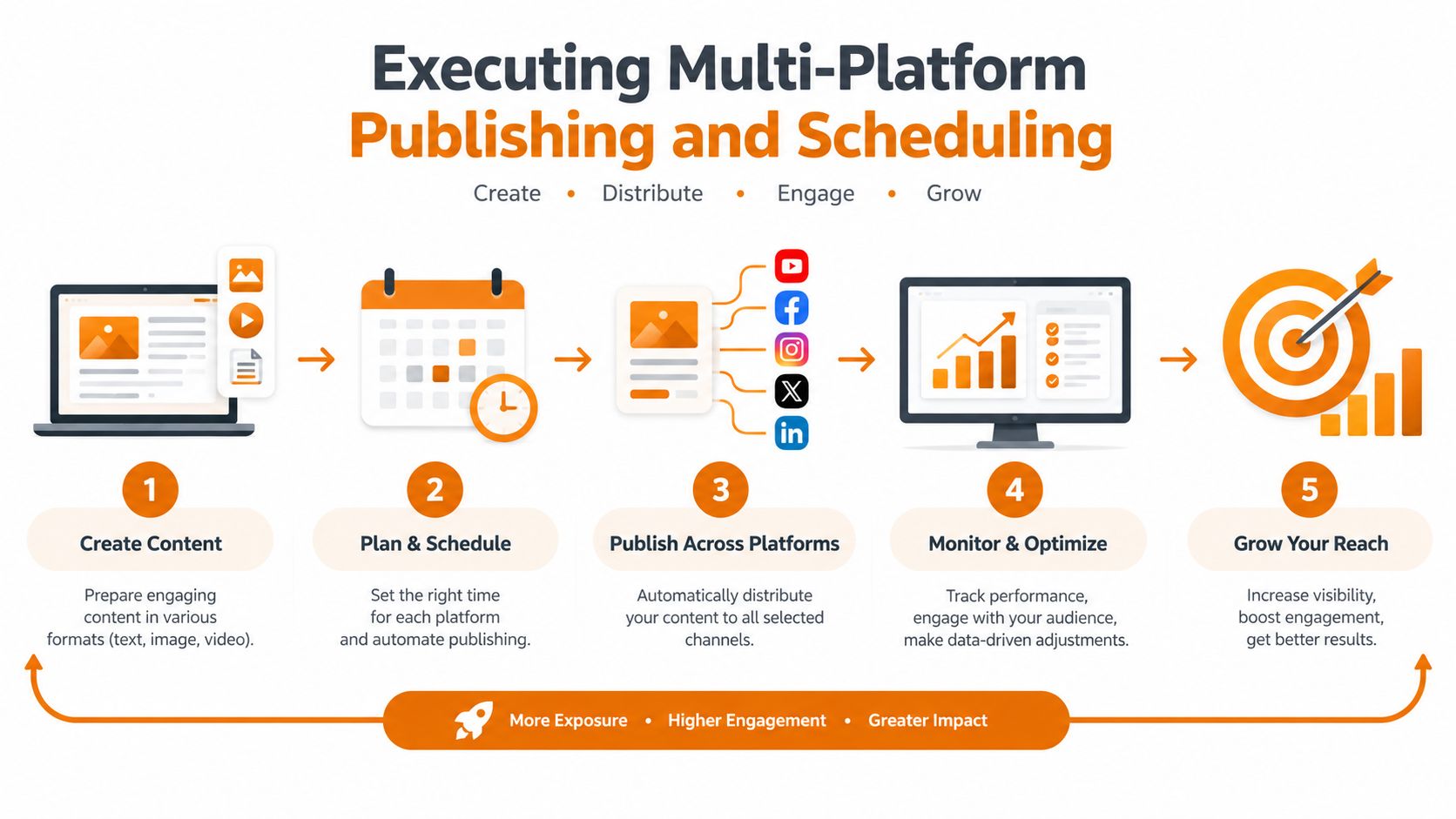
Once the endpoint is configured, the publishing layer should stay declarative. Tell the API what to post and where. Don't push destination-specific branching into your app unless you absolutely have to.
The broad industry direction supports that design. One survey summary reports that 82% of organizations have adopted some level of an API-first approach, 25% describe themselves as fully API-first, 65% generate revenue from APIs, and 75% of teams use CI/CD pipelines for API deployment. The same summary says 54% of API-related CI/CD tooling adoption is attributed to GitHub Actions in the cited survey summary. The operational takeaway is simple: API workflows now sit inside release and delivery systems, not just side scripts. See the cited overview at YourWebTeam's API statistics summary.
A scheduling request that stays readable
A good multi-platform request should express intent clearly and leave adaptation to the backend. For example:
{
  "destinations": [
    "linkedin:company_page",
    "x:brand_account",
    "facebook:page"
  ],
  "content": {
    "text": "Shipping notes are live. Full changelog in the link.",
    "link": {
      "url": "https://example.com/changelog"
    },
    "media": [
      {
        "type": "image",
        "url": "https://assets.example.com/release-cover.png"
      }
    ]
  },
  "firstComments": [
    "Questions? Drop them here and we’ll answer them.",
    "If you’re migrating from the old workflow, the docs cover the edge cases."
  ],
  "schedule": {
    "publishAt": "2026-02-10T15:30:00Z",
    "timezone": "UTC"
  }
}
That payload gives your automation enough structure to do useful validation before any network call happens. It can reject impossible combinations, normalize metadata, and queue a durable job instead of depending on a single request completing in one shot.
Queue the work, don't trust the first response
For scheduled campaigns, the create request should usually return a job handle rather than pretending the work is complete.
{
  "jobId": "job_01HX...",
  "status": "queued",
  "scheduledFor": "2026-02-10T15:30:00Z"
}
That small shift changes the whole system design:
- Your app records intent when the job is accepted.
- The worker tier handles execution at publish time.
- Status changes arrive later through polling or webhooks.
- Retries stay inside the orchestration layer where state is visible.
If you want a concrete product shape for that pattern, a social media posting API typically exposes post creation separately from job-status checks so your application can stay asynchronous without becoming blind.
Keep payloads expressive, not platform-specific
You'll run into edge cases around media quickly. One network accepts a link preview and image together. Another chooses one. A short video is acceptable in one place and gets rejected elsewhere because of duration, ratio, or encoding details.
The orchestration layer should handle as much of that translation as possible, but your app still helps by separating content into intentional parts:
| Payload area | What your app should say | What the backend should decide |
|---|---|---|
| Text | Canonical message | Truncation or adaptation rules |
| Media | Asset references and type | Per-platform validation and transformation |
| Comments | Candidate first comments | Which destinations support them |
| Schedule | Desired publish time | Worker execution timing and retries |
Queue accepted intent, not assumed success. Those are different states.
When developers skip this separation, they usually end up encoding platform quirks all over the product. Then every new destination becomes another branch in already messy code.
Engineering Resilience with Idempotency and Retries
Most API automation examples stop being useful here. A retry loop isn't resilience by itself. It can make things worse if you repeat unsafe requests or hammer an already overloaded service.
Idempotency comes first
If a publish request can create a social post, comment, or DM, you need idempotency before you enable automatic retries. AWS's guidance on making retries safe with idempotent APIs is clear on the principle: the same request should be safely retransmitted without creating extra side effects, and it explicitly recommends verifying idempotency before turning retries on. The same guidance describes a common pattern of retaining idempotency keys for roughly a day so retry windows stay bounded.
In practice, that means every action with side effects should include a stable key generated by your app, not by the transport layer.
{
  "idempotencyKey": "post-tenant42-campaign88-slot03",
  "destinations": ["linkedin:brand", "x:brand"],
  "content": {
    "text": "Docs update is live."
  }
}
If the client times out after sending this request, you resend the exact same payload with the exact same key. The server should either return the original result or the current known state of that same operation.
Retries need policy, not hope
Once idempotency is in place, configure retries conservatively. The operational guidance in BoldSign's retry best practices recommends exponential backoff, jitter, bounded attempts, and a total retry deadline. It gives a practical range of 3 to 5 attempts, 1 to 5 second per-attempt timeouts, 10 to 30 second backoff caps, and 10 to 60 second total retry windows, while also honoring 429 responses and Retry-After.
That's a sane baseline for outbound automation jobs.
A worker policy might look like this:
retry:
  max_attempts: 5
  per_attempt_timeout_seconds: 5
  strategy: exponential_backoff_with_jitter
  backoff_cap_seconds: 30
  total_deadline_seconds: 60
  respect_retry_after: true
Don't apply that blindly to every error. Retry on transient network failures, upstream timeouts, and rate limits when the provider allows it. Don't retry malformed payloads, revoked permissions, or unsupported media combinations. Those need correction, not persistence.
Treat 429 as flow control
A 429 Too Many Requests isn't an invitation to retry immediately. It's feedback from the upstream platform that your current pace is unacceptable.
Handle it this way:
- Pause the job according to
Retry-Afterwhen present - Reduce concurrency for the affected destination or tenant
- Preserve the same idempotency key on the resumed attempt
- Emit a status event so your app knows the job is delayed, not lost
That last point matters operationally. If your product UI only shows “failed” or “success,” support teams will misread delayed jobs as broken jobs.
Durable jobs beat inline fetch calls
Inline request chains are fragile because they force one process to stay alive long enough to finish external work. Durable jobs decouple acceptance from execution.
A resilient publish flow usually looks like this:
- API receives a publish intent with an idempotency key.
- API validates auth, scopes, and payload shape.
- API writes a job record and returns queued status.
- Worker executes destination-specific actions.
- Worker retries transient failures under policy.
- Final status is recorded and emitted.
If you can't answer “what happened to this post?” from a single job record, your automation isn't ready for production.
The hidden benefit is debuggability. With a durable queue, you can inspect attempt history, payload normalization, upstream responses, and final state without replaying the whole incident from logs.
Handling Webhooks for AI Auto-Replies
Outbound publishing gets attention because it's visible. Inbound automation is where things get interesting. The moment you listen for comments, mentions, or DMs, your system stops being a scheduler and starts behaving like an event-driven service.
The event loop in practice
A useful webhook-driven flow for AI replies usually follows this sequence:
- A platform emits an event for a new comment or message.
- Your webhook endpoint verifies the signature and stores the raw payload.
- A worker normalizes the event into your internal schema.
- The worker loads context, such as account rules, campaign metadata, and recent thread history.
- An AI model drafts a response under guardrails.
- A publishing call sends the reply back through the same unified social API.
That shape matters because inbound events are noisy. Some arrive late. Some arrive twice. Some reference content you haven't seen yet because another event is still in flight.
Keep the webhook handler thin
The webhook handler should do as little as possible synchronously. Verify authenticity, acknowledge receipt, persist the event, and hand off. If you try to generate the AI response inline, you'll create avoidable timeout risk and make redelivery harder to reason about.
A thin Node handler often looks like this:
app.post("/webhooks/social", async (req, res) => {
  verifySignature(req);
  const event = await storeIncomingEvent(req.body, req.headers);
  await enqueue("process-social-event", { eventId: event.id });
  res.status(202).send({ accepted: true });
});
If you need a refresher on the delivery model itself, this guide on what a webhook is and how it works covers the core request flow well.
Put guardrails around the model call
AI auto-replies are useful when the system is opinionated about when not to reply. Don't let the model answer everything.
Use explicit rules such as:
- Skip high-risk topics: billing disputes, legal threats, harassment, and account security issues
- Require confidence checks: if the event lacks enough context, route to a human queue
- Limit response style: cap length, ban unsupported claims, and constrain CTA language
- Preserve thread state: avoid answering the same user twice because duplicate events arrived
IBM's overview of API automation is useful here because it emphasizes the often-missed production concerns: durable queues, retries, rate-limit handling, token refresh, idempotency, and preflight validation. That same mindset applies to AI-driven engagement. The interesting problem isn't “can the model draft a reply?” It's “can the system do it safely and reliably when events are delayed, duplicated, or rate-limited?”
Good AI automation isn't just fast. It knows when to wait, when to skip, and when to hand off.
Near real-time engagement comes from this event loop discipline, not from making one clever model call.
Choosing Between REST, Webhooks, and MCP Agents
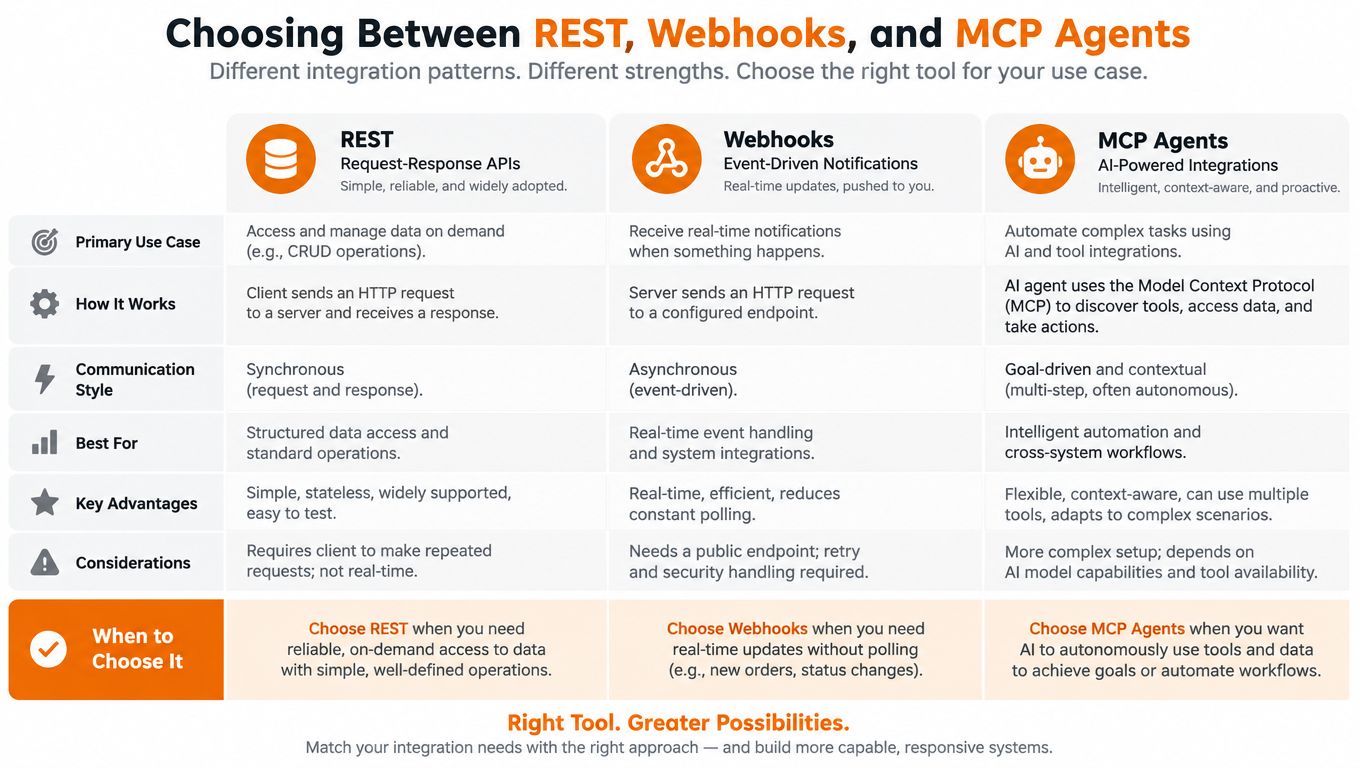
Different integration patterns solve different problems. Trying to force everything through one interface usually creates awkward trade-offs.
REST for explicit commands
Use REST when your app knows exactly what action it wants to perform and wants a clear request contract.
REST fits well for:
- creating or scheduling posts
- updating campaign metadata
- requesting job status
- triggering bulk uploads from your product backend
This remains the default interface across many teams. As noted earlier, REST is the dominant architectural style across API developer teams according to Postman.
Webhooks for state changes
Use webhooks when the important thing is that something happened, not that your app must ask every few seconds whether it happened.
Webhooks fit well for:
- publish-complete notifications
- comment and DM intake
- moderation events
- account disconnect alerts
They reduce waste compared with polling and let you build event-driven automation that reacts quickly without keeping a client loop busy.
MCP agents for adaptive workflows
Agent interfaces are a better fit when the system needs to choose among tools dynamically instead of following one fixed branch. That's relevant for AI-assisted social workflows where an agent may inspect incoming engagement, decide whether to draft a reply, schedule a follow-up post, or query campaign context first.
Industry coverage points in that direction. Digia's analysis of API trends for 2026 describes a shift toward asynchronous and real-time patterns and names AI-driven API consumption as a trend. The same piece cites a market report projecting 18.82% CAGR for the AI, machine learning, and automation API segment. Treat that as a projection, not a present-tense operational fact, but it lines up with what builders are already asking for.
A practical decision view
| Pattern | Best when | Weak when |
|---|---|---|
| REST | You need direct commands and predictable contracts | You need instant event awareness without polling |
| Webhooks | You need event-driven reactions | You need the caller to control every step synchronously |
| MCP agents | The workflow needs tool selection and adaptive decision-making | The task is simple and fully deterministic |
For any given team, the right answer isn't choosing one. It's combining them cleanly:
- REST to declare intent
- webhooks to receive outcomes and inbound events
- agent interfaces for higher-level automation loops where AI decides the next action under guardrails
That combination is what turns a basic API automation example into a system that can publish, observe, and respond without constant operator intervention.
Mallary.ai gives teams one developer-first surface for that full workflow: unified social publishing, scheduling, webhooks, job handling, and AI-ready automation without maintaining separate platform integrations yourself. If you're building multi-platform posting or event-driven engagement into a product, visit Mallary.ai and evaluate whether its API, CLI, and agent interfaces fit your stack.
Try it with Mallary
STOP!
Want ChatGPT or Claude to post on social media for you?
Connect your social accounts one time. Then tell your AI what to write. It can make your posts, share them, and reply on social sites that allow replies. You do not need to write code.
Pick your AI





Connect once. Ask in plain English. Mallary does the work.


