Written by Outrank. Published by Mallary Labs LLC.
Published .
AI Social Media Scheduler: How It Works and What to Use
Sunday night. The launch is Thursday. Your desktop has five tabs open: a long Instagram caption, a trimmed version for X, a LinkedIn draft with the hashtags stripped out, a TikTok script, and a spreadsheet holding the times each one was meant to go live. Someone asks which post runs first. Nobody's sure, and the Facebook post you scheduled on Friday failed at 2 a.m. without telling anyone.
That gap between the plan and the published post is where an AI social media scheduler does its work. Not the calendar view. The plumbing under it.
Most write-ups of these tools stop at the calendar grid and a feature list. The version that holds up in production looks different: a durable queue, a set of per-platform limits, a retry policy that knows which failures are worth retrying, and a review step where a person decides what goes out under the brand's name.
Table of Contents
- What an AI Social Media Scheduler Does Day to Day
- Core Features and Benefits
- How a Scheduled Post Travels From Queue to Live
- AI Scheduler Versus a Traditional Scheduler
- Integration Patterns for APIs, Webhooks and Bulk Uploads
- Use Cases for Developers and Marketing Teams
- Best Practices for Human Review and Safe Publishing
- Confirm an AI Scheduler Fits Your Publishing Workflow
What an AI Social Media Scheduler Does Day to Day
An AI social media scheduler is software that queues posts for future publishing across several networks and uses AI to draft or adapt captions, propose publishing times, check each post against platform requirements before dispatch and, in some products, answer comments. A traditional scheduler is a wall calendar you fill in by hand. An AI scheduler behaves closer to an air traffic controller: it knows each runway's limits, holds a post when a platform closes a gate, and routes traffic around a surface that's stopped accepting requests.
Three layers sit inside every tool in this category. Planning is the queue: which post, which account, which time zone. Generation turns one brief into platform-shaped variants with the right length, hashtags and media. Execution is the layer buyers rarely inspect before signing up, and the one that decides whether a campaign finishes: publishing through official APIs, retrying what can be retried, and reporting what happened.
Multi-channel pressure explains why that third layer matters so much now. DataReportal's Digital 2025 Global Overview Report put the global social audience at 5.24 billion active user identities and found that connected adults use an average of 6.83 social platforms per month. A single channel rarely reaches the audience a brand is trying to serve, so one post composed once and pasted everywhere is rarely enough.
Here's the day-to-day view for a small team running that schedule across accounts, clients and time zones.

A quick self-test tells you whether a scheduler will pay off for you. If you publish to three or more networks each week and find yourself rewriting the same post several times, the tool earns its keep inside a month. If you post to a single network twice a week, the native app and a notes file are cheaper and faster.
That's also where handoffs get messy. Teams passing part of the work to an outside partner still need the queue and the approval step to stay in-house, which is why solid guidance on outsourced social media management tasks spends as much time on sign-off as on posting.
Core Features and Benefits
Eight capabilities separate a scheduler that survives production from a calendar with a publish button.
- Multi-network queue. One calendar holds posts for every connected account, with time zone and media type confirmed before a post joins the queue.
- Per-platform variants. The AI drafts or adapts caption length, tone and hashtags for each network from one brief, and the team approves what it produced.
- Preflight checks. Media format, character limits and required fields are validated before dispatch, not after a failed publish.
- Quota-aware publishing. The queue tracks each account's daily ceiling and holds posts that would breach it.
- Timing suggestions. Slots come from the account's own engagement history, then get tested against results instead of copied from a generic blog post.
- AI replies with escalation. Routine comments can be drafted or answered automatically. Complaints, legal questions and regulated topics route to a person.
- Analytics feedback. Impressions and interaction events flow into the next scheduling decision rather than sitting in a report nobody opens.
- Developer access. A REST API, webhooks and bulk upload expose the same functions outside the dashboard, which is what product teams need.
The benefit isn't volume. Posting more often is easy and usually counterproductive. What changes is the share of scheduled work that completes without someone chasing it, and the share of posts landing in a slot where the audience is present.
Distribution position matters more than many teams assume. A peer-reviewed analysis of social ranking systems reports that moving a post from the top position to ranks 6 to 10 reduced engagement probability by approximately 40%. That argues against a universal best time and for scheduling tied to measured interaction data, tested with holdouts rather than assumed.
Rule of thumb: if your scheduler can't show you the engagement result of the last 20 posts it timed, it's guessing.
Generation only pays off when it's wired to publishing, and AI social media automation is the clearest example of that. Keep brief, variant, publish and result in one pipeline and you remove the step teams complain about most: copying text between five tabs.
How a Scheduled Post Travels From Queue to Live
Publishing at scale is a distributed-systems problem wearing a marketing hat. Every network applies its own quotas, request semantics and failure responses, and a scheduler that ignores that will lose posts without an error anyone sees. The path from draft to live runs through five stages.
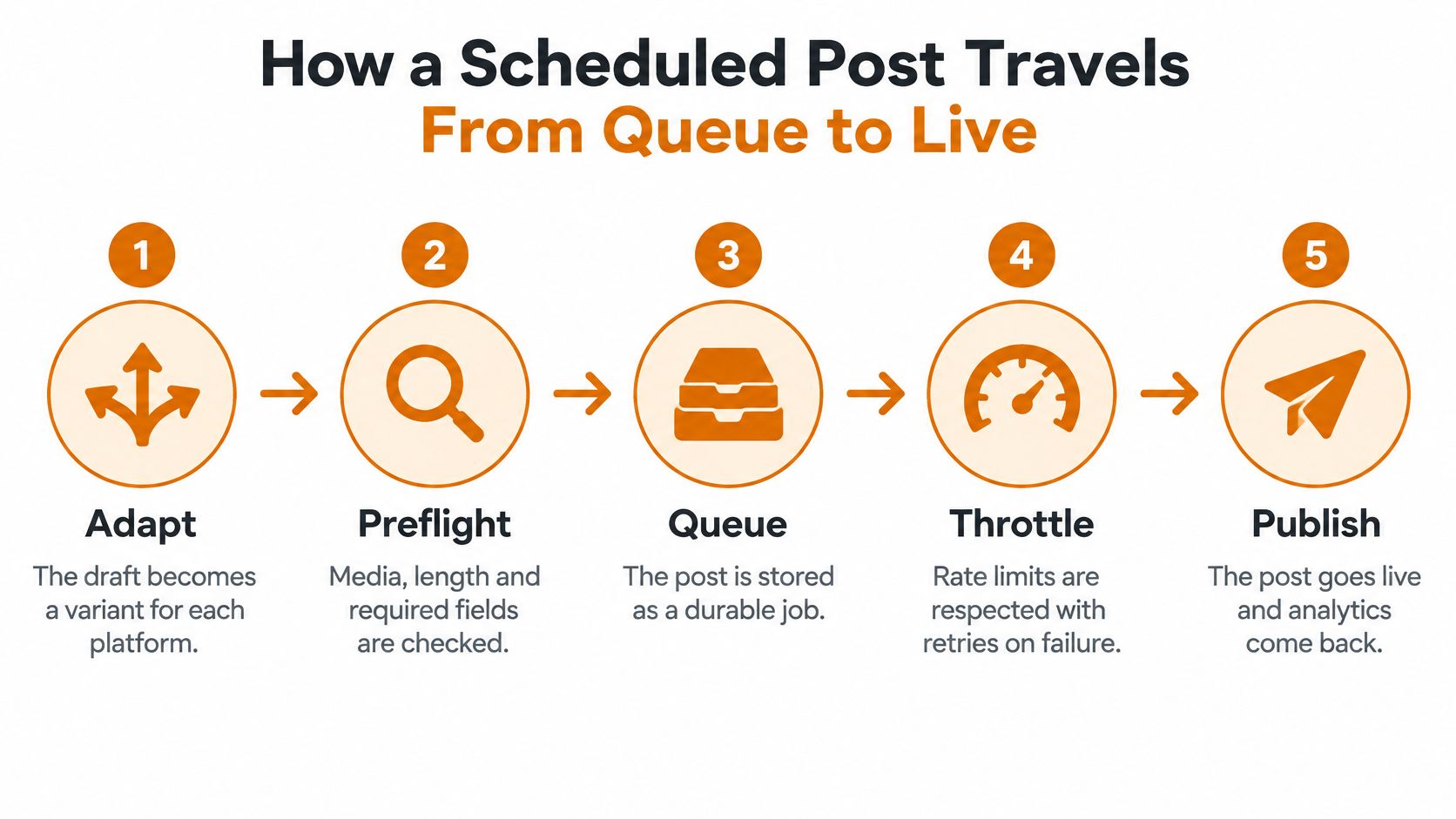
1. Adapt the draft. One brief becomes a variant per platform. The common failure is truncation: a caption that fits Instagram gets cut mid-sentence on X, or a hashtag block that reads fine on LinkedIn looks like spam on Threads. Adapt at the field level, not with a character counter.
2. Run preflight checks. Media format, aspect ratio, file size, caption length and required fields get validated before anything enters the queue. Catching a 4:5 image on a network that wants 1:1 costs seconds here. Catching it after a failed publish costs a campaign slot.
3. Store the post as a durable job. The record needs the account, the payload, the scheduled time with its time zone, the attempt count and the last error. Jobs held in memory vanish on deploy, and a redeploy at 3 p.m. shouldn't erase the 3:05 p.m. post.
4. Reserve quota before dispatch. Quota state belongs to the platform account, not the workspace. Reserve capacity when the job comes due and release it on permanent failure, or three parallel campaigns will each believe they have 50 posts left.
5. Send through the official API with an idempotency key. Retries happen. Without a key that marks an attempt as the same post, a timeout followed by a retry publishes twice, and deleting the duplicate doesn't restore the engagement it split.
6. Record the result and collect the metrics. Store the platform's post ID, then pull impressions and interaction events on a schedule. This is what makes the next timing decision evidence-based instead of folklore.
Daily caps vary far more than teams expect, and the Social API rate limit guide documents the ceilings per connected target that one integration reports.
| Platform | Daily cap per connected target |
|---|---|
| 45 posts | |
| 100 posts | |
| Threads | 250 posts |
| X | 50 posts |
| TikTok | 13 posts |
TikTok is the constraint that catches people. A 20-post push across five TikTok accounts needs planning, not a bulk upload at 8 a.m., and current platform rules are always worth checking before you commit to a volume.
Rate limiting gets handled by reading the response, not by retrying faster. A throttled request comes back as HTTP 429 with a Retry-After header. Read it, delay that job by the stated interval, and requeue with exponential backoff plus jitter so a hundred jobs don't all retry in the same second.
Split failures by kind before you build a retry policy. Rate limits, network errors and temporary outages are transient and deserve automatic retries. Invalid media, expired permissions and unsupported post types are permanent, and retrying them burns attempts and buries the real error.
Permanent failures belong in a human queue with the platform's error message attached. That single design choice separates a scheduler your team trusts from one they stop checking.
AI Scheduler Versus a Traditional Scheduler
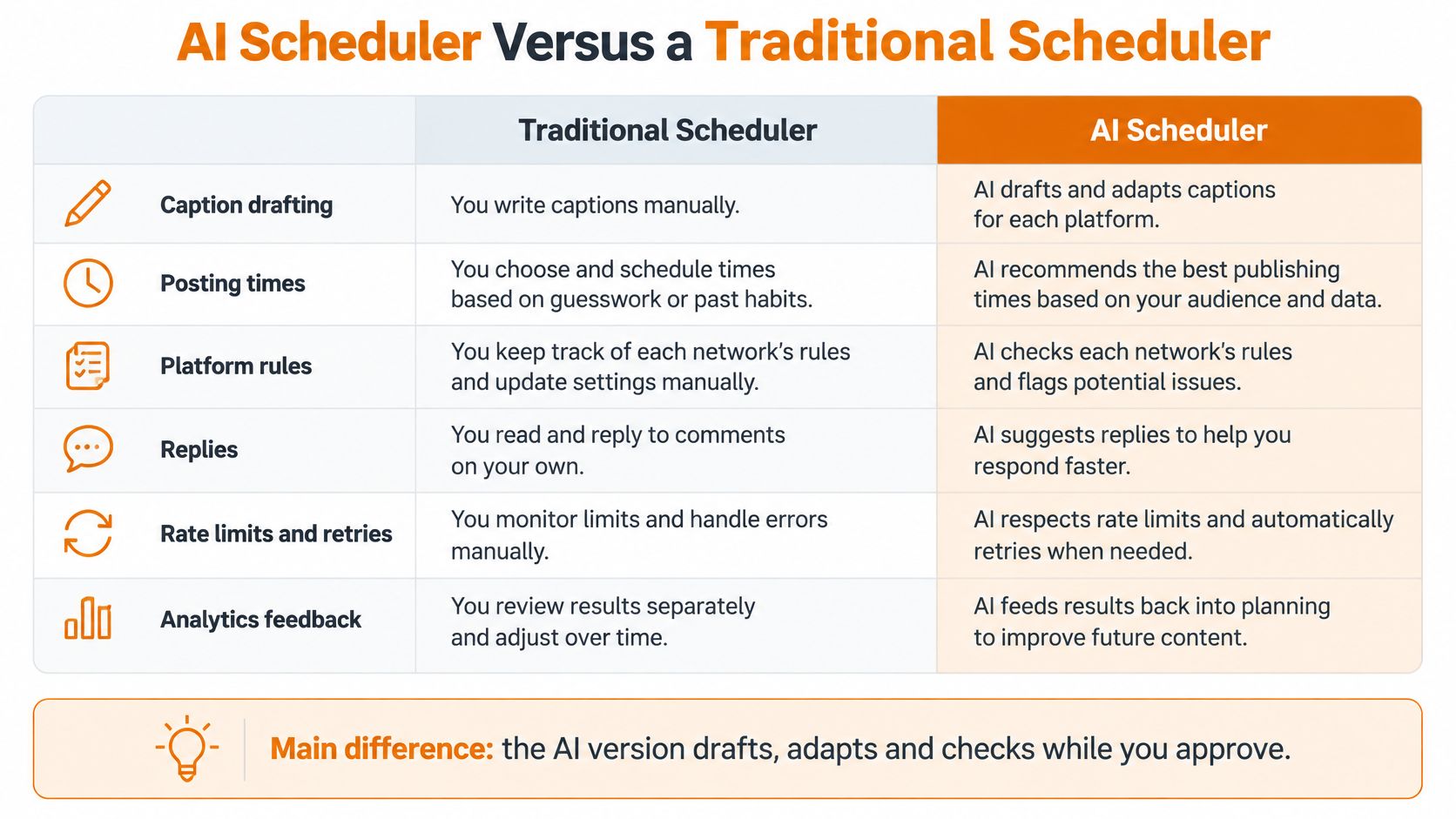
Both tool types publish to the same APIs, so the difference isn't the posting. It's what happens before and after the slot you picked.
| Task | Traditional scheduler | AI social media scheduler |
|---|---|---|
| Caption drafting | You write every variant by hand | Drafts or adapts variants per platform, subject to your review |
| Posting times | You pick fixed slots | Suggests slots from engagement history and tests them |
| Platform rules | You check media and length yourself | Runs preflight checks before dispatch |
| Replies | Handled manually | Optional AI replies with escalation rules |
| Rate limits and retries | Failures often need manual retry | Quota-aware queue with idempotent retries |
| Analytics feedback | Reports results after the fact | Feeds results into future scheduling decisions |
Put the same five-post launch week into each tool and the split shows up fast. In the traditional one you write five captions, adapt each by hand for the networks that need it, pick the times, then discover at 9 a.m. that Tuesday's Facebook post failed because the image was 12 MB. You reschedule it manually, and the follow-up thread now goes out a day late. In the AI version, one brief produces the variants, preflight rejects the oversized file before it joins the queue, the retry policy absorbs a transient failure nobody was watching, and you spend the morning reviewing two flagged captions instead of rewriting five.
That contrast is the whole product difference in one sentence: the traditional tool publishes at the time you chose and leaves recovery to you, while the AI tool decides what to adjust before and after the slot.
The trade-off is real and worth saying plainly. Automated drafts and timing suggestions save hours, but unchecked output publishes at scale, so one weak caption reaches every account at once, and one wrong claim about a regulated product ships before anyone reads it. Speed of generation is also speed of error.
Both approaches overlap more than vendors admit. Both need accurate time zones, media that meets each platform's rules, and a queue that can survive a restart. A traditional tool with a careful editorial process will outperform an AI tool nobody reviews, and it isn't close.
Market expectations have moved underneath the comparison. Salesforce's ninth State of Marketing report found 32% of marketing organizations had fully implemented AI in their workflows and another 43% were experimenting, which makes drafting and timing features table stakes rather than a reason to switch.
Start by listing the two tasks you repeat most often each week and check them against the rows above. If both sit in the right column, an AI scheduler changes your week. If both sit in the left, you're about to pay for a calendar.
Integration Patterns for APIs, Webhooks and Bulk Uploads
There are five sensible ways to connect a scheduler to the rest of your stack, and choosing wrong costs more than choosing late.
| Pattern | Best for | What you control | Main trade-off |
|---|---|---|---|
| Scheduling REST API | Product teams embedding posting in an app | Payload, timing and retry logic in your code | You build and maintain the calling logic |
| Webhooks | Reacting to publish, failure and reply events | Event handling in your own systems | You must secure and monitor an endpoint |
| Bulk upload | Agencies loading many posts across many accounts | Batches of posts with dates and time zones | Errors show per row, so validate before submitting |
| No-code workflows (n8n, Zapier, Make) | Marketing teams triggering posts from a sheet or CMS | Triggers and field mapping in a visual builder | Less control over retries and rate handling |
| MCP agent interface and CLI | Agent builders and scripted pipelines | Tool calls and scheduled jobs | Requires an agent or scripting setup |
The decision rule is short. Embedding posting for your own users means starting with the API. An agency loading a month of content for a dozen clients starts with bulk upload. A marketing team whose stack already runs on triggers uses a no-code workflow. Agent builders start with MCP or the CLI.
Webhooks are the feedback path, not a notification nicety. They report publish events, failures and incoming replies, so your handler has to verify signatures and be idempotent, because the same event can arrive twice and a duplicate reply is a public mistake. Treat every webhook payload as untrusted input and log the raw body for debugging.
Most analytics promises break at this point. In Sprout Social's 2025 Impact of Social Media report, more than half of marketing leaders named incompatibility between social management tools and the rest of their marketing technology as the leading barrier to understanding social impact, and fewer than half embed social data in a CRM. A unified publishing API does not produce unified truth on its own.
So build the event side deliberately. Use campaign-level IDs and consistent UTM conventions, ingest through webhooks, normalize each platform's schema into your own, and accept that some metrics arrive late. Report a confidence level instead of a false precision you can't defend in a board meeting.
Validate a bulk upload like a database migration. Time zone on every row, media that meets the target platform's rules, and duplicate detection against what's already queued. Then dry-run the batch before submission.
If you're loading content in volume, the mechanics of bulk scheduling matter more than the dashboard's calendar view. Pick the one pattern that fits your setup today and name the first thing you'd build with it before you open a trial.
Use Cases for Developers and Marketing Teams
Five groups get real value out of this category, and they buy for different reasons.
- SaaS product teams adding publishing to their own app for their customers, where the API matters more than the calendar.
- Agencies running many client accounts, where approval queues and per-client quota state decide whether the month closes on time.
- Startups executing a multi-platform launch with two people and no dedicated social hire.
- Indie creators who want scheduling and comment replies without a full marketing stack or a retainer.
- Agent builders who need a callable publishing tool with predictable behaviour when an autonomous workflow calls it.
AI use in this work is close to universal. Metricool's 2025 report found 96% of surveyed social media professionals said they used AI for social media tasks. The interesting question stopped being whether teams use it and became which step they let it own.

Take a launch team covering five networks. They write one brief, let the tool produce a variant for each platform, bulk upload two weeks of posts with dates and time zones, and review only the items flagged for approval instead of every post. The saving isn't the writing time, it's the number of decisions that reach a human.
On a developer-first platform such as Mallary.ai, the setup follows three steps: connect your social media accounts, choose how you want to post, then publish now or schedule and measure results. The connecting step matters more than it looks, because each network's permissions and media rules get checked at that point rather than at publish time.
Every planned post still passes through the same gauntlet, and it's worth understanding what the tool can and can't promise. Event promotion is the classic example, where how promoters actually fill the room depends on a rhythm of announcements and reminders rather than one hero post. A scheduler handles the rhythm. It can't decide the date, the offer or whether the venue suits the crowd.
Pick one use case from that list and map the first workflow you'd automate, end to end, before you connect anything. The workflow, not the account count, is what you're really choosing.
Best Practices for Human Review and Safe Publishing
Fully autonomous publishing is still the exception, and the numbers say so. Sociality.io's 2026 AI in social media marketing report found that 78.4% of marketers apply moderate or extensive editing to AI-generated social outputs. The strongest scheduler, then, isn't the one that removes people. It's the one that makes reviewing faster and more selective.
A review routine that works in practice has six parts.
- Sort posts into risk tiers. Routine product updates go out under a light check. Claims, pricing, regulated topics, crisis replies and anything touching a named person need explicit approval.
- Set confidence thresholds. When a generated draft scores low on brand-voice match or factual grounding, send it to a human queue instead of a publish slot. The threshold is a policy decision, so write it down.
- Run preflight checks for platform rules and tone. Format and length checks catch mechanical failures. A tone pass catches the caption that's technically valid and culturally wrong for the market it's aimed at.
- Keep an audit log. Record who approved what, when, and which version they saw. When a post causes a problem, the log is the difference between a fix and an argument.
- Write escalation rules for complaints and crises. An automated reply that meets a refund demand or a safety complaint should stop and route to a person within minutes.
- Apply disclosure rules per market. Labelling expectations for AI-generated content vary by country and platform, so the rule can't live in one person's head.
A platform check is not a content review. We check the connection, media and required choices before sending a post, but the social platform still makes the final decision on whether to accept it. No preflight catches a claim that's simply wrong.
Timing deserves the same scepticism as copy. Test slots against the account's own results, with a holdout, and resist the urge to declare a universal best hour from two weeks of data. Audience behaviour shifts by platform, season and content type.
A written approval process beats an improvised one, and the operational detail of a content approval process is worth copying rather than inventing. Take your next batch and assign every post a tier before it enters the queue. If you can't decide the tier in five seconds, the post probably needs a person.
Confirm an AI Scheduler Fits Your Publishing Workflow
Three criteria settle this faster than any feature comparison. You publish to three or more networks each week. You repeat the same work across accounts or clients. And you have someone who can review flagged posts within a working day. If all three hold, the tool will pay for itself. If one is missing, fix that first.
When the criteria hold, work through five steps.
- List every account and the networks it covers. Include the ones nobody has posted to since March, because they still count against limits and still need permissions refreshed.
- Map the post types and media rules each network requires. Aspect ratios, video lengths and caption limits per surface, written down.
- Decide which posts need approval and which go out under a light check. This becomes your tier list and your confidence thresholds.
- Confirm the route that fits your team, whether that's the API, webhooks or a no-code workflow.
- Run a trial batch of about ten posts and compare the results, including the failures, against your current process.
Two things don't carry over when you switch tools. Posts already live on the social accounts stay there, and scheduled queues aren't portable: a new platform won't import your old tool's post history or pending queue, so anything already scheduled has to be recreated.
On pricing, Mallary's Starter plan costs $15 per month for 5 social media accounts and includes unlimited posts, scheduling, analytics and AI comment replies. The free trial lets you send or schedule a group of posts to your chosen accounts once every five minutes, which is enough to run a real batch rather than a single test post.
Run that trial batch this week. Ten posts, two accounts you care about, one reviewer, and a short list of what broke. You'll know more from that than from any comparison table, including the ones above.
An AI social media scheduler is only useful if the posts go out, land in the right place and get reviewed by someone accountable for them. Mallary.ai covers that whole path with one API and dashboard across 10 networks, handling scheduling, retries, preflight validation, AI comment replies and analytics without you maintaining ten separate integrations. Start on the free trial, schedule a real batch to the accounts that matter, and see how much of your publishing week it takes off your desk at Mallary.ai.
Try it with Mallary
STOP!
Want ChatGPT or Claude to post on social media for you?
Connect your social accounts one time. Then tell your AI what to write. It can make your posts, share them, and reply on social sites that allow replies. You do not need to write code.
Pick your AI





Connect once. Ask in plain English. Mallary does the work.


